WeInfuse reporting: a field guide to the embedded Looker
How WeInfuse reporting works in its embedded Looker, which Explore to use for orders, appointments, authorizations and inventory, and how to get data out.

Written by Linus Tse, founder of Greyfield Data
· 15 min read
On this page 11 sections
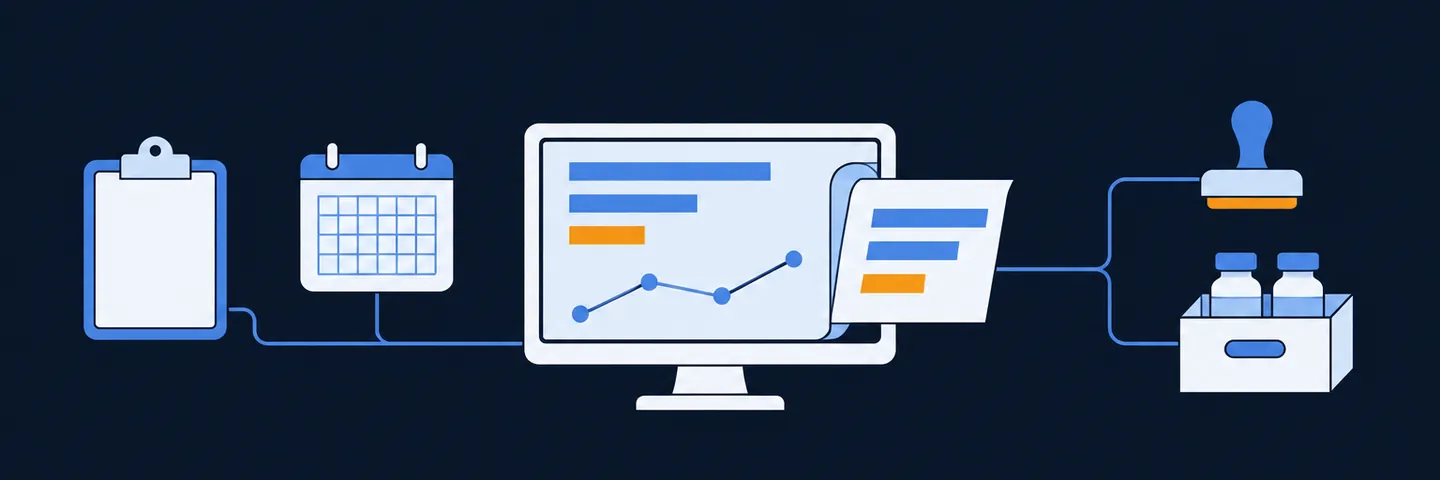
WeInfuse reporting runs on an embedded copy of Looker. You pick a model and an Explore, choose fields, add filters, and save the result as a Look or dashboard. The hard part is not the clicking. It is knowing that every model starts from a different table, so the model you pick decides what one row means.
I have built WeInfuse Looker reports for multi-site ambulatory infusion centers, manufacturer program files, a hub-services integration that pulls reports through the Looker API, and a referring-provider portal. This guide is what I wish I had on day one. If you want help building or checking your reports, that is the WeInfuse reporting service I run, and you can book a 30-minute call. If your question is chair capacity rather than reporting, start with the chair utilization calculator.
Key takeaways
- WeInfuse reporting is Looker, embedded inside WeInfuse. Each center sees only its own data, and WeInfuse defines the models, Explores and joins.
- Choosing a model is choosing a row grain. The orders Explore starts from every order; the appointments Explore starts from appointments, so orders with no appointment never appear in it.
- The order is the center of the data. One order can have many appointments, so a repeated order ID in an appointment report is usually expected, not a duplicate.
- Count with distinct keys (
orders.id,appointments.id,order_series.id) and add only fields that are one row per base row, or your totals inflate. - You can get data out by scheduled delivery (email, SFTP and other destinations your Looker admin enables) or through the Looker API with per-tenant credentials from WeInfuse. A successful run does not prove a complete file.
Quick answers
- Every order, including ones not yet scheduled: the orders Explore.
- Visits and drugs administered: the appointments Explore.
- Current authorization status: the Latest Authorization Explore.
- Drug on hand by location: the Inventory Item History Explore.
- Getting data out: scheduled delivery of a saved Look, or the Looker API.
- Plain-language version for owners: what your WeInfuse data can tell you.
How does WeInfuse reporting work?
WeInfuse reporting is a Looker instance owned and modeled by WeInfuse and embedded in the app. WeInfuse's own reporting and analytics page describes Looker as its option for clients who want deeper analytics.
A few things follow from that setup:
- It is Looker, not Looker Studio. The concepts in Google's Looker documentation apply: models, Explores, dimensions, measures, Looks and dashboards.
- Each center sees only its own rows. The data is filtered to your organization before you touch it.
- WeInfuse owns the model. You choose from predefined Explores and their joins. In the engagements I have worked on, nobody on the customer side could add a field or a join. If a field is missing from one Explore, look for another Explore that has it.
- Direct SQL access was not part of the setup I worked with. That was the access path in those engagements, not a statement about every customer or contract.
Models, Explores and Looks in one paragraph
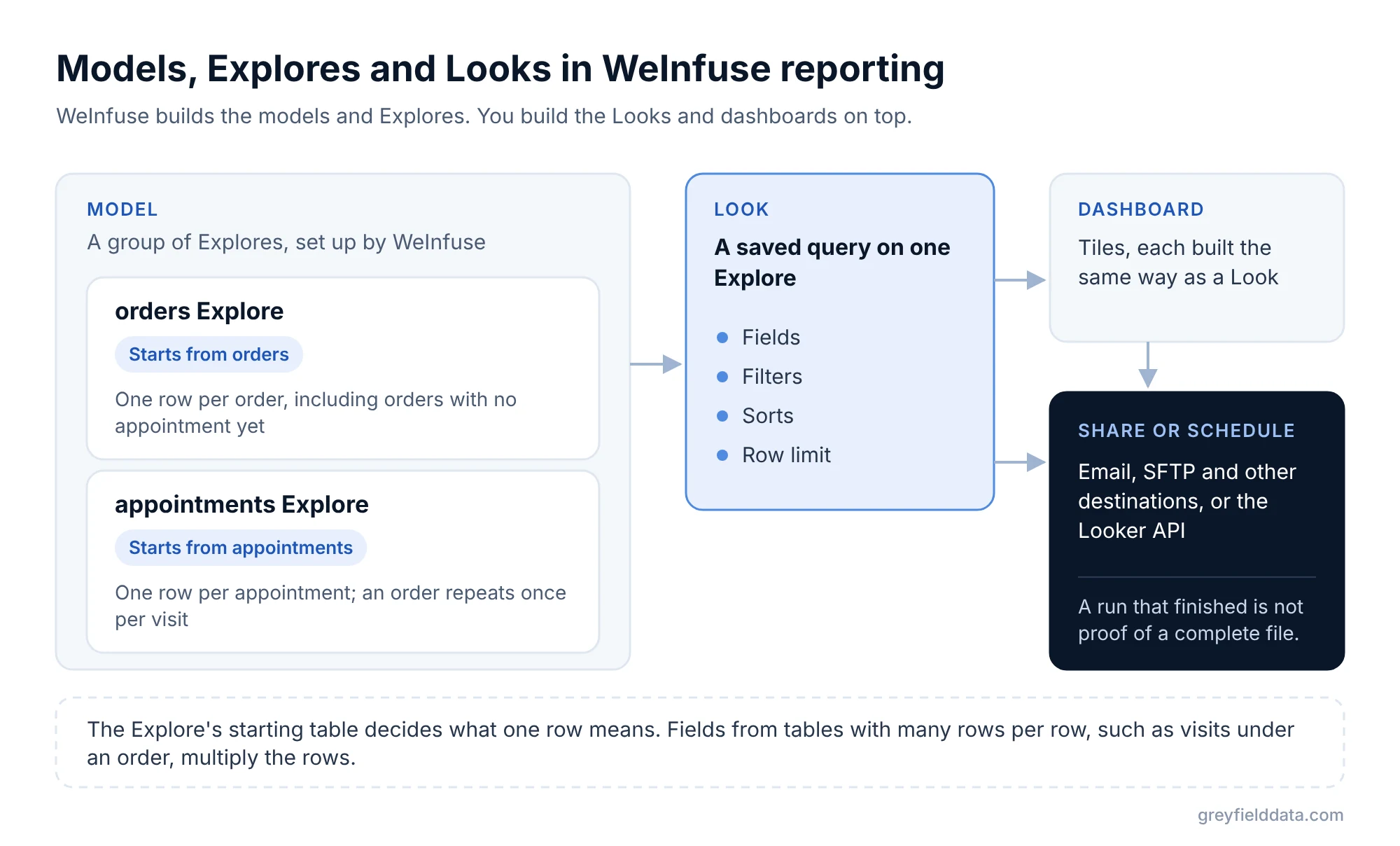
A model is a group of Explores. An Explore is a starting table plus the tables WeInfuse has joined to it. A Look is a saved query on one Explore: the fields, filters, sorts and limits you chose. Dashboards are collections of tiles built the same way. When you share or schedule a report, you are sharing or scheduling a Look or dashboard.
Why the model you choose sets the row grain
Every Explore has a base table, and every row in your result is one row of that base table, multiplied by any one-to-many joins you pull fields from. That is standard Looker behavior: the join relationship between tables decides whether adding a field can multiply rows.
So the same question gives different answers in different Explores:
- In the orders Explore, the base is orders. Every order appears, including orders that have no appointment yet.
- In the appointments Explore, the base is appointments. An order only appears if it has at least one appointment, and it appears once per appointment.
Neither is wrong. They answer different questions. The orders vs appointments guide has a decision table for picking one.
What are the core entities in WeInfuse data?
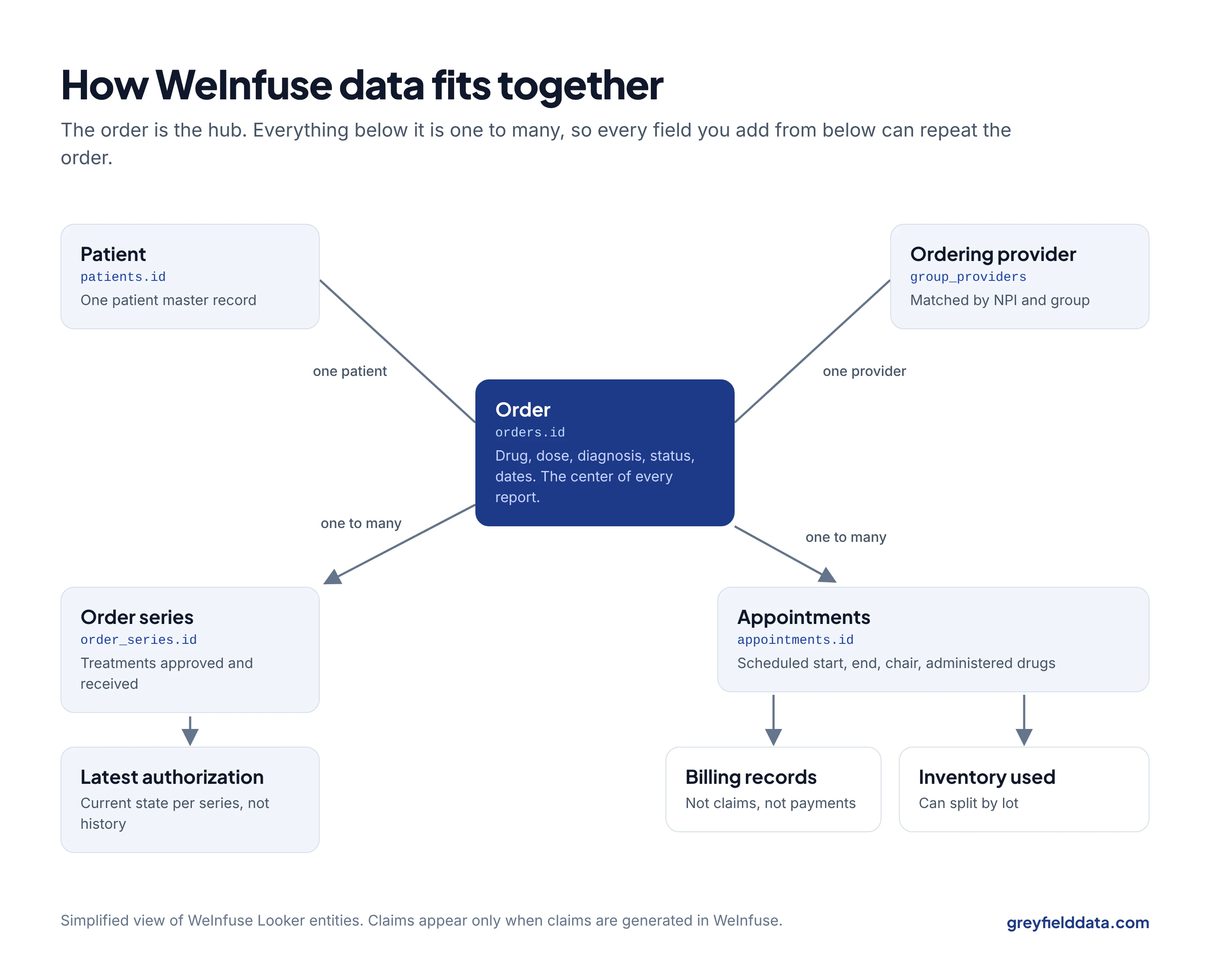
The order is the hub. A provider sends an order, the center registers the patient, works verification and authorization, schedules appointments, and administers treatment. Almost every report joins back to the order.
| Entity | What one row means | Distinct key to count | Watch out for |
|---|---|---|---|
| Order | One treatment order for a patient | orders.id |
Not an appointment, administration or claim |
| Order series | One series under an order, with approved and received treatment counts | order_series.id |
Treatments remaining is not refills, vials or inventory |
| Appointment | One scheduled appointment | appointments.id |
Has scheduled start and end times, not check-in or check-out times |
| Latest authorization | The latest authorization record per order series | latest_authorization.id |
Current state, not authorization history |
| Billing record | One billing record tied to an appointment | billing_records.id |
Not a claim and not a payment |
| Inventory item | One inventory item, which can carry a lot | inventory_items.inventory_item_id |
Used inventory is not approved supply |
| Patient | One patient master record | patients.id |
Not a visit or a treatment episode |
Orders and order series
An order carries the drug, dose, frequency, diagnosis code, patient, ordering provider, status and created and updated dates. Order series sit under orders and carry order_series.treatments_approved and order_series.treatments_received.
On one data-contract project, "treatments remaining" was defined as approved minus received at order-series grain. That is a useful definition, but it is not a count of refills, vials on the shelf, or everything a patient has left across orders. Write down which one your report means. Used inventory vs approved supply explains the three numbers people mix up.
Appointments
Appointments are the operational heartbeat: date, status, location, chair and the drugs administered. The appointments Explore's own description says it is the place to pull appointment and administered-drug information.
Appointments expose scheduled times: appointments.start_time, appointments.end_time, appointments.scheduled_duration and appointments.chair_id. In the metadata I documented I found no check-in or check-out timestamp, so treat any "actual chair time" metric with care. Scheduled chair hours are still useful for capacity planning, which is what the chair utilization calculator uses.
Latest authorization
The Latest Authorization Explore shows the latest authorizations by order series, and its description says you can choose how many latest authorizations per series to return. Set that to more than one and you get more than one row per series. Either way, it is a current-state view. It cannot tell you how long each authorization took or what states it passed through. The expiring authorizations report is a worked example built on it.
Billing records vs claims
Billing records and claims are different things. The Billings Explore's description says plainly that it does not contain claim information.
In the engagements I have worked on, expected reimbursement values appeared only once a claim was generated in WeInfuse's claims module. If a practice bills in an outside system, those values do not show up in Looker, even though billing records (with NDC and units billed) still do. And neither billed amounts nor expected amounts are collected revenue, as claims, charges and collections explains.
Inventory
Inventory has several Explores: current inventory items, item history over time, adjustments, buy-and-bill products, purchase orders, and required inventory for scheduled appointments. Inventory items can carry a lot, and a lot adds rows. If your report is meant to be one row per location, NDC and day, lot detail has to leave the grain. The duplicate rows guide walks through that case, and the WeInfuse inventory report guide builds the on-hand report step by step.
Inventory used in completed appointments tells you what was consumed. It does not tell you what a payer approved or what supply remains on an order.
Which WeInfuse Explore should you use?
Use the Explore whose base table matches the row you want.
The table below lists the Explores I found in a metadata export of one WeInfuse Looker account in November 2026 (33 models, 34 Explores). Your account may show more or fewer depending on your permissions and setup. Where WeInfuse supplied a description, the "Use it for" column paraphrases it.
| Model / Explore | Starts from | Use it for |
|---|---|---|
| orders / orders | Orders | Order-level questions: volume, status, drug, provider, with appointments and verifications joined |
| orders / order_series | Order series | The path from order to first appointment: verification, authorization, financial review |
| appointments / appointments | Appointments | Appointment and administered-drug reporting |
| appointments / appointments_weekly | Weekly appointment rollup | No description; confirm the grain before use |
| Latest_Authorization / latest_authorization | Latest authorization per order series | Current authorization status and approvals |
| Billings / billing_records | Billing records | Billing workflow; contains no claim information |
| Patients / patients | Patients | Patient attributes, insurances, medications, allergies, first appointment |
| Providers / group_providers | Group providers | Provider details at group level |
| Patient_Flow / order_changes | Order change records | No description; confirm the grain before use |
| Plan_of_Care / care_plan_series | Care plan series | Its description repeats the Patients text, so check the fields |
| tasks / tasks and archived_tasks | Tasks | Workflow tasks at order-series and patient level |
| inventory / inventory_items | Inventory items | Buy-and-bill and specialty inventory, with drug and appointment details |
| Inventory_Item_History / inventory_item_history | Inventory history | Inventory level trends at a location |
| Inventory_Adjustments / inventory_adjustments | Adjustments | Adjustments with NDC, vendor and destination |
| Buy_&_Bill_Inventory / products | Products | Purchase orders, stock and required inventory; lowest price per medication |
| requireds / required_inventory_items and required_specialty_drugs | Required inventory | What scheduled appointments need, split by buy-and-bill and specialty |
| purchase_orders / purchase_orders and specialty_purchase_orders | Purchase orders | Buy-and-bill or specialty purchase orders |
| formulary / formulary_entries | Formulary entries | Formulary duration, locations and NDCs |
| insurance / insurance_plans | Insurance plans | Plan definitions by group, payer type |
| fee_scheudles_admin / cost_schedules | Cost schedules | Fee schedule information by group |
| users / users | App users | Roles, logins and report access |
| administered_drugs / dwh_fact_administered_drugs | Administered drugs | Do not use. Its description marks it obsolete and points you to the appointments Explore |
The rest (E&M visits, communications, calendar and schedule events, product history, payment balance transactions) cover narrower jobs. Several have no description at all.
Two warnings. An Explore being visible does not mean it is populated for your center or right for your question. And a description can be wrong or copied, as the Plan of Care one appears to be, so check the fields and a sample of rows.
What mistakes show up most in WeInfuse reports?
Most bad WeInfuse reports come from grain, not from the data being wrong.
- Counting rows instead of distinct IDs. A row count in the appointments Explore is not an order count. Use a distinct count on
orders.id. - Adding a one-to-many field to a clean report. Pulling a lot, an administered drug line or a second authorization multiplies rows. Looker's symmetric aggregates protect many built-in measures, but they do not stop the table from showing repeated rows, and they do not protect a CSV someone sums in Excel.
- Starting from appointments when you need every order. Orders waiting on authorization have no appointments yet, so an appointments-based pipeline report hides exactly the orders you are chasing.
- Treating different dates as the same date. Order created, first appointment, completed administration and billed dates answer different questions. Some fields also come in two versions, such as
orders.updated_dateandorders.updated_local_date. Pick one clock on purpose and label it. - Reading a status field without its vocabulary. Order status, appointment status, authorization status and task status are separate lists. Before you add a status to a filter, get the list your team actually uses.
- Changing filter logic without brackets. When you add an OR condition to existing authorization logic, group the existing conditions first and rerun. I have seen operator order change a report's output silently.
- Using the obsolete Explore. The administered drugs Explore is marked do not use. Old Looks built on it should move to the appointments Explore.
For a longer list of how to tell expected repeats from true duplicates, see why a WeInfuse Looker report shows duplicate rows. For KPI definitions to put on top of these Explores, see the infusion center KPI glossary.
How do you export and schedule WeInfuse reports?
You export or schedule a saved Look or dashboard from Looker's own delivery menu. Looker's delivery documentation lists built-in destinations such as email, webhook, Amazon S3 and SFTP, plus integrations an admin can enable. Formats include CSV, XLSX, JSON and others.
Destinations I have seen offered in WeInfuse Looker include email, SFTP, Google Drive, Slack, Teams, Salesforce Campaigns, Tray and Zapier. Which ones you see depends on what is enabled for your account.
Three habits make scheduled reports dependable:
- Use a rolling date filter, such as the last 7 complete days, so each send covers the right window without editing.
- Pick the row limit on purpose. Looker's docs describe a typical 5,000-row limit for results in a table and an "All Results" option for file formats. Check which one your schedule uses.
- Plan for a failed send. In my engagements a scheduled send that failed was not picked up again automatically. Run a periodic full refresh so a missed week does not become a permanent gap.
The scheduling guide covers backfills, delta feeds, file naming and the full refresh in detail.
How do you get WeInfuse data into a warehouse or another system?
There are two practical paths: scheduled file delivery, or the Looker API.
| Path | Good for | What you need | Watch out for |
|---|---|---|---|
| Scheduled delivery (SFTP, email, Drive and others) | Weekly contract feeds, simple loads into a warehouse or CRM | A saved Look, a destination, a rolling date filter | No change events, no deletes, failed sends need a plan |
| Looker API | Frequent pulls, many tables, many centers | API credentials for your tenant | Row limits, windowing, checkpoints that can skip failed batches |
The Looker API route
The Looker API uses a client ID and secret tied to a Looker user. Google's API authentication docs cover how the keys work. In WeInfuse's case, the credentials are issued by WeInfuse, not created by the customer. On a hub-services integration I worked on, each new infusion center needed an active Looker seat and its own API credentials from WeInfuse support before we could pull anything. Ask early, because it is a dependency you do not control. The Looker API checklist lists everything to line up first.
Separately, one integration partner I worked with set up WeInfuse Client API credentials inside WeInfuse. Access paths vary by customer and contract, so do not assume there is "no API". Ask WeInfuse what is available for your account.
Make completeness a test, not an assumption
A pipeline that runs green can still be missing rows. On the API integration we pulled each table by its created or updated date, in windows, and stored a watermark. Two things can quietly lose data in that design: a failed batch that gets skipped, and a checkpoint that moves past it. Record the row count for every window, log failures, and reconcile counts against Looker before you trust the warehouse.
For loading into Power BI, Sigma or Snowflake, see getting WeInfuse data into a warehouse. For why one data warehouse helps, see the infusion data warehouse white paper.
We also kept full lists of slow-changing tables such as providers and locations, and added a test that every order resolves to a provider. Building those order-driven checks on day one is the thing I would do earlier next time.
When should you bring in help?
You can build most single reports yourself in an afternoon once you know the grain. Bring in help when:
- A manufacturer, hub or payer gives you a data contract with required fields, a fixed column order and a weekly delivery. The status vs dispense guide covers the most common files.
- Two reports disagree and you cannot tell whether it is grain, dates, filters or the data.
- You need WeInfuse data in a warehouse, CRM or provider portal on a schedule, with checks that it is complete.
- You need KPIs that hold up in a board meeting, such as referral-to-first-treatment time or chair utilization.
The infusion data readiness check gives a quick read on where you stand, and the WeInfuse data guide is a free version of this guide for owners and managers.
On a four-report manufacturer contract, the first version of each report took hours. Most of the elapsed time went to QA, field-mapping edge cases and coordination between the center, the manufacturer and the receiving data vendor. That is normal, and worth planning for.
WeInfuse is a trademark of its owner. Greyfield Data is independent and not affiliated with WeInfuse.
Frequently asked questions
Is WeInfuse reporting Looker or Looker Studio?
It is Looker, the enterprise BI product, embedded inside WeInfuse. WeInfuse's own reporting page describes its Looker partnership, and the models, Explores and Looks behave as Google's Looker documentation describes.
Can I add a custom field to a WeInfuse Explore?
In the setups I have worked with, customers could not change WeInfuse's models. You can add custom fields and table calculations inside a Look, but a field that does not exist in any Explore needs a request to WeInfuse.
Why does my WeInfuse report show the same order many times?
Usually because you started from appointments, and one order has many appointments. Count distinct orders.id, or switch to the orders Explore if you want one row per order.
Does WeInfuse have an API?
Data can be pulled through the Looker API with credentials WeInfuse issues per tenant, and some partners use WeInfuse Client API credentials. What is available depends on your account, so ask WeInfuse support.
How do I send a WeInfuse report to SFTP every week?
Save the report as a Look with a rolling date filter, then schedule it to an SFTP destination in CSV. Add a periodic full refresh in case a weekly send fails.
What to do next
Start with the orders vs appointments decision table before your next report, and run the checklist in the duplicate rows guide before you send anything outside the building. If you are planning a contract feed or a warehouse load, read the scheduling guide. Every other infusion guide is collected on the infusion analytics resource hub.
Or book a call and we can look at your reports together.
Part of the Infusion analytics guides, a reading path through related articles.
Linus Tse
Founder of Greyfield Data. Built 400+ dashboards. Certified in Sigma, Snowflake, Tableau, and Power BI.
About Linus