How do you list authorizations that expire before the next infusion?
Build a weekly WeInfuse report listing authorizations that expire before the patient's next infusion, or have no treatments left, so intake renews in time.

Written by Linus Tse, founder of Greyfield Data
· 8 min read
On this page 9 sections

To list authorizations that expire before the next infusion, start a WeInfuse report from the Latest Authorization section. Add the expiry date, the treatments approved and received, and the patient's next appointment on that order. Then flag every row where the next visit falls after the expiry date, or where no approved treatments are left. Schedule it weekly to whoever renews authorizations.
I build WeInfuse reports like this for ambulatory infusion centers, along with the weekly scorecard that sits on top of them. If you want it built and checked on your own data, see WeInfuse reporting help or book a 30-minute call.
Key takeaways
- An authorization can run out two ways: the date passes, or the approved treatments are used up. Check both.
- Compare the expiry date with the next scheduled visit on the same order, not with today's date.
- Treatments left is treatments approved minus treatments received, for one order series. It counts visits, not vials.
- A blank expiry date means "check this", not "never expires". List blanks on their own.
- Send the list every week to the person who renews authorizations, with enough lead time for the slowest payer.
Why do authorizations lapse before a visit?
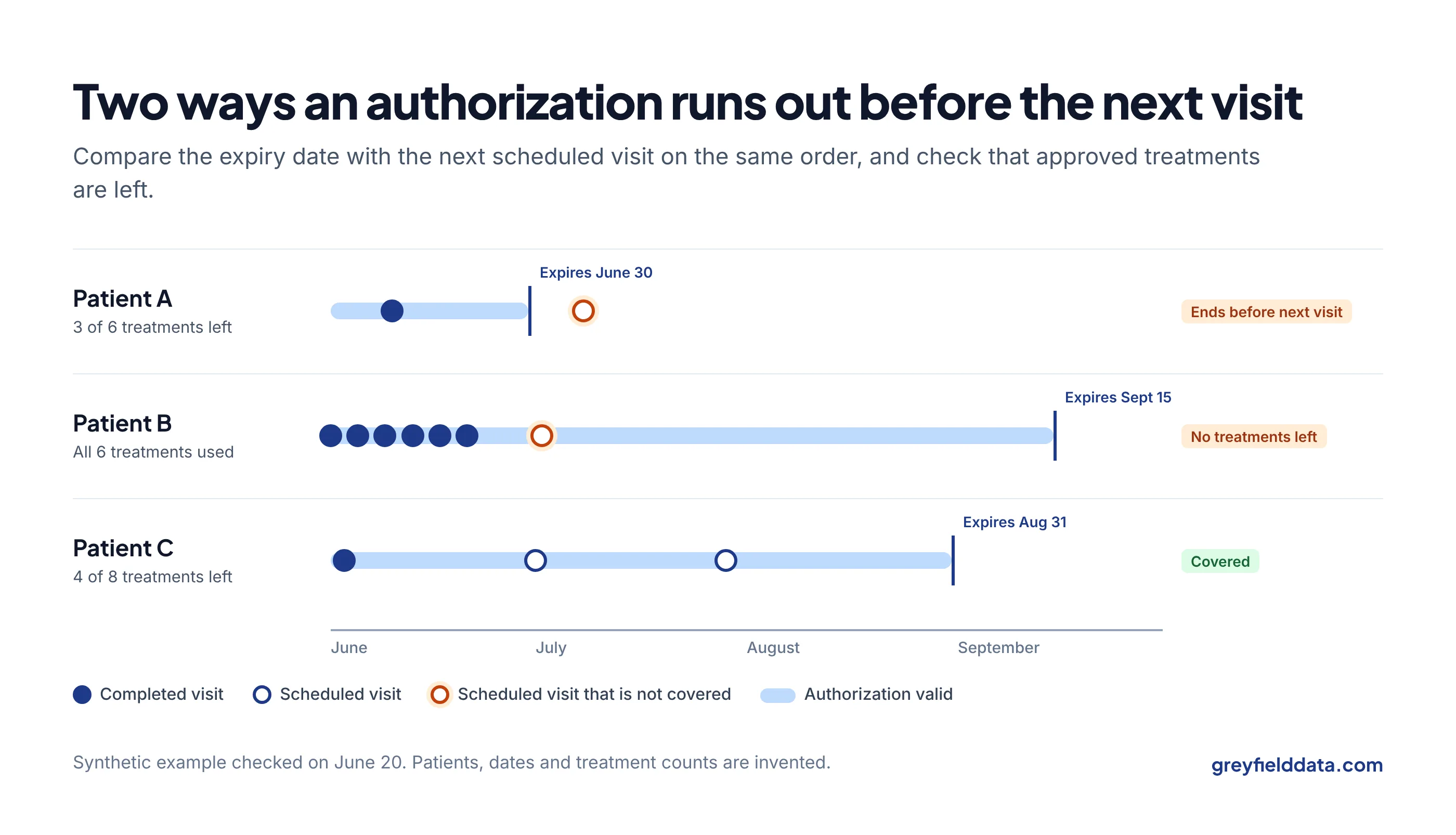
They lapse because nobody compared two dates that live in different places. The payer's approval has an end date and a number of treatments, and the schedule has the next visit.
When a patient is on a long series, the visit gets booked weeks ahead and the authorization quietly ends in between.
The cost shows up later: a visit that has to be moved, or a visit given without coverage that turns into a denial. A short weekly list catches both while there is still time to renew. The no-show cost calculator prices a moved visit, and the revenue leakage calculator shows what uncovered visits add up to.
Where does the information live in WeInfuse?
Start from the Latest Authorization section. WeInfuse reporting runs on Looker, where each section you can start a report from is called an Explore. The one you start from decides what one row means.
WeInfuse describes it as the latest authorizations by order series, and it lets you choose how many latest authorizations per series to show. Keep that at one. The orders vs appointments guide explains why the starting section matters, and the WeInfuse reporting guide maps the others.
These are the fields I use. All of them appear in that section of WeInfuse's own data dictionary:
| What you need | Field name in WeInfuse | Notes |
|---|---|---|
| Who and which therapy | Patients ID, Orders ID, Order Series ID, Locations Name | Order series is one course of treatment on an order |
| Authorization status | Latest Authorization Status | The current status, not its history |
| End date | Latest Authorization Expiry Date | "The date of when the authorization will expire" |
| Approved treatments | Latest Authorization Treatments Approved | Number of treatments on the authorization |
| Treatments given | Latest Authorization Treatments Received | Compare with approved |
| Next visit | Patient Min Max Appointment Next Appointment on Order | The next appointment on this order |
| Decision date | Latest Authorization Decision Date | Useful for spotting old approvals |
There is also a field called Patient Min Max Appointment Next Appointment, without "on Order". Going by the names, that one is the patient's next visit on any order. For a patient on two therapies, it can point at the wrong visit, so use the "on Order" version.
How do you build the report?
Build it in five steps.
- Start from Latest Authorization and add the fields in the table above.
- Filter the status to the approved statuses your team actually uses. Ask intake for the exact list. Do not add statuses because they sound related.
- Add two flags. In Looker these are table calculations, which work like spreadsheet formulas on the results:
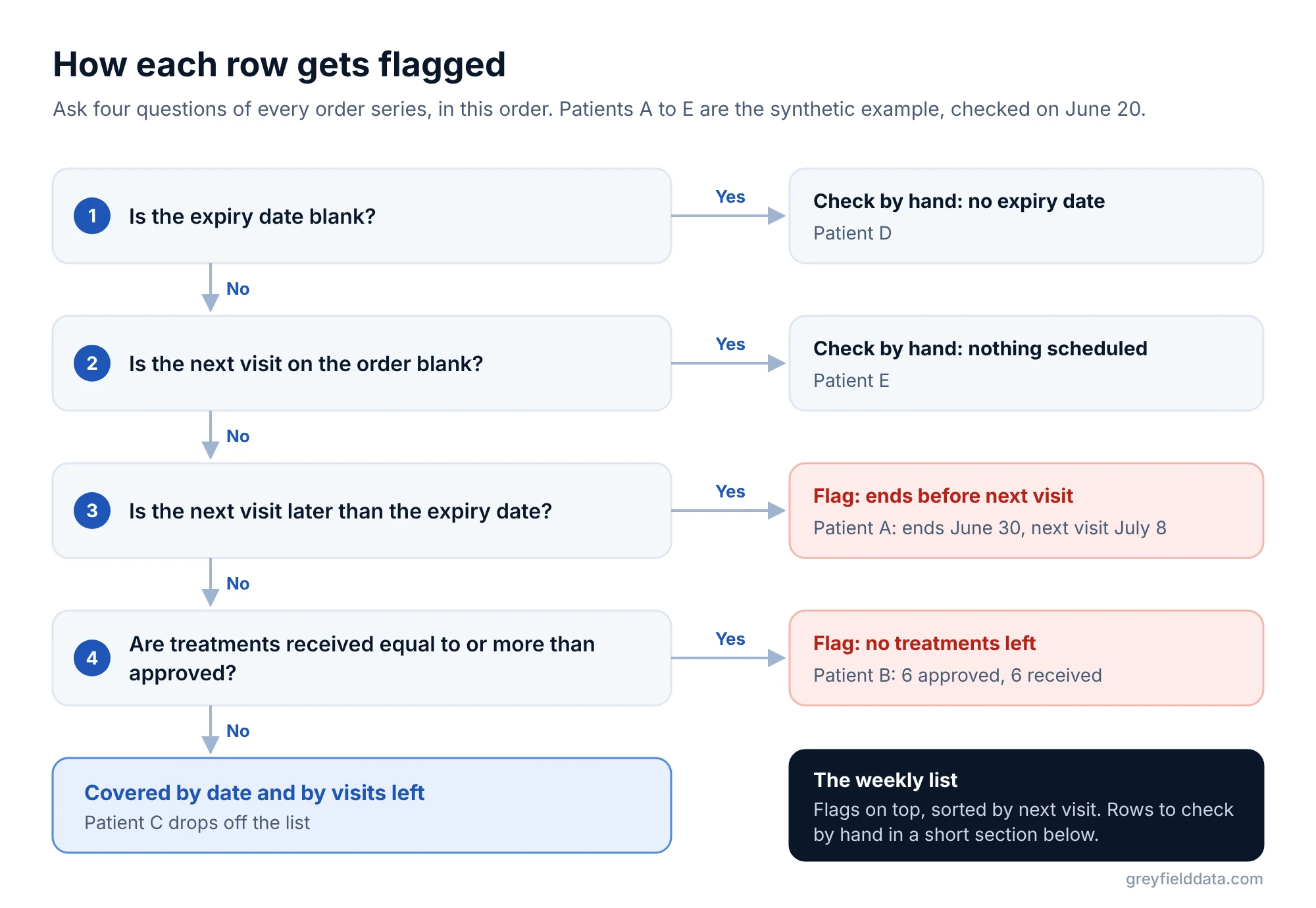
- Ends before next visit: the next appointment on the order is later than the expiry date.
- No treatments left: treatments received is equal to or greater than treatments approved.
- Keep rows where either flag is yes, plus rows where the expiry date or the next appointment is blank.
- Sort by next appointment date, soonest first, so the most urgent renewals sit at the top.
Choose the lead time
Lead time is how far ahead you look. If your slowest payer takes three weeks to decide, a list that only covers the next seven days is too late. Filter to next visits in the coming 30 to 45 days, or whatever matches your own payer times. The referral-to-first-treatment guide shows how to measure authorization turnaround by payer, which tells you the right window.
What does the finished list look like?
Two of five rows get flagged, and two more need a check by hand. Synthetic example. Five order series, checked on June 20:
| Patient | Expiry date | Approved | Received | Left | Next visit on order | Flag |
|---|---|---|---|---|---|---|
| A | June 30 | 6 | 3 | 3 | July 8 | Ends before next visit |
| B | Sept 15 | 6 | 6 | 0 | July 2 | No treatments left |
| C | Aug 31 | 8 | 4 | 4 | July 1 | None |
| D | (blank) | 4 | 1 | 3 | June 27 | Check: no expiry date |
| E | July 31 | 6 | 2 | 4 | (blank) | Check: nothing scheduled |
Treatments left is approved minus received: for A, 6 − 3 = 3.
- Patient A has visits left, but the date runs out first.
- Patient B is covered by date, but has no treatments left.
- Patient C is fine and drops off the list.
D and E go on a short "check by hand" section at the bottom. Treatments left counts visits, not vials; used inventory vs approved supply explains the difference.
What can make the list wrong?
Most mistakes come from what the report leaves out, not from the math.
- Secondary authorizations. The list above covers the latest authorization per series. If a patient needs a secondary payer's approval too, check how your team records it before trusting one row per series.
- Time zone on visit dates. WeInfuse stores the scheduled start time of appointments in UTC. A visit near midnight can land on the next day. Compare dates, and if a visit sits right on the expiry date, check it by hand.
- A renewal already in progress. The current authorization may expire while a new request is pending. Add the requested date, or your authorization task status, so intake can see what is already moving.
- Cancelled visits. A cancelled appointment is not a next visit. If the next visit date looks wrong, check the appointment status for that order.
- Repeated rows. If you add fields from appointments or drugs, one series can turn into several rows. The duplicate rows guide explains why and how to undo it.
Some centers also use WeInfuse workflow tasks for upcoming expirations. Task names and how they are used vary between centers, so treat them as a second check, not a replacement for comparing the dates.
How should you send it?
Save the report and schedule it to the person who renews authorizations, every Monday morning. Email is fine if your compliance team has approved it for patient information; the scheduling guide covers other destinations and what to do when a send fails. Keep the columns short: patient, therapy, location, expiry date, treatments left, next visit, flag.
Once the list is running, track how many visits had to be moved because of an expired authorization. That number belongs on a weekly scorecard; the infusion center metrics playbook shows where it fits, and the KPI glossary defines the related measures. This list is red flag number 1 in the red flag reports guide. To see which payers deny renewals most often, use the prior authorization denials by payer scorecard.
WeInfuse is a trademark of its owner. Greyfield Data is independent and not affiliated with WeInfuse.
Frequently asked questions
Can WeInfuse show authorizations that expire before the next appointment?
Yes, by combining fields. Start from Latest Authorization, add the expiry date and the next appointment on the order, and flag rows where the visit is later than the expiry date.
How do I calculate treatments remaining on an authorization?
Subtract treatments received from treatments approved for the same order series. It counts treatments, not vials or refills, and it covers one series, not the whole patient.
How far ahead should an expiring authorization report look?
At least as far as your slowest payer takes to decide, plus a few days to submit. Many centers start with 30 to 45 days and adjust from their own turnaround times.
Why is the expiry date blank on some authorizations?
It was not entered, or the payer did not give one. Keep those rows on the list so someone checks them, rather than filtering them out.
What to do next
Build the report for next month's visits and look at how many rows it returns.
If it surprises you, the first fix is usually the status list or the lead time. If you would like help building it on your WeInfuse account and adding it to a weekly scorecard, book a call.
Part of the Infusion analytics guides, a reading path through related articles.
Linus Tse
Founder of Greyfield Data. Built 400+ dashboards. Certified in Sigma, Snowflake, Tableau, and Power BI.
About Linus