WeInfuse orders vs appointments Explore: which one should you use?
Use the orders Explore for one row per order and the appointments Explore for one row per appointment. A decision table for orders, series and authorizations.

Written by Linus Tse, founder of Greyfield Data
· 8 min read
On this page 9 sections
Use the orders Explore when you want one row per order, including orders that have no appointment yet. Use the appointments Explore when you want one row per appointment, or anything about what was administered. Use order series for authorization and treatment-count progress, and Latest Authorization for current authorization status. The table further down maps common questions to the right one.
I pick Explores this way on every WeInfuse Looker report I build, from manufacturer program files to referring-provider dashboards for ambulatory infusion centers. If you want someone to build or check the reports with you, that is the WeInfuse reporting service I run. If your real question is chair capacity, the chair utilization calculator gets you there faster.
Key takeaways
- In WeInfuse Looker, the Explore you pick decides what one row means. Decide the row first, then pick the Explore.
- The orders Explore includes orders with no appointments. The appointments Explore only includes orders that have at least one appointment, once per appointment.
- A repeated order ID in an appointments report is usually expected. Count distinct
orders.idfor order counts. - Order series carry approved and received treatment counts. Latest Authorization is a current-state view, not history.
- Every report needs one distinct key that should be unique per row. If it is not unique, a join has fanned out.
Why does the Explore choice change the numbers?
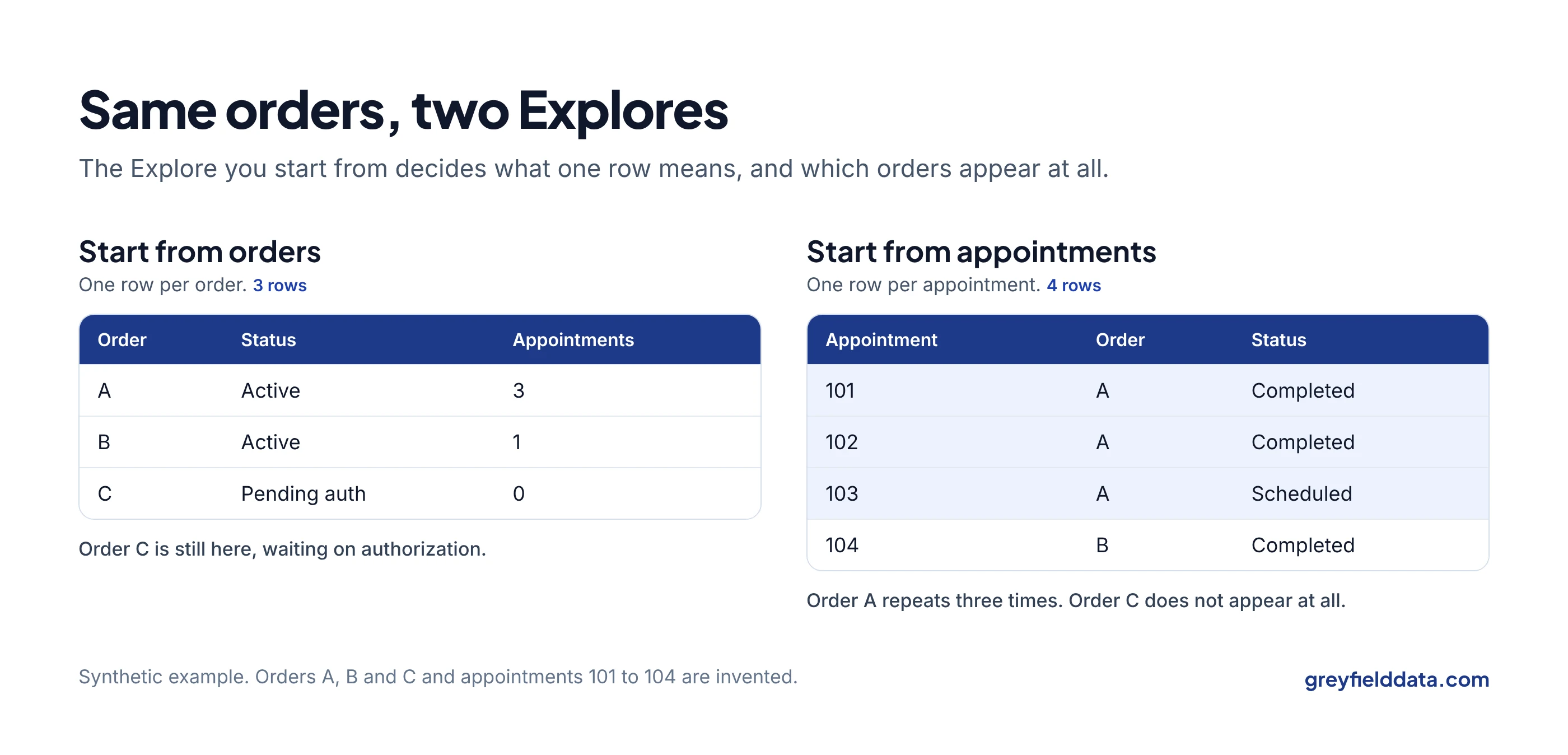
The Explore choice changes the numbers because each Explore starts from a different base table, and every row in the result is one row of that table. Fields joined from other tables either sit beside each row or multiply it, depending on whether the join is one-to-one or one-to-many. Google's docs on the join relationship parameter explain the mechanics.
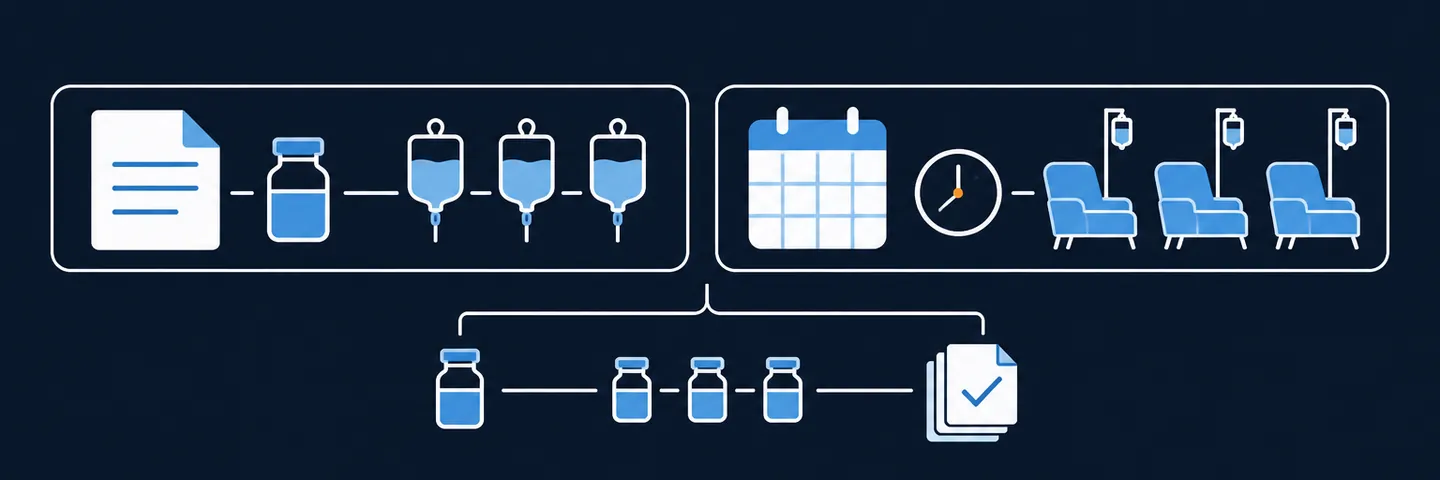
In WeInfuse, the order is the parent and appointments are its children. So:
- Orders Explore: one row per order. Pull an appointment field and the order repeats once per appointment.
- Appointments Explore: one row per appointment. The order fields repeat on each appointment, and orders without appointments are not there at all.
The image above is a synthetic example. The orders Explore gives three rows; the appointments Explore gives four and loses the order still waiting on authorization. Both are correct for the question they answer.
Which WeInfuse Explore answers which question?
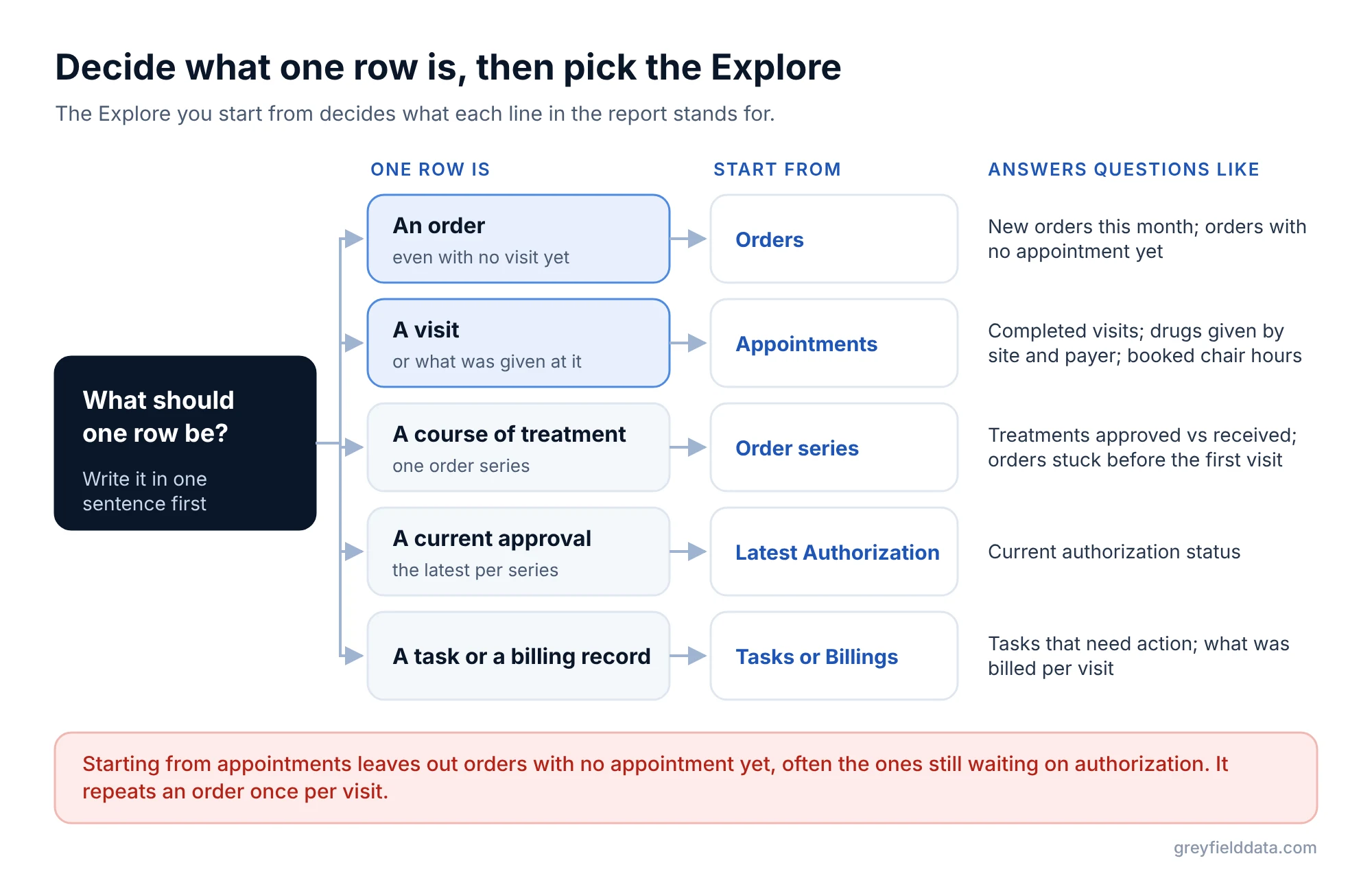
Match the question to the row it needs, then use the Explore whose base table is that row. The model and Explore names below are the ones that appear in WeInfuse's Looker metadata.
| Question | Explore (model / Explore) | One row is | Count distinct |
|---|---|---|---|
| How many new orders did we receive this month? | orders / orders | An order | orders.id |
| Which orders have no appointment scheduled yet? | orders / orders | An order | orders.id |
| How many appointments did we complete last week? | appointments / appointments | An appointment | appointments.id |
| Which drugs did we administer, by site and payer? | appointments / appointments | An appointment | appointments.id |
| How many scheduled chair hours did we book? | appointments / appointments | An appointment | appointments.id |
| How many treatments are approved vs received? | orders / order_series | An order series | order_series.id |
| Where are orders stuck before the first appointment? | orders / order_series | An order series | order_series.id |
| What is the current authorization status? | Latest_Authorization / latest_authorization | A latest authorization per series | latest_authorization.id |
| Which authorization tasks need action? | tasks / tasks | A task | tasks.id |
| What did we bill for each appointment? | Billings / billing_records | A billing record | billing_records.id |
| How many patients have we treated? | appointments / appointments | An appointment | patients.id |
The last row is a reminder that the distinct key does not have to be the base table's key. A patient count from the appointments Explore is patients with appointments, not the patient master total.
When should you use the orders Explore?
Use the orders Explore when the order is the thing you are counting or chasing. WeInfuse describes it as the place for order information, including administered-drug details, verifications, insurances and appointments linked to an order.
It is the right start for:
- Intake and pipeline reports. New orders by referring provider, orders by status, orders without a first appointment. The referral to first treatment guide and the red flag reports guide both start here.
- Order-grain contract feeds. On a manufacturer status feed, the recipient chose one row per order with a chosen date. That fits the orders Explore.
- Provider attribution. On a referring-provider portal, linking patients to providers only through appointments missed every patient who had an order but no appointment yet. Adding the order's provider as a fallback fixed it.
Keep it clean by adding only fields that are one per order. The moment you add an appointment date, you are at appointment grain inside the orders Explore.
When should you use the appointments Explore?
Use the appointments Explore for anything that happens at a visit: scheduling, completion, cancellations, chairs, and what was administered. WeInfuse's own description says it is for appointment and administered-drug information, and the older administered drugs Explore is marked do not use and points here.
It is the right start for:
- Volume and throughput. Completed appointments by week, site, drug or payer. Filter appointment status explicitly, because "scheduled", "completed" and "canceled" are different populations.
- Dispense or administration feeds. On a manufacturer contract, the dispense feed was one row per completed administration, which is appointment grain. The status vs dispense guide explains why its line count never matches the status file.
- Chair planning. Appointments carry
appointments.start_time,appointments.end_time,appointments.scheduled_durationandappointments.chair_id. These are scheduled times. I found no check-in or check-out field, so do not label them as actual chair time.
If you feed scheduled hours into a capacity model, the chair utilization calculator shows how booked hours, open hours and chairs combine. The infusion staffing planner turns the same visits into nurse hours.
When should you use order series or Latest Authorization?
Use order series for treatment-count and authorization progress, and Latest Authorization for current authorization status.
Order series
WeInfuse describes the order series Explore as tracking the process from the order to the very first appointment: verification, authorization, financial review and first appointment. It carries order_series.treatments_approved and order_series.treatments_received.
Approved minus received gives treatments remaining at order-series grain. That is not refills, vials, or a patient-wide total, as used inventory vs approved supply explains. If you need it per order, check first whether any order has more than one series by comparing distinct orders.id with distinct order_series.id.
Latest Authorization
The Latest Authorization Explore returns the latest authorizations by order series, and lets you choose how many per series. Set it to one if you want one row per series.
It shows the current state only. It cannot rebuild how long authorization took or which states it passed through. If an order has both a denied and an approved authorization, confirm which one is "latest" and how it is ordered before using it in a feed. The expiring authorizations report is a worked example built on this Explore.
How do you check you picked the right Explore?
Check that the key you expect to be unique really is unique, and that the rows you expect to be included are there.
- Write the grain in one sentence before building: "one row per completed appointment in the last 7 days."
- Compare row count with distinct count of the key for that grain. If they differ, something is fanning out.
- Look for the missing population. Orders without appointments, canceled appointments, pending authorizations. Decide whether each belongs.
- Cross-check one total against another Explore. Distinct orders in the appointments Explore should be no more than orders in the orders Explore for the same filter.
The duplicate rows guide covers the fan-out cases in detail, and the WeInfuse reporting guide lists every Explore and what it is for. The WeInfuse data guide covers the same records in plain language for owners. For the KPIs you build on top, use the infusion center KPI glossary.
WeInfuse is a trademark of its owner. Greyfield Data is independent and not affiliated with WeInfuse.
Frequently asked questions
Why are there fewer orders in the appointments Explore than in the orders Explore?
The appointments Explore starts from appointments, so orders with no appointment are left out. Those are often the orders waiting on verification or authorization.
Is a repeated order ID in my appointments report a duplicate?
Usually not. One order can have many appointments, so the order repeats once per appointment. Check uniqueness on appointments.id instead.
Which Explore should I use for administered drugs?
Use the appointments Explore. The administered drugs Explore is marked do not use and its description points to the appointments Explore.
Can I get one row per order with the latest appointment date?
Usually, by starting from the orders Explore and taking the max of the appointment date as a measure rather than a dimension, so the order does not repeat. That may need a custom measure, if your Looker permissions allow custom fields. Filter appointment status first so "latest" means latest completed or next scheduled, as you intend.
What to do next
Before your next report, write the grain in one sentence and find its row in the decision table. Then run the four checks above. If you want a second pair of eyes on a contract feed or a dashboard that disagrees with another one, book a call.
Part of the Infusion analytics guides, a reading path through related articles.
Linus Tse
Founder of Greyfield Data. Built 400+ dashboards. Certified in Sigma, Snowflake, Tableau, and Power BI.
About Linus