Why don't our status and dispense reports have the same number of lines?
Status reports have one line per patient on a therapy; dispense reports have one per dose given. Why counts never match, and how to check patient by patient.

Written by Linus Tse, founder of Greyfield Data
· 7 min read
On this page 8 sections

Your status and dispense reports never have the same number of lines because they count different things. The status report has one line for each patient on a therapy, usually one per order. The dispense report has one line for each dose given in the chair. A patient with six doses is one line in one report and six in the other. Instead of comparing totals, check patient by patient: every active patient should appear in both, with the same latest dose date.
I build and check manufacturer and hub program reports for infusion centers, as part of my WeInfuse reporting service. If your team rebuilds these every week, see program reporting for manufacturers and hubs, or book a 30-minute call.
Key takeaways
- A status report has one line per patient on a therapy (one order). A dispense report has one line per dose given. Totals are not supposed to match.
- Matching totals prove nothing either. Two reports can have the same count and still disagree about individual patients.
- Check by patient and order: every active patient appears in both reports, with the same latest dose date.
- Waiting and denied patients should be in the status report only, with no dose date.
- Some mismatches are real errors. Others are timing, such as a dose recorded before the status caught up. Fix the first, explain the second.
What does each report count?
Each report answers a different question, so each line means something different.
| Status report | Dispense report | |
|---|---|---|
| Question it answers | Where does each patient's therapy stand? | Which doses were given, where, and to whom? |
| One line is | One patient on one therapy (an order) | One dose given in the chair |
| Who appears | Active, waiting, denied, stopped | Only patients who received a dose |
| Dates | Latest or next dose date, if any | The date of that dose |
| Typical size | Roughly one line per patient in the program | Many more lines than patients, over time |
In program reporting, "dispense" usually means given in the chair, not shipped from a pharmacy. That catches people out when the program's team comes from a pharmacy background.
Some programs ask for status by visit
Not every program wants one status line per order. Some ask for one per visit. On one program I worked on, the status report changed from one line per visit to one line per order between versions of the specification. Read the current specification, and get the answer in writing, before you decide a count is wrong.
Why don't matching totals prove the reports are right?
Matching totals can be an accident. Two reports can have the same number of lines and still disagree about individual patients.
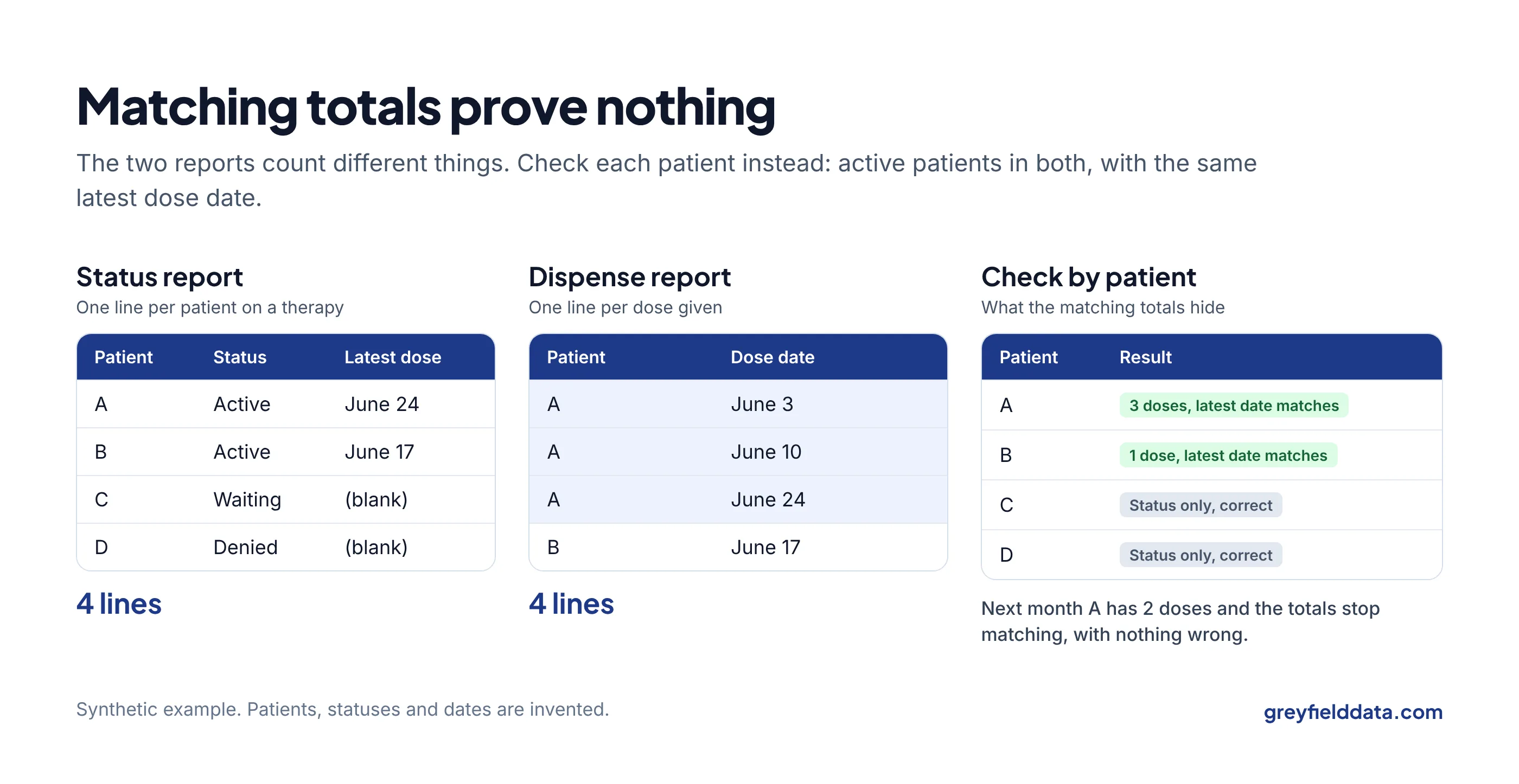
Synthetic example. Four patients in a program this month:
| Patient | Status | Doses this month |
|---|---|---|
| A | Active | 3 |
| B | Active | 1 |
| C | Waiting for approval | 0 |
| D | Denied | 0 |
The status report has four lines: A, B, C and D. The dispense report also has four lines: three for A and one for B. The totals match, 4 and 4.
But C and D appear only in the status report, and A appears three times in the dispense report. The match is an accident. Next month, A gets two doses, and the totals stop matching even though nothing is wrong.
That is why line counts are not a check. The check is by patient.
How do you check them patient by patient?
You can do this in a spreadsheet.
- Summarize the dispense report by patient and order. A pivot table with one row per patient and order, showing the number of doses and the latest dose date.
- Put the status report next to it. Look up each status line in your summary using the patient and order.
- Sort the results into the groups below.
| What you see | What it usually means | What to do |
|---|---|---|
| Active in status, with doses, same latest date | Correct | Nothing |
| Active in status, with doses, different latest date | One report is out of date, or uses a different date | Check which date each report uses |
| Active in status, no doses at all | New patient not yet treated, or a missing dose record | Confirm the first visit date; if a dose was given, find why it is missing |
| Waiting or denied in status, with doses | The status was not updated after approval | Fix the status at the source |
| Doses, but no status line | Patient missing from the status report | Check the report's filters and the patient's status |
| Waiting or denied, no doses, blank dose date | Correct | Nothing |
Timing differences are not errors
A dose given on Friday and a status updated on Monday will disagree in a file run on Saturday. In the cases I have seen, the dispense report was right and the status was a step behind. Note it, and check that it clears in the next file. If the same patient shows up three weeks running, it is not timing.
Is it enough that the two reports agree with each other?
No. Two reports can agree with each other and still fail the program's specification.
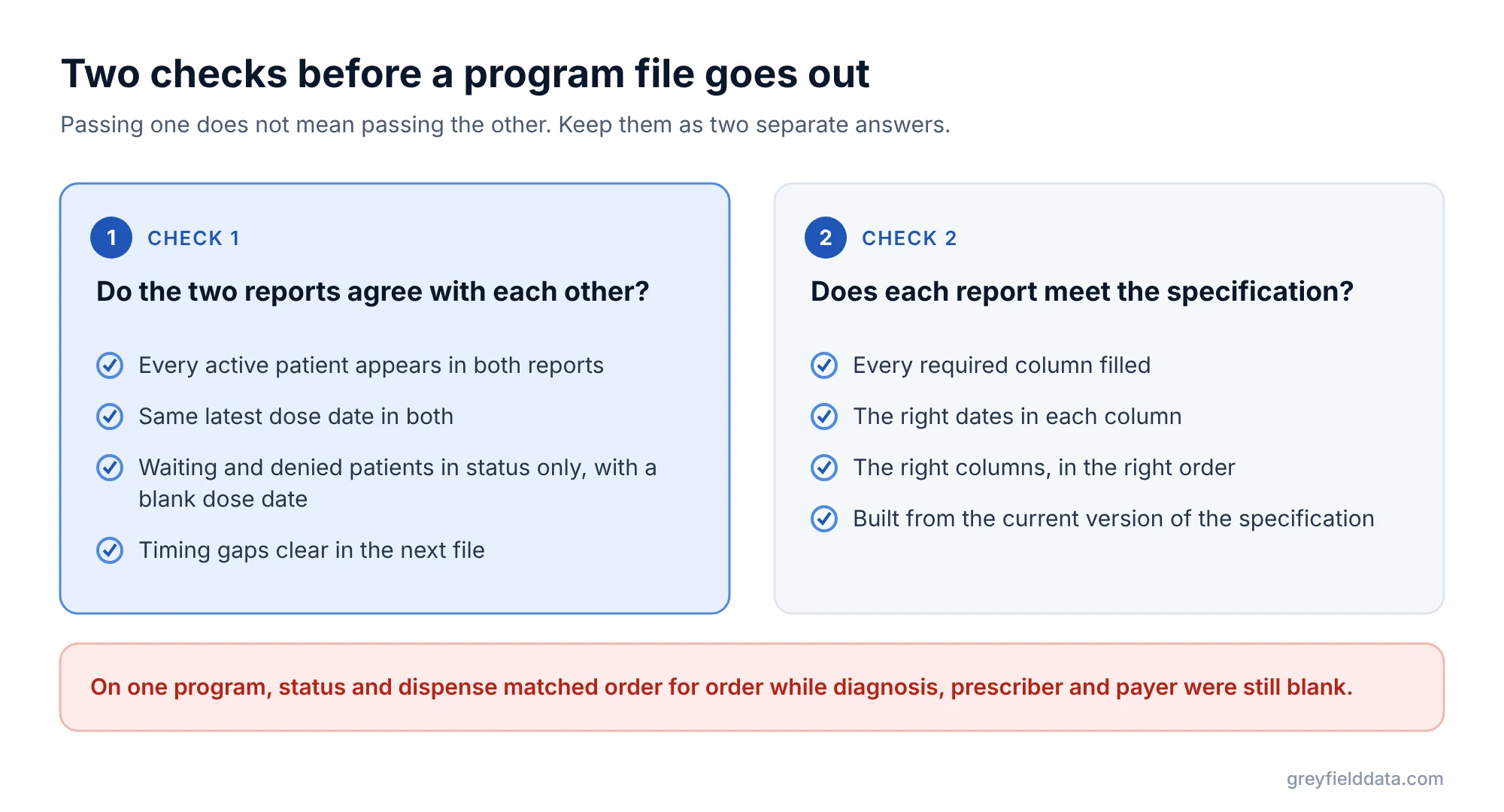
On one program, status and dispense matched order for order while the diagnosis, prescriber and payer columns were still blank. Keep two separate answers:
- Do the reports agree with each other? The patient-by-patient check above.
- Does each report meet the specification? Every required column filled, the right dates, the right columns in the right order.
The free guide Manufacturer Programs Without the Manual Reporting has the full list of checks before a file goes out, with a worked example of seven orders.
Where do mismatches come from in the first place?
Most come from how each report is built, not from bad data.
- Starting from visits instead of orders. A status report built from visits repeats the patient on every visit, and leaves out patients who have no visit yet. If you use WeInfuse, the orders vs appointments guide shows the difference.
- Different date fields. One report uses the visit date, the other an order or shipping date.
- Different status filters. One report includes "on hold" and the other does not.
- Repeated lines. Adding a detail such as lot or billing line splits one dose into several lines. Why WeInfuse reports repeat rows explains how to spot it.
A patient can have more than one approval on record, for example an old denial and a newer approval. Make sure the status report uses the latest one. Then check that "latest" really is sorted by date.
For where these fields sit in WeInfuse, see the WeInfuse reporting guide and the WeInfuse data guide. A similar count mix-up affects drug supply, covered in used inventory vs approved supply.
WeInfuse is a trademark of its owner. Greyfield Data is independent and not affiliated with WeInfuse.
Frequently asked questions
Should my status and dispense reports have the same number of rows?
No. The status report has one line per patient on a therapy and the dispense report has one line per dose. Compare them by patient instead.
What is a dispense report in infusion?
A list of doses given, usually one line per dose administered in the chair, with the drug, site, prescriber and date. It is not a pharmacy shipment list unless the program says so.
Should waiting or denied patients appear in the dispense report?
No. They have not received a dose, so they appear only in the status report, with a blank dose date.
How often should I check status against dispense?
Every time a file goes out, at least for active patients. Once the steps are set up in a spreadsheet or built into the report, it takes minutes.
What to do next
Take last week's two files and run the patient-by-patient check on the active patients only. If more than a handful land outside "correct", the report setup is the likely cause.
To see what else programs check, read full files vs changes-only files and the program reporting overview. To send the files on a schedule, see how to schedule WeInfuse reports to SFTP. The infusion data readiness check shows which required fields your records already hold. If you want the reports built so they line up every week, book a call.
Part of the Infusion analytics guides, a reading path through related articles.
Linus Tse
Founder of Greyfield Data. Built 400+ dashboards. Certified in Sigma, Snowflake, Tableau, and Power BI.
About Linus