What disappears from your WeInfuse reports when billing moves out
When billing moves to an outside system or billing company, margin, denial and A/R reports go quiet in WeInfuse. Here is what you lose and how to get one view.

Written by Linus Tse, founder of Greyfield Data
· 8 min read
On this page 9 sections
When your billing moves out of WeInfuse, WeInfuse keeps showing what happened in the clinic: orders, authorizations, appointments, drugs given, and inventory used. That holds whether billing moves to a billing company's system or your own practice management software. What goes quiet is everything after the claim: charges, payments, denials, A/R, and real margin by drug. The fix is not to move billing back. It's to put the two systems' numbers side by side on a schedule, matched visit by visit.
I've built that combined view for infusion centers as part of WeInfuse reporting work. One center was about to change its billing setup and would have lost its margin reporting the day it switched. If your first question is how many referrals you lose before billing ever starts, the referral leakage calculator gives you a quick estimate.
Key takeaways
- When claims are no longer created in WeInfuse, any WeInfuse report that depends on claims, payments, or denials stops filling in, even if it still runs without errors.
- Clinic reports keep working: open referrals, expiring authorizations, scheduling, no-shows, drugs given, and inventory.
- You lose sight of the gap between "treated" and "paid". A visit can look complete in WeInfuse and never be billed in the other system.
- To get one view, match each visit in WeInfuse to its claim lines in the billing system using patient, date of service, and drug. Then refresh both on the same schedule.
- Decide before the switch which reports you need, and save a copy of the last month of full reports, so you can check the new combined view against them.
Why does billing move out of WeInfuse?
Centers move billing out for ordinary reasons. They hire a billing company that works in its own system, they join a larger group with a shared practice management system, or they add services that bill through a different platform.
None of that is a problem on its own. The problem is that reports built when billing lived in WeInfuse quietly assume it still does. They don't break. They just start showing blanks, zeros, or old numbers.
What stops working in your WeInfuse reports?
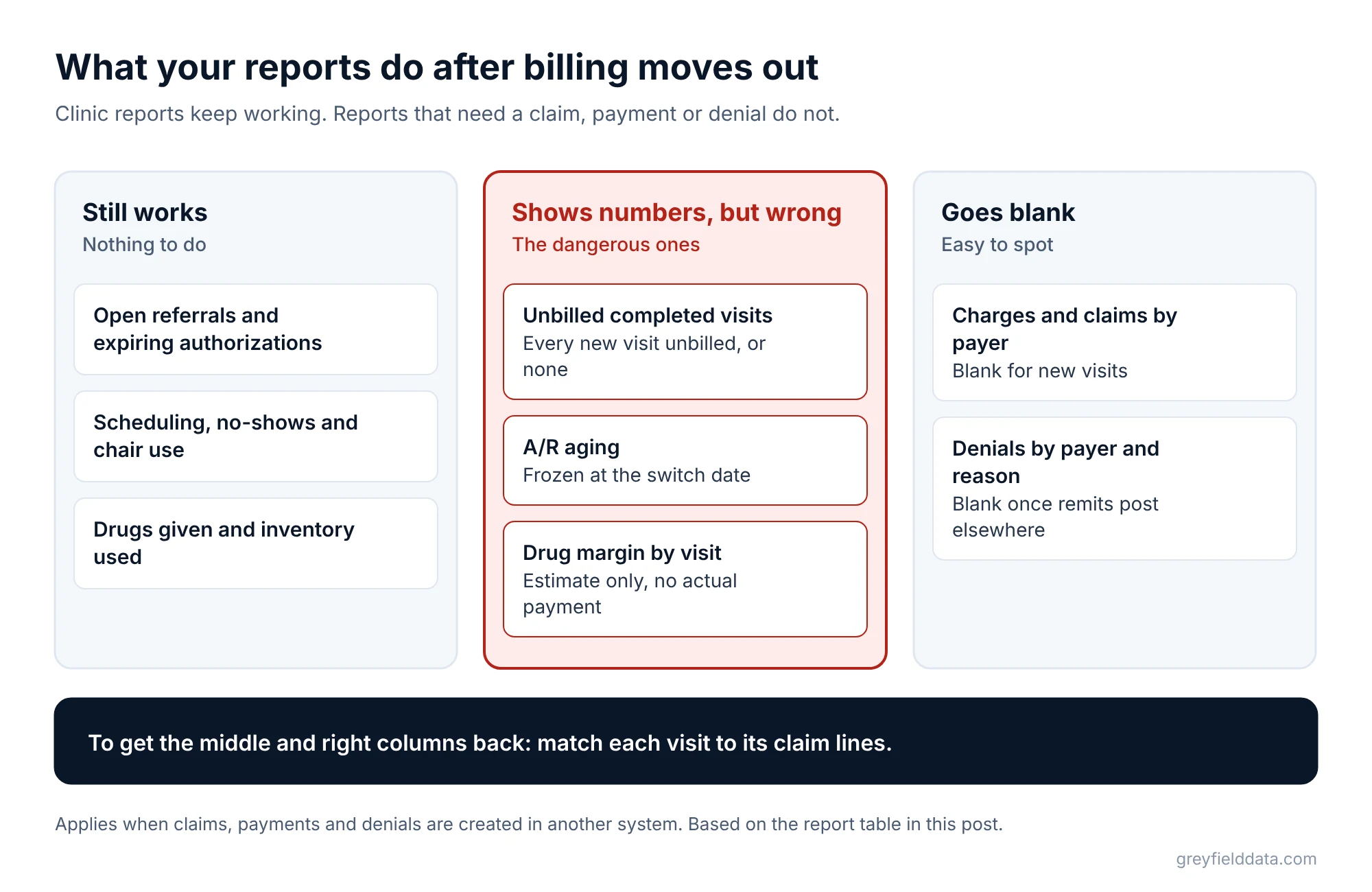
The reports that stop working are the ones that need a claim, a payment, or a denial. In WeInfuse, claims appear only when they are generated in WeInfuse, so once claims are created elsewhere, those fields go empty for new visits.
| Report | Before the switch | After the switch | How to get it back |
|---|---|---|---|
| Open referrals, expiring authorizations | Works | Still works | Nothing to do |
| Scheduling, no-shows, chair use | Works | Still works | Nothing to do |
| Drugs given and inventory used | Works | Still works | Nothing to do |
| Unbilled completed visits | Works | Shows every new visit as unbilled, or none | Match visits to claims from the billing system |
| Charges and claims by payer | Works | Blank for new visits | Billing system claim export |
| Denials by payer and reason | Works if remits are posted in WeInfuse | Blank | Remittance files (835s) from the billing system |
| A/R aging | Works if payments are posted in WeInfuse | Frozen at the switch date | Billing system A/R report |
| Drug margin by visit | Estimate available | Estimate only, no actual payment | Payments from billing system plus drug cost |
The dangerous rows are the ones in the middle: reports that still return numbers. An unbilled visits report that suddenly shows nothing looks like great news.
What do you lose sight of when the two systems are separate?
You lose sight of the handoff between them. WeInfuse knows a visit happened, and the billing system knows a claim was sent. Neither knows whether every visit became a claim.
That handoff is where money drops out:
- Visits that never get billed. The nurse documented the visit, but the charge never reached the billing system.
- Units that don't match. WeInfuse shows 30 units given plus 5 units of waste. The claim shows 30 units and no waste line. The buy-and-bill margin calculator shows what an unpaid waste line does to the margin on one administration.
- Denials nobody connects back to the clinic. The biller sees "authorization expired". The intake team never hears about it, so the next dose is given without a renewal too. The infusion denial analysis guide shows how to send each rejected claim back to the team that can prevent the next one.
Each of these is a stage in where infusion centers lose revenue between order and deposit. When billing is separate, you need a report that spans both systems to see them at all. The infusion revenue leakage calculator estimates what each stage costs you per month.
How do you get one view across WeInfuse and the billing system?
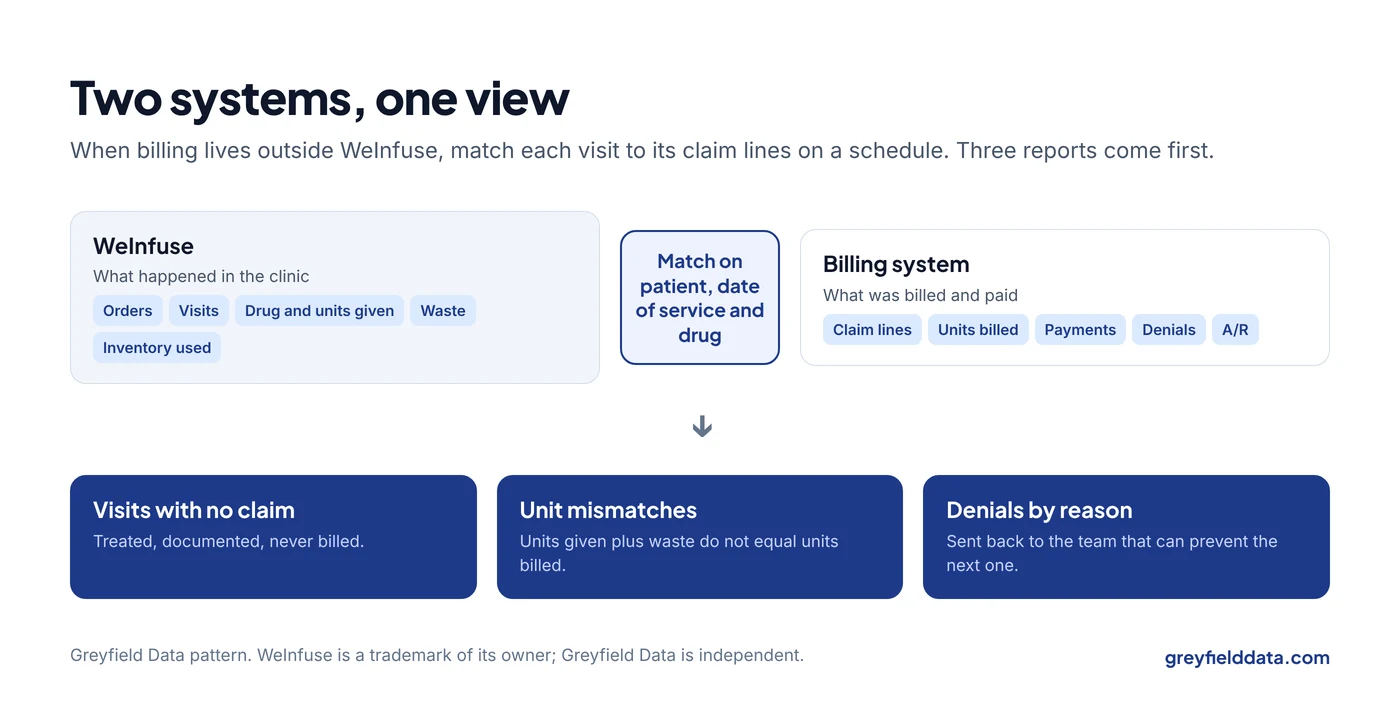
You get one view by matching each visit in WeInfuse to the claim lines that billed it, then refreshing both on the same schedule. In plain steps:
- List what each system will send you. From WeInfuse: completed visits with patient, date, drug, units given, and units wasted. From billing: claim lines with patient, date of service, billing code, units, charge, and status, plus payments and denials from remittances.
- Agree on how a visit and a claim line match. Usually patient, date of service, and drug billing code. Write it down. If the two systems use different patient numbers, keep a small lookup table that links them.
- Pull both on a schedule. Weekly is enough for most centers to start. Scheduled exports from WeInfuse are covered in scheduling WeInfuse reports that hold up.
- Put them in one place. A spreadsheet works for one site and a few hundred visits a month. Past that, a small database refreshed by scheduled code is easier to trust. The Excel or BI tool guide helps you decide, and the infusion data warehouse white paper explains the single source of truth that larger groups grow into.
- Build three reports first. Visits with no claim. Visits where billed units don't match units given plus waste. Denials by reason, sent back to the team that can prevent the next one.
What does matching look like on real rows?
Here is a small example. All data is synthetic: invented patients and visits.
| Visit in WeInfuse | Units given + waste | Claim line in billing | Units billed | Result |
|---|---|---|---|---|
| Patient 1, May 6, Drug A | 30 + 5 | Claim 9001, May 6, Drug A | 30 | Waste line missing: 5 units unbilled |
| Patient 2, May 6, Drug B | 40 + 0 | Claim 9002, May 6, Drug B | 40 | Match |
| Patient 3, May 7, Drug A | 30 + 5 | (none) | 0 | Visit never billed |
Three visits, two problems. Neither would show up in WeInfuse alone, because WeInfuse no longer holds the claims. The unbilled waste in the first row is the kind of gap the JW and JZ modifier guide explains. Neither would show up in the billing system alone, because it doesn't know what the nurse documented.
What should you do before the switch?
The cheapest time to protect your reporting is the month before billing moves. Four steps:
- List every report someone uses that touches claims, payments, or denials. Ask each owner what decision it supports.
- Save the last full month of those reports. You'll check the new combined view against them.
- Ask the billing company or vendor what they can send and how often. Remittance files and a claim-level export are the two you need.
- Pick an owner for the matching. Someone has to look at the "no claim" list every week, or it grows.
The free infusion data readiness check is a quick way to see which of these steps you already have covered.
WeInfuse is a trademark of its owner. Greyfield Data is independent and not affiliated with WeInfuse.
What to do next
Pull last month's completed visits from WeInfuse and the claim list from your billing system, and match ten visits by hand. If even one doesn't line up, you have a reason to build the combined view.
The WeInfuse reporting guide explains where visits and drugs live on the WeInfuse side. If you'd like help setting up the matching and the weekly reports, book a call with me. More on this work is on the infusion analytics page.
Frequently asked questions
How is this different from what my EHR reports?
Your infusion EHR reports what happened in the clinic. When billing lives elsewhere, it can't report what was billed, paid, or denied. A combined view matches the two so you can see whether every visit became a paid claim.
Can we keep some billing in WeInfuse and some in another system?
You can, but your reports need to know which visits are billed where. Add a field or rule that marks the billing route for each visit, or the unbilled report will be wrong for one group.
Do we need a data warehouse to combine the two systems?
Not at first. A spreadsheet that matches visits and claim lines works for one site and modest volume. Move to a small database when the weekly match takes more than an hour or more than one site is involved.
How often should the combined view refresh?
Weekly is a good start, because most of the problems it finds can be fixed within a week. Move to daily only if the billing team works the "no claim" list every day.
Part of the Infusion analytics guides, a reading path through related articles.
Linus Tse
Founder of Greyfield Data. Built 400+ dashboards. Certified in Sigma, Snowflake, Tableau, and Power BI.
About Linus