Should program reports send the full file or only what changed?
Full weekly files versus files with only what changed for manufacturer and hub program reports, which to choose, and why you still need a periodic full resend.

Written by Linus Tse, founder of Greyfield Data
· 8 min read
On this page 9 sections

For manufacturer and hub program reports, a full file resends every line in scope each week. A changes-only file sends just the lines that are new or changed since the last one. Changes-only files are smaller and carry less patient information, so many programs prefer them. But a changes-only file cannot fix a week that never arrived, so pair it with a full resend on a regular schedule, such as monthly.
I set up and check weekly program reports for infusion centers, from the first catch-up file to the regular schedule. If your team rebuilds these files every week, see program reporting for manufacturers and hubs, or book a 30-minute call.
Key takeaways
- There are three common choices: everything every time, only what changed, or everything with a date in the last few days.
- Changes-only files are smaller and move less patient information, but they need an agreed date that shows when a line changed.
- A missed week is not resent on its own. Without a full resend, the gap stays.
- Tell the program whether each file replaces their copy or updates it. Mixing the two causes duplicates or lost lines.
- Agree the choice, the date that marks a change, and the full-resend schedule in writing before the first file.
What are the three ways to send a weekly program file?
You can send everything every time, only what changed, or everything dated in the last few days.
| Approach | Each file contains | Good for | Watch out for |
|---|---|---|---|
| Everything, every time | Every line in scope, every week | Small programs; simple to check | Bigger files, more patient information moved than needed |
| Only what changed | Lines new or changed since the last file | Most weekly programs | Needs a date that marks a change; missed weeks stay missing |
| The last few days | Every line whose date falls in a fixed window, such as the last 7 days | Dose lists, where each dose has a date | Changes to older lines are never resent |
Whatever you choose, send one catch-up file first, covering everything from the program's agreed start date. Then start the weekly schedule. The summary of the manufacturer program reporting white paper explains what programs usually ask for in that first file.
Why do programs prefer changes-only files?
Programs prefer them because they are smaller and they move less patient information each week.
Smaller files are faster to send and to load. Moving less patient information fits the rule that a program should get only what the agreement requires. Where patient information is involved, a business associate agreement (BAA) should cover the reporting, and each file should carry only the required columns.
What decides whether a line "changed"?
A changes-only file needs a date that moves every time a line is new or changed. Pick it with the program, not alone.
For dose lines it is easy: the date the dose was given. A new dose is a new line with a new date.
For status lines it is harder. A patient waiting for approval has no dose date at all. On one program I worked on, the order's last-updated date was the candidate. We treated it as a proposal until the program confirmed it against the agreement.
A date that moves for reasons the program does not care about, such as a note being edited, sends lines that did not really change. A date that does not move when a status changes misses lines that did.
Agree what the words in the specification mean, too. The guide to orders versus appointments in WeInfuse shows why an order and a visit can carry different statuses. On one program, "pending" meant the value a line carries, not "resend every waiting patient every week". Those two readings produce very different files.
Why do you still need a full resend?
Because changes-only files only move forward. Each one assumes the last one arrived. Four things break that:
- A failed send. In the setups I have worked with, a scheduled file that failed was not sent again automatically. The next week simply covered the next week.
- A change older than the window. If a dose from three weeks ago is corrected today and the file only covers the last 7 days, the correction never goes out.
- Removed lines. A cancelled visit or a deleted record is often just absent from the next file. The program's copy still has it.
- A specification change. If a column is added or a rule changes, old lines on the program's side are in the old format.
A full resend fixes all four at once. The program replaces its copy, or checks its copy against the full file, and any gap closes.
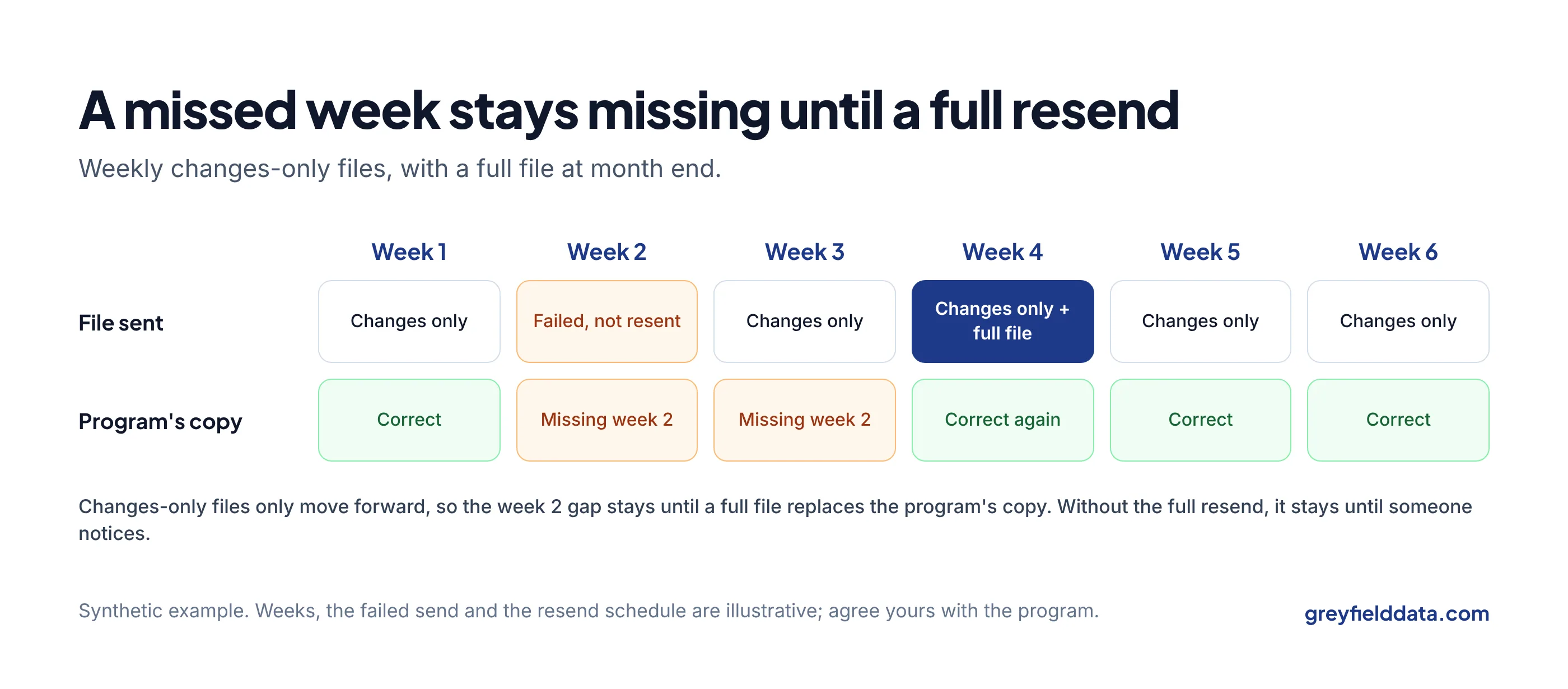
Synthetic example. A program receives changes-only files every Monday. The week 2 file fails. Nobody notices. Week 2 had three new doses and one status change from waiting to active.
| Week | File sent | Program's copy |
|---|---|---|
| 1 | Changes only | Correct |
| 2 | Failed | Missing 3 doses and 1 status change |
| 3 | Changes only | Still missing week 2 |
| 4 | Changes only, then full file at month end | Correct again |
With a monthly full resend, the gap lasts until month end. Without one, it lasts until someone notices.
How often should you resend in full?
Resend in full often enough that a gap would be closed before anyone relies on it. Monthly is a common starting point for weekly programs.
If the program reconciles your files against its own records every week, you may be able to go longer; if it pays or makes decisions on the data, go shorter. Agree it with the program.
Should each file replace or update the program's copy?
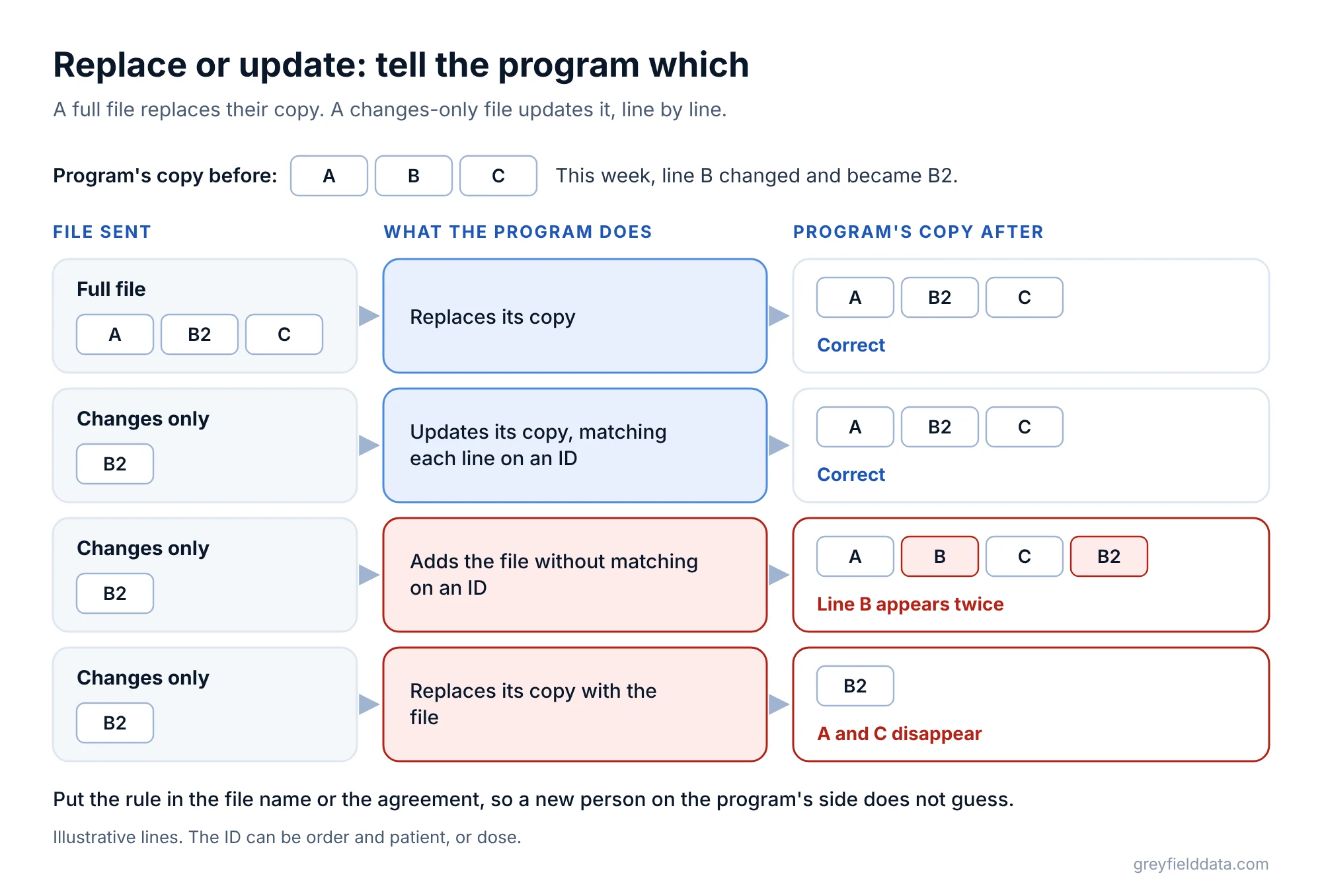
A full file should replace the program's copy, and a changes-only file should update it. The program needs to know which one each file is:
- A full file replaces their copy for the period it covers.
- A changes-only file updates their copy, matching each line on an ID such as order and patient, or dose.
If a program adds changes-only files to its copy without matching on an ID, a changed line appears twice. If it replaces its copy with a changes-only file, everything else disappears. Put the rule in the file name or the agreement, so a new person on their side does not guess.
How do you know the files are complete?
Check what arrives, not just that the job ran. For each file, record the date range and the number of lines, and compare with recent weeks.
Ask the program to tell you when a file does not arrive. The scheduling guide shows how to set this up for WeInfuse reports, and status and dispense report counts covers the check between the two main files. For the full picture of what programs ask for and why files come back, read the free guide Manufacturer Programs Without the Manual Reporting.
If the files come from a scheduled connection rather than saved reports, the Looker API checklist lists the checks to build in. The same missed-week problem is behind many "missing patient" reports, as the guide to connecting hub vendors to WeInfuse explains. The WeInfuse reporting guide and the WeInfuse data guide explain where each line in these files comes from.
WeInfuse is a trademark of its owner. Greyfield Data is independent and not affiliated with WeInfuse.
Frequently asked questions
What is the difference between a full file and an incremental file?
A full file contains every line in scope each time. An incremental, or changes-only, file contains only lines that are new or changed since the last file.
If we send changes only, do we ever need to resend everything?
Yes. A missed week, a late correction or a removed line is never fixed by later changes-only files. A regular full resend closes those gaps.
How do we know which lines changed?
By an agreed date that moves whenever a line is new or changed, such as the dose date for dose lines. For status lines, agree the date with the program in writing.
Does a full file break the minimum necessary rule?
Not if it carries only the columns the agreement requires. It does move more lines, which is one reason many programs prefer changes-only files with a periodic full resend.
What to do next
Write down three things for each program file: which approach it uses, which date marks a change, and when it is resent in full. If any of the three is missing, agree it with the program this month.
If someone on your intake or pharmacy team rebuilds these files by hand each week, count those hours in the infusion staffing planner. The free infusion data readiness check shows what else to fix first. If you want help setting up the schedule and the checks, book a call.
Part of the Infusion analytics guides, a reading path through related articles.
Linus Tse
Founder of Greyfield Data. Built 400+ dashboards. Certified in Sigma, Snowflake, Tableau, and Power BI.
About Linus