Why does my WeInfuse Looker report show duplicate rows?
Duplicate rows in WeInfuse Looker usually come from one-to-many joins, like appointments per order or lots per item. How to spot real duplicates and fix them.

Written by Linus Tse, founder of Greyfield Data
· 8 min read
On this page 7 sections
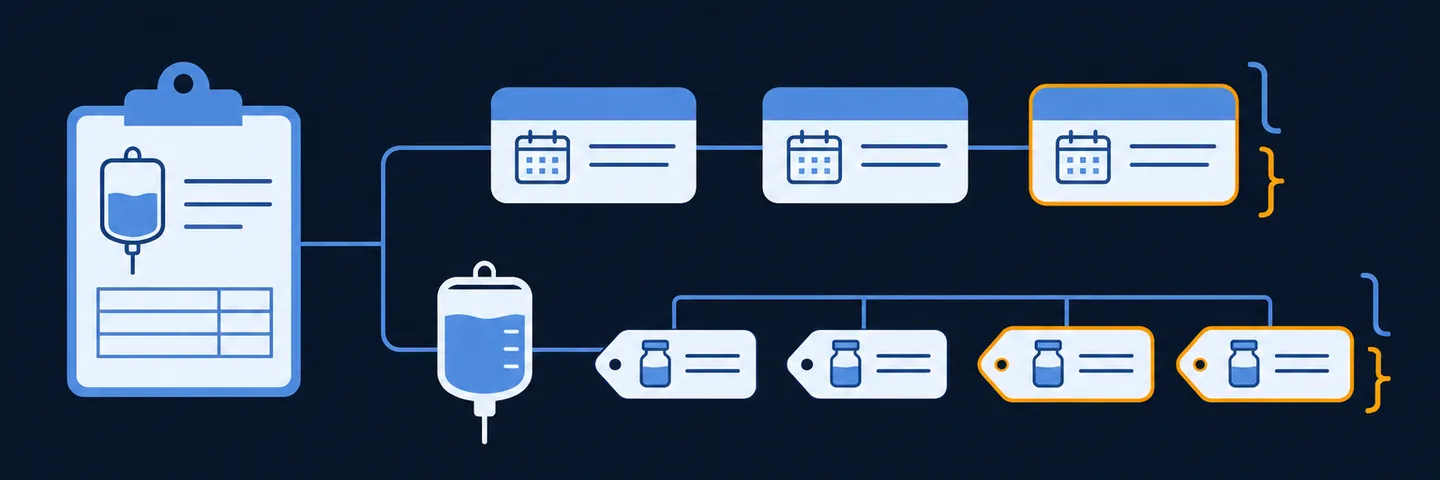
A WeInfuse Looker report shows duplicate rows when you add a field from a table that has many rows for each row of your base table. The three I see most:
- an order repeated once per appointment
- an inventory item split by lot
- an appointment split by drug or billing line
Most of these are expected repeats, not bad data. The fix is to pick the right base grain and drop or aggregate the one-to-many fields.
I have cleaned up these reports on manufacturer program files, inventory snapshots and provider portals built on WeInfuse data. If you would rather have someone check your report before it goes out, that is part of the WeInfuse reporting service I run, or book a 30-minute call.
Key takeaways
- Most "duplicates" in WeInfuse Looker are fan-out: a one-to-many join repeating the parent row once per child.
- An order repeated once per appointment is expected. It is a duplicate only if the same appointment appears twice.
- "No exact duplicate rows" is not a pass. Test uniqueness on the business key for the grain you promised.
- Fix fan-out by choosing the Explore whose base matches your grain, removing one-to-many fields, or counting distinct keys.
- Before sending, also check the date window, required blanks and extra helper columns. A report can be unique and still wrong.
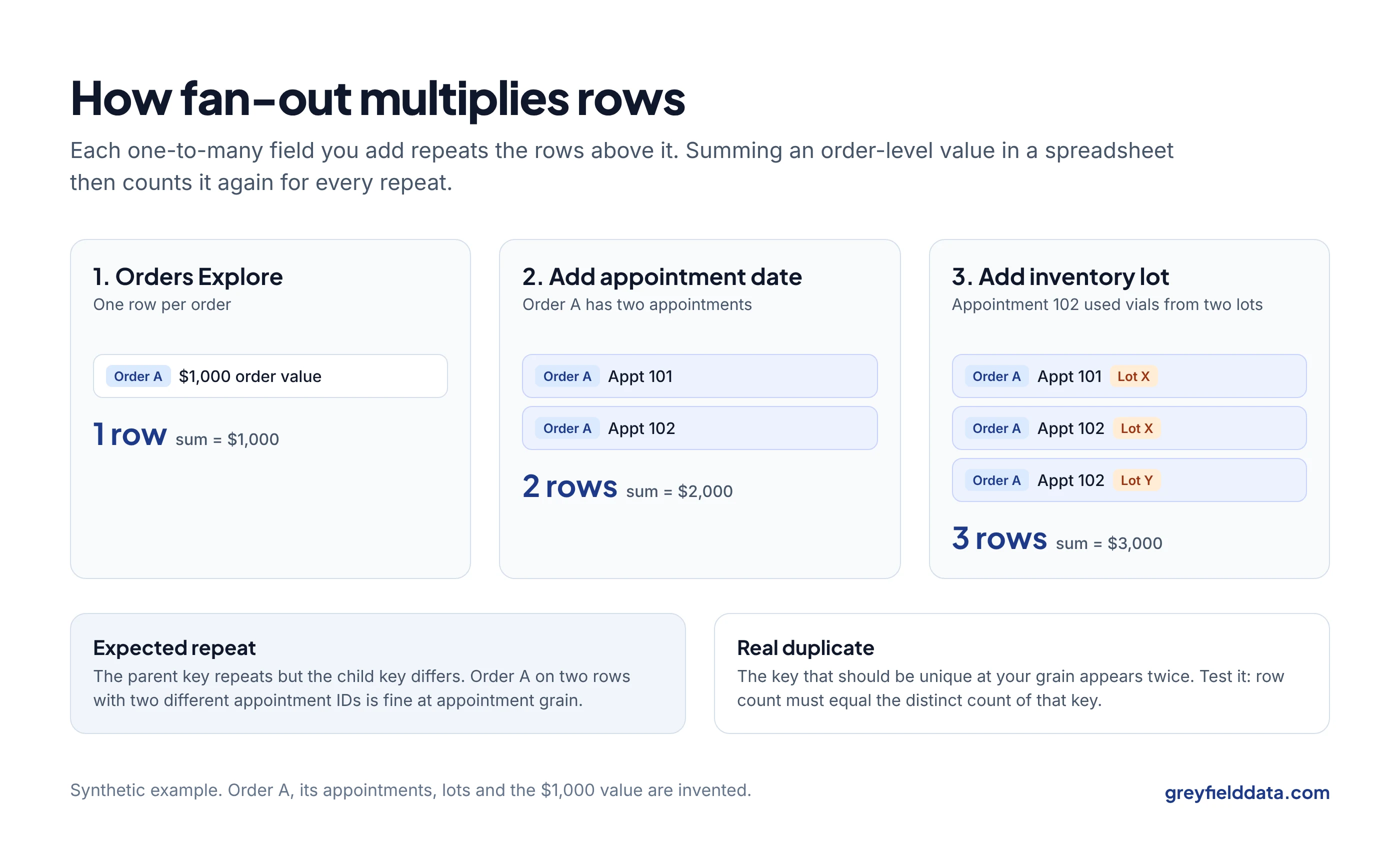
What causes duplicate rows in WeInfuse Looker?
Duplicate rows are caused by joins where one row on one side matches many rows on the other. In Looker this is called fan-out, and it follows from the join relationship between the tables in an Explore.
WeInfuse defines those joins, so you cannot change them. You can only choose which fields you pull.
The cases that come up most in WeInfuse:
| What you see | Why it happens | Real duplicate? |
|---|---|---|
| Same order ID on several rows | One order has many appointments | No, if each row has a different appointments.id |
| Same appointment on several rows | More than one drug, billing record or inventory item on that appointment | No, if the extra field differs on each row |
| Inventory rows split for the same NDC and day | inventory_items.lot is in the report |
No, but it breaks a location, NDC and date grain |
| Same order series on several rows | Latest Authorization set to return more than one per series | No, if that setting is intended |
| Identical rows, every column the same | A hidden field still splits the rows, or the source truly repeats | Investigate |
The last row matters. A field you hid in the visualization can still be part of the query. On a saved Look migration I reviewed, a hidden unit-of-measure field split rows that looked identical in the output. Hidden is not removed.
How do you tell real duplicates from expected repeats?
A row is a real duplicate when the key that should be unique at your grain appears more than once. A row is an expected repeat when a parent key repeats but the child key differs.
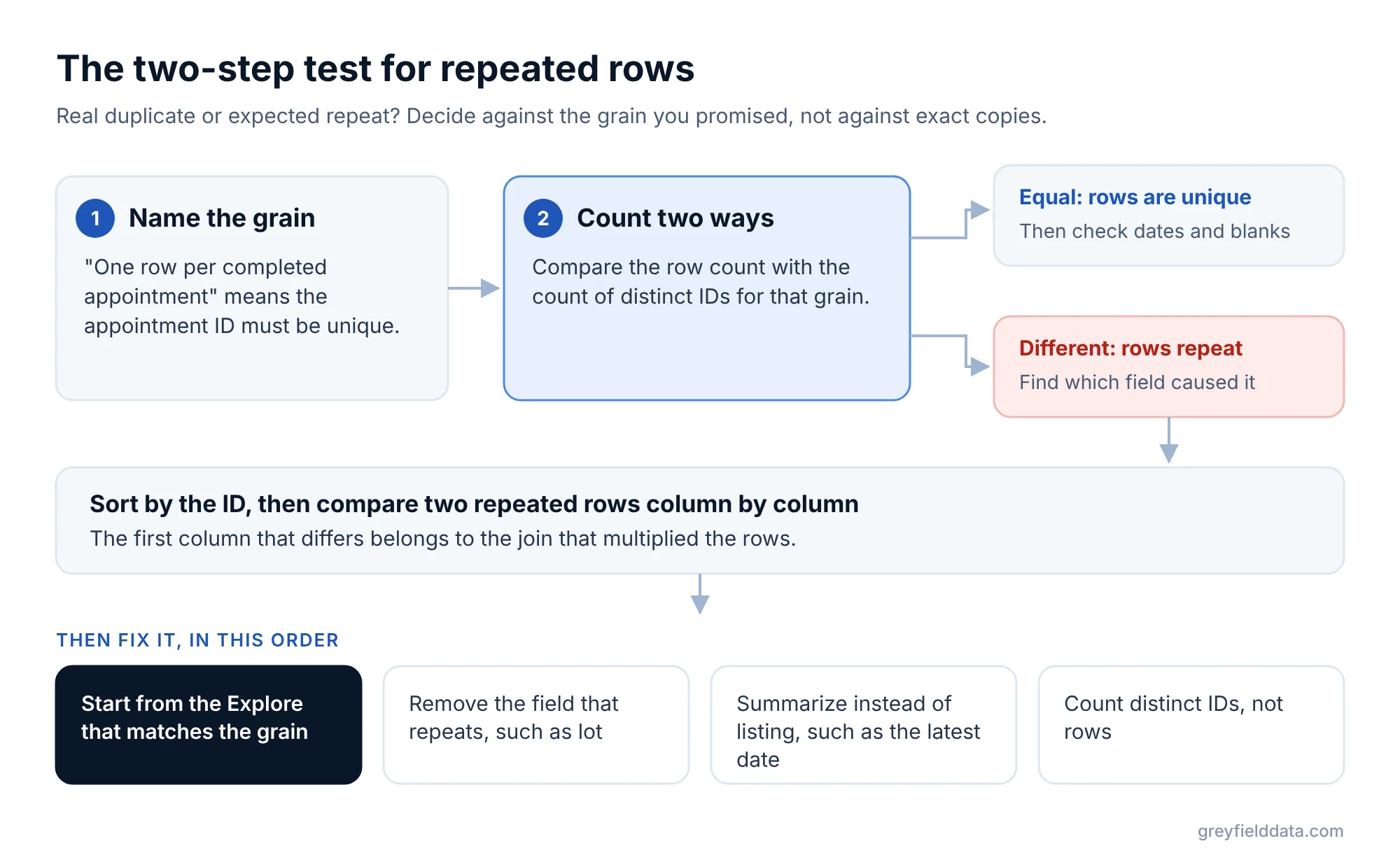
Use this two-step test:
- Name the grain. "One row per completed appointment" means
appointments.idmust be unique. "One row per order" meansorders.idmust be unique. - Compare the row count with the distinct count of that key. Equal means unique. If they differ, sort by the key and compare two repeated rows column by column. The first column that differs is the join that fanned out.
Order repeated per appointment
This is the most common one, and usually fine. In the appointments Explore, the order fields repeat on every appointment. On a manufacturer status feed, an order-level status repeated once per appointment because the shipping date was an appointment date.
Do not dedupe it before you decide what the report is for. The recipient had to choose between one row per order with one chosen date (latest completed or next scheduled) and one row per appointment with an appointment ID. Either is valid. Deleting rows to "fix" it without that decision would have thrown away the dates they needed.
Lot in inventory
Inventory items can carry a lot, and one NDC at one location can have several lots on the same day.
If the report is meant to be one row per location, NDC and snapshot date, the lot field has to go. On one inventory feed, we removed lot from the grain, summed same-day received and removed quantities, and then computed beginning and ending balances by date. When lot left the grain, any formula comparing lots between rows had to change too. The WeInfuse inventory report guide walks through the on-hand version of this.
How do you fix fan-out in a WeInfuse report?
Fix fan-out by bringing the report back to one row per business key. In order of preference:
- Start from the right Explore. If you want one row per order, start from the orders Explore. The orders vs appointments guide has a decision table.
- Remove one-to-many dimensions. Lot, administered drug lines, billing lines and task rows are the usual culprits. Ask whether the report really needs them.
- Aggregate instead of listing. If you need the child information, use a measure (a count, a max date, a sum) instead of a dimension. Max of appointment date keeps one row per order.
- Count distinct keys. A distinct count of
orders.idis right even when rows fan out. Looker's symmetric aggregates keep many built-in sums and averages correct across fan-out, but only inside Looker. Once the rows land in a CSV, anyone who sums a column gets the inflated number. The revenue cycle dashboards guide shows the same trap in denial rates.
Avoid "remove duplicates" in a spreadsheet as the fix. It hides the cause, and the next export brings it back.
What should you check before sending a WeInfuse report?
Check the grain, the window, the blanks and the columns. Unique rows are one test out of several. On one contract feed, the export had a unique key on every row and still covered a full year instead of one week, because of a date filter.
| Check | How to run it | What it catches |
|---|---|---|
| Business-grain uniqueness | Row count equals distinct count of the grain key | Fan-out and true duplicates |
| Date window | Min and max of the report date match the intended period | Wrong or stale date filters |
| Required blanks | Count blanks per required field | Missing diagnosis, prescriber NPI, payer, location identifiers |
| Column set and order | Compare header row to the contract, column by column | Missing columns, extra helper columns |
| Hidden fields | Export with and without hidden fields, recheck uniqueness | Hidden fields that split rows |
| Status filters | List the distinct statuses in the output | Statuses added or dropped by accident |
| Cross-report reconciliation | Every active order in a status feed appears in the dispense feed | Feeds that disagree with each other |
Required blanks are a source problem first
When a required field is blank, check whether it is blank in WeInfuse before you blame the report. On one feed, blank order dates were blank in the source, not a formatting error. Do not fill a missing identifier with a guessed one from another field.
Reconciling is not the same as passing
Two feeds can reconcile with each other and still fail the contract. On one project, status and dispense feeds matched order for order while diagnosis, prescriber and payer fields were still blank. Track "feeds agree" and "feed meets the contract" as two separate checks. The status vs dispense guide shows the patient-by-patient check, and the manufacturer program reporting guide lists the contract checks.
If you are scheduling these reports to an outside recipient, the scheduling guide covers delivery windows and failed sends. If another system pulls the report through the API, run the same checks from the Looker API checklist. The WeInfuse reporting guide explains the data model behind all of this, and the infusion center KPI glossary defines the metrics built on top. Owners and managers can read the plain-language version in the WeInfuse data guide.
WeInfuse is a trademark of its owner. Greyfield Data is independent and not affiliated with WeInfuse.
Frequently asked questions
Why do my WeInfuse totals look too high?
A one-to-many join is probably repeating rows, and something is summing them outside Looker. Check whether the row count is higher than the distinct count of your grain key.
Should I remove the lot field from an inventory report?
Remove it if the report is meant to be one row per location, NDC and date. Keep it only if the recipient needs lot-level detail, and then make lot part of the stated grain.
Can I just remove duplicates in Excel?
It hides the cause and comes back with the next export. Fix the grain in the Look instead, by choosing the right Explore or aggregating the one-to-many field.
How do I know which field is causing the duplicates?
Sort by the key that should be unique and compare two repeated rows column by column. The first column that differs belongs to the join that fanned out.
What to do next
Write down the grain of the report you trust least, then run the uniqueness and date-window checks from the table. The infusion data readiness check is a quick way to see which other gaps to look for.
If either fails and you cannot see why, book a call and we can trace it together.
Part of the Infusion analytics guides, a reading path through related articles.
Linus Tse
Founder of Greyfield Data. Built 400+ dashboards. Certified in Sigma, Snowflake, Tableau, and Power BI.
About Linus