How do you report WeInfuse inventory on hand by location and drug?
Report WeInfuse inventory on hand by location and NDC for one day, why lot numbers make rows look duplicated, and how to total them without double counting.

Written by Linus Tse, founder of Greyfield Data
· 7 min read
On this page 9 sections
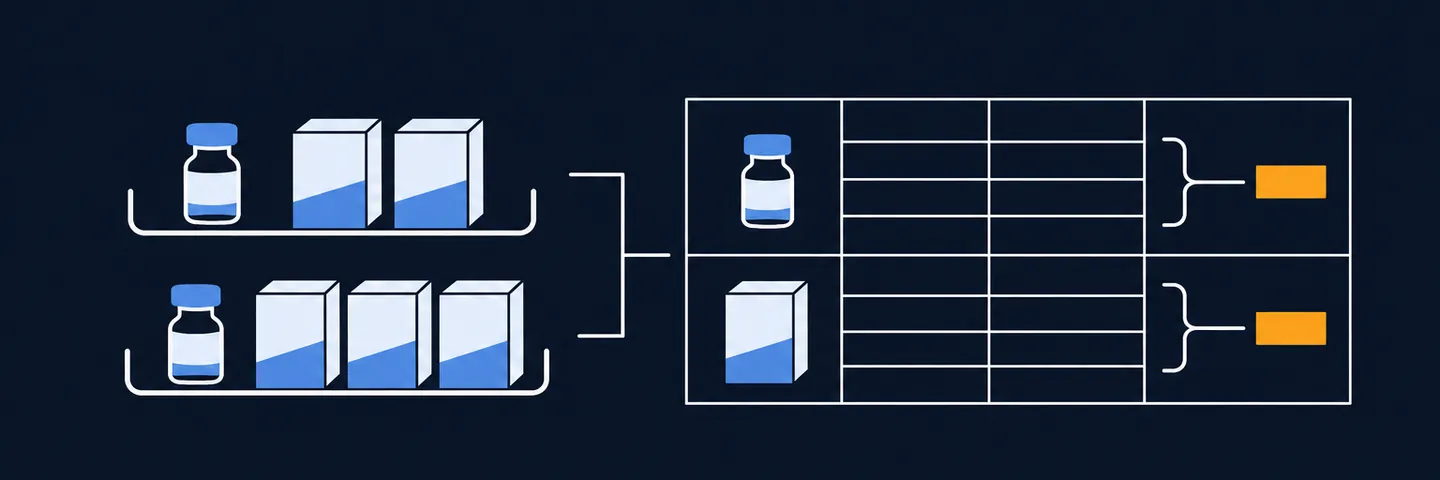
To report WeInfuse inventory on hand by location and drug, start from the Inventory Item History section, pick one snapshot date, and group by location and NDC with the on-hand quantity totalled. Leave the lot number out unless you are checking expiration dates. Each lot is its own row, which is why the same drug at the same location seems to appear several times.
I have built inventory reports from WeInfuse for manufacturer programs and for internal stock reviews at ambulatory infusion centers. If you want one built and checked against a physical count, see WeInfuse reporting help, or book a 30-minute call.
Key takeaways
- One drug at one location can have several lots, each with its own quantity and expiration date. That is why rows look duplicated.
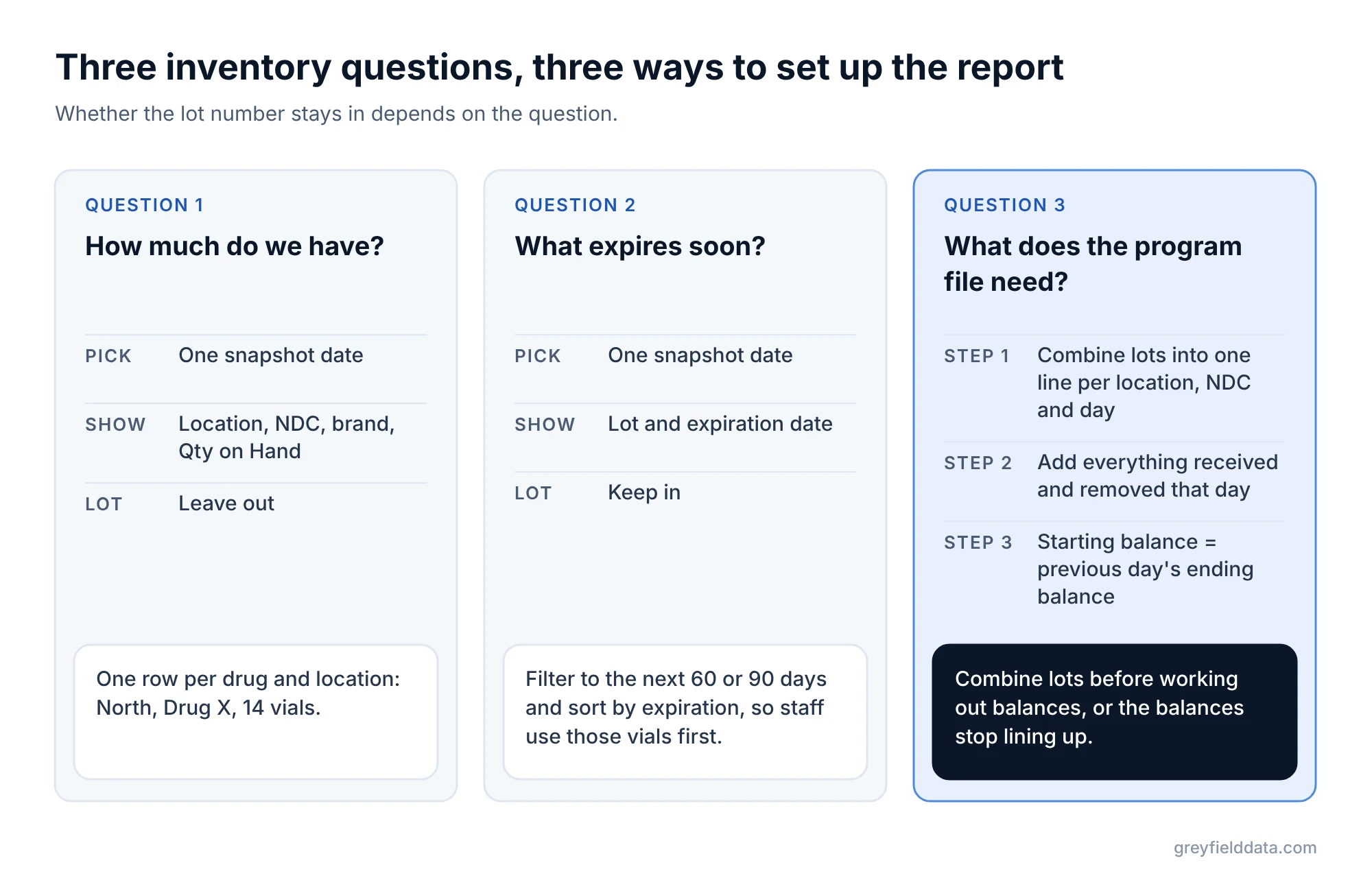
- For "how much do we have", leave lot out and total the quantity by location and NDC.
- For "what expires soon", keep lot in. It is the only way to see which vials to use first.
- On-hand is a level, not a running total. Pick one snapshot date. Adding up several days counts the same vials again.
- Keep buy-and-bill stock and patient-specific specialty pharmacy drug apart. Only one of them is yours to use on anyone.
Which part of WeInfuse holds inventory?
WeInfuse reporting runs on Looker, and each section you start a report from is called an Explore. Several hold inventory. Their descriptions in WeInfuse's own data dictionary tell you which to use:
| Section | What WeInfuse says it holds | Use it for |
|---|---|---|
| Inventory Item History | Historic inventory levels at a location, for trends | On hand on a given day, by location and drug |
| Inventory | Inventory items, buy-and-bill and specialty, with drug and appointment detail | Which items were used, on which visit |
| Buy & Bill Inventory | Purchase orders, stock on inventory, required inventory, lowest price | Ordering and reorder planning |
| Inventory Adjustments | Adjustments, with NDC, vendor and destination location | Waste, transfers and corrections |
For a count on hand, Inventory Item History is the one built for it. These are its fields that matter here: Snapshot Date, Location Name, Ndc Code, Brand Name, Lot, Expiration Date, Qty, and a totalled measure called Qty on Hand.
Why does the same drug show up on several rows?
It shows up on several rows because the report is split by lot. Vials arrive in lots, and each lot has its own lot number and expiration date.
If you receive the same drug three times, you can hold three lots at once. Add the Lot field, or the Expiration Date field, and you get one row per lot.
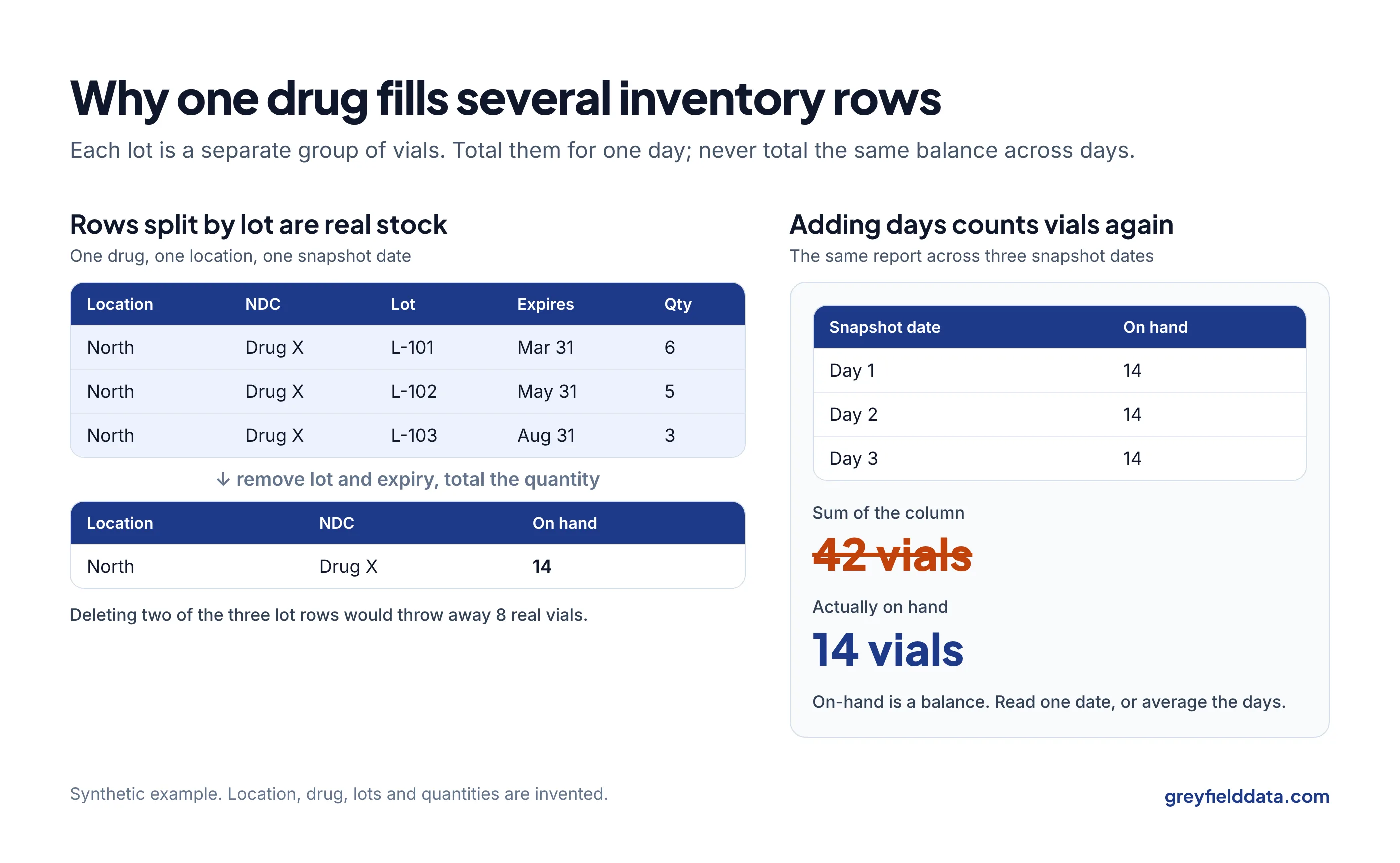
Those rows are not duplicates. Each one is a real, separate group of vials. Deleting the "extra" rows in a spreadsheet throws away real stock.
Synthetic example. One drug at one location on one day:
| Location | NDC | Lot | Expiration | Qty |
|---|---|---|---|---|
| North | Drug X | L-101 | March 31 | 6 |
| North | Drug X | L-102 | May 31 | 5 |
| North | Drug X | L-103 | August 31 | 3 |
On hand is 6 + 5 + 3 = 14 vials. Remove lot and expiration from the report, keep the Qty on Hand measure, and you get a single row: North, Drug X, 14.
How do you build the on-hand report?
Build it in four steps.
- Start from Inventory Item History.
- Filter Snapshot Date to one day, such as yesterday or the last day of the month.
- Add Location Name, Ndc Code and Brand Name, then the Qty on Hand measure. Leave Lot and Expiration Date out.
- Check the result against a physical count for one or two drugs before anyone relies on it.
Before you trust it for a trend, look at which snapshot dates exist in your account. List the distinct dates for one month and see how often a snapshot is taken.
Do not add up several days
On-hand is a level, like a bank balance. If the report covers three days and you total the column, the same 14 vials count three times and you see 42. For a trend, put Snapshot Date on the rows and read each day on its own. For a monthly figure, pick the month-end date, or average the daily values. Do not sum them.
When should you keep the lot number?
Keep lot when the question is about specific vials:
- What expires in the next 60 days, so staff use those first.
- A recall or a manufacturer query about one lot.
- A missing-vial investigation, where you need to trace one lot from receipt to use.
For an expiration list, keep Lot and Expiration Date, filter to the next 60 or 90 days, and sort by expiration. An expired vial of an infusion drug is a direct loss, so this is a list worth reading every week. Fridge failures cause the same kind of loss; temperature excursion drug loss shows how to count it.
What about program inventory reports?
Manufacturer programs often ask for one line per location, product and day, with quantities received, removed, and the starting and ending balance. Lot is usually not part of that line, so the lot rows must be combined first.
The order matters:
- Combine lots into one line per location, NDC and day.
- Add up everything received that day, and everything removed that day, before working out balances.
- Starting balance equals the previous day's ending balance. If you combine lots after calculating balances, the balances stop lining up.
The manufacturer program guide, Manufacturer Programs Without the Manual Reporting, covers the inventory file and the other weekly program reports in plain terms. The status vs dispense guide covers the two other files programs most often send back.
What else can make the totals wrong?
- Mixing stock types. WeInfuse tracks buy-and-bill inventory and specialty pharmacy drug separately. Specialty drug is usually dispensed for one patient. Counting it as general stock overstates what you can use. The white bagging revenue guide and the white bagging waste calculator cover what unused specialty drug costs.
- Repeated item IDs. WeInfuse's dictionary notes that the plain inventory item ID can repeat across buy-and-bill and specialty records. The Inventory Item ID field starts with BB or SP, which tells them apart.
- Adding visit or patient fields. In the Inventory section, adding appointment fields splits rows again, one per visit that used the item. The duplicate rows guide explains this in more detail.
- Treating used vials as supply. Drug used at visits tells you what went out, not what a patient is approved for. Used inventory vs approved supply explains the difference.
If you want to see how drug cost and payment drive margin per visit, the buy-and-bill margin calculator is a quick next step. The WeInfuse reporting guide covers the other sections of WeInfuse reporting, and the WeInfuse data guide explains them for owners and managers.
WeInfuse is a trademark of its owner. Greyfield Data is independent and not affiliated with WeInfuse.
Frequently asked questions
Why does my WeInfuse inventory report show the same drug twice?
The report is split by lot or expiration date. Each lot is a separate group of vials. Remove those fields and total the quantity to get one row per drug and location.
How do I see inventory on hand for a past date?
Use Inventory Item History and filter Snapshot Date to the day you want. Check first that a snapshot exists for that date.
Can I add up inventory across days for a monthly total?
No. On-hand is a balance, so adding days counts the same vials again. Use the month-end snapshot or an average of daily values.
Should specialty pharmacy drug be in my on-hand report?
Report it separately. It is usually dispensed for one patient, so it is not stock you can use for anyone else.
What to do next
Run the on-hand report for yesterday and compare two drugs with a physical count. If they match, add the 60-day expiration list. If counts keep drifting from what was bought and used, how to measure infusion drug inventory shrink is the next read.
If they do not match, or you need the program inventory report built, book a call and we can trace the gap.
Part of the Infusion analytics guides, a reading path through related articles.
Linus Tse
Founder of Greyfield Data. Built 400+ dashboards. Certified in Sigma, Snowflake, Tableau, and Power BI.
About Linus