How do you move from an on-prem database and legacy BI to Snowflake and Sigma?
A five-phase plan for moving an on-prem database and Tableau or Power BI to Snowflake and Sigma: inventory, load, convert, rebuild, then validate and cut over.

Written by Linus Tse, founder of Greyfield Data
· 7 min read
On this page 11 sections
If you're running an on-prem database or babysitting a legacy BI tool like Tableau or Power BI, there has never been a better time to upgrade than 2026.
I've been deep in a Snowflake migration recently. Work that used to take me 4 weeks now takes 3 days. My clients are seeing business value in a matter of weeks, instead of months. This post is the plan I follow, phase by phase. If you want help with it, that's what our Snowflake consulting covers, and the free Tableau to Sigma and Power BI to Sigma migration assessments size the reporting side.
Key takeaways
- Move the database first and the BI tool second. Reports rebuilt on a stable Snowflake model only need to be built once.
- Start with an inventory of tables, jobs, and reports, with an owner and last-used date for each. It decides what you don't migrate.
- Snowflake's SnowConvert AI translates SQL from sources such as SQL Server, Oracle, and Teradata into Snowflake SQL. Review its output like any other code.
- Sigma queries the warehouse live, with no extracts, so there are no extract refreshes to rebuild.
- Validate at the same data cutoff and run old and new side by side before you switch anything off.
Why move off an on-prem database and legacy BI now?
Because the gap between what you're maintaining and what's available keeps growing. Those who are willing to take risks are seeing outsized rewards more than ever. By integrating data into their day-to-day decision-making, my clients have been able to provide more value to their own customers and drive growth.
These are the signs I look for that a team is due:
| Sign | What it costs you |
|---|---|
| Someone patches, backs up, and sizes the database server | Time spent keeping the lights on instead of answering questions |
| Reports run slowly at month end or when several people open them | Decisions wait for the data |
| Extract refreshes fail and someone fixes them by hand | Stale numbers, and a person who can't take a day off |
| The same metric has different logic in different workbooks | Meetings spent arguing about whose number is right |
| New sources take months to add | The business works around the data team |
What order should you migrate in?
Database first, then BI. If you rebuild reports while the data underneath is still moving, you rebuild them twice. The five phases below run in order, with some overlap between the last two.
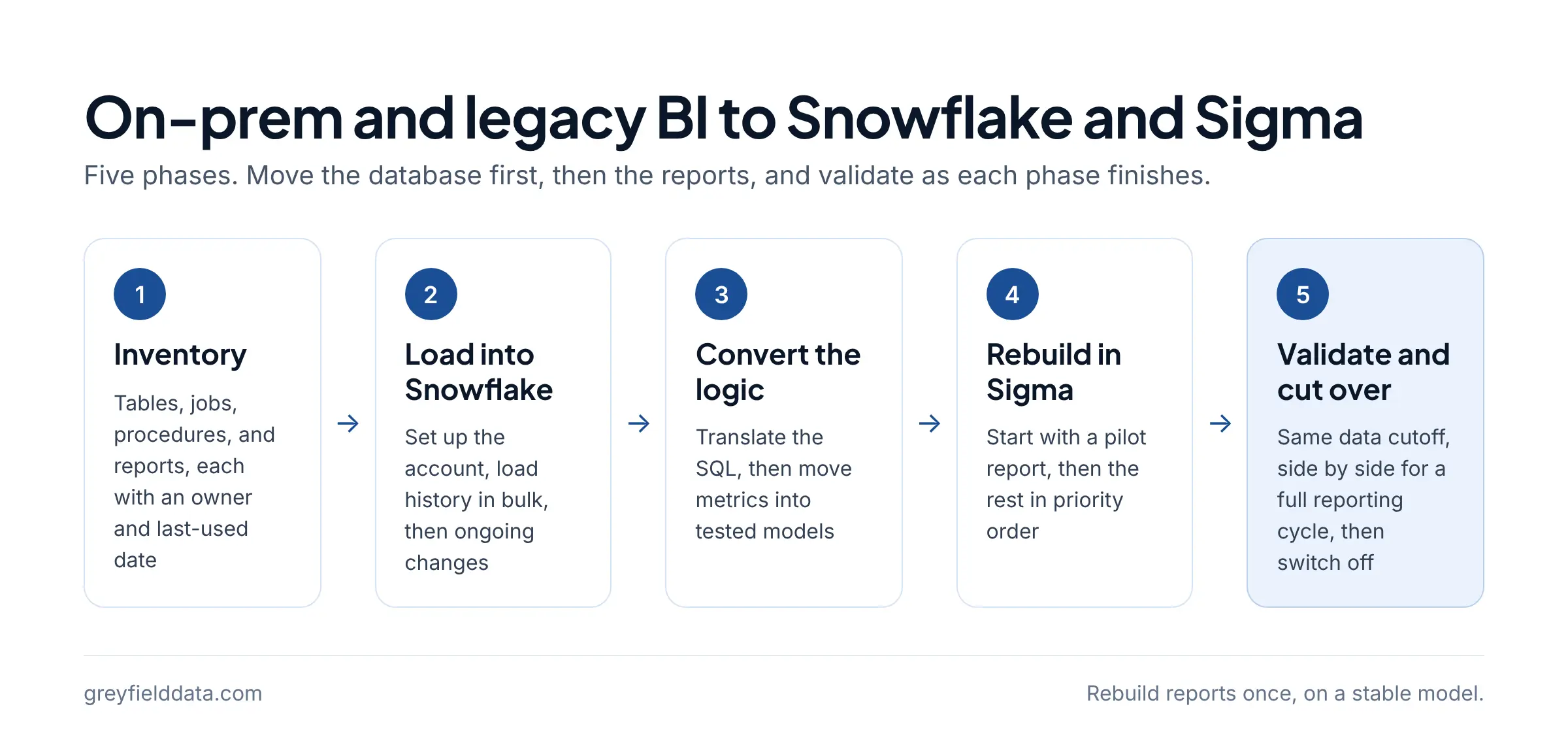
| Phase | What you do | Done when |
|---|---|---|
| 1. Inventory | List tables, jobs, stored procedures, and reports, with owners and usage | Every item is marked migrate, consolidate, or retire |
| 2. Load | Set up the Snowflake account and load history plus ongoing changes | Row counts match the source for every migrated table |
| 3. Convert | Translate SQL and move business logic into tested models | Key metrics match the old system at the same cutoff |
| 4. Rebuild | Rebuild the reports people use in Sigma on the new models | Owners have signed off on each report |
| 5. Cut over | Run old and new side by side, then switch off the old | Nobody needs the old system for a full reporting cycle |
Phase 1: what should the inventory include?
Everything that produces a number someone relies on, and who that someone is. For each item, record what it is, where it runs, who owns it, and when it was last used.
- Database: schemas, tables, views, stored procedures, and scheduled jobs.
- Feeds: every source system that writes in, and every system that reads out.
- Reports: workbooks, dashboards, data sources, and scheduled exports.
Then sort it. Some reports should move as they are, some should be merged, and some should be retired because nobody has opened them in months. Which dashboards to migrate, consolidate, or retire covers how to make that call. For the BI side, the free Tableau to Sigma and Power BI to Sigma assessments turn your answers into a readout of size, rebuild risks, and a phase plan.
Phase 2: how do you get the data into Snowflake?
Set up the account properly first, then load in two passes: history once, then ongoing changes.
Set up the account before the first load
Create roles, warehouses, databases, and grants, plus auto-suspend, query timeouts, and a resource monitor so the bill stays predictable from day one. What I put in a new Snowflake account has the script.
Load history, then changes
Snowflake supports bulk loading with COPY INTO and continuous loading with Snowpipe. For most on-prem moves, I export history once, load it in bulk, then point a loader or scheduled job at ongoing changes. For SaaS sources that also feed the old database, it's often simpler to connect them straight to Snowflake. Ecommerce data ingestion tools compared covers the loader choice.
Check row counts by table and by month against the source before you move on. It's the cheapest test you'll run.
Phase 3: how do you convert the SQL and business logic?
Translate the SQL, then move the business logic into models you can test and read. Don't just copy stored procedures across.
- Translate: Snowflake's SnowConvert AI analyzes existing SQL and converts it to Snowflake SQL. Its supported sources include Teradata, Oracle, SQL Server, Redshift, Azure Synapse, BigQuery, and more.
- Review: treat converted code like a pull request. Read it, run it, and compare its output to the old system.
- Restructure: move logic into layered models (raw, cleaned, reporting) in dbt, so each metric is defined once. Bronze, silver, gold with one order shows how the layers fit.
Agree on definitions here, not later. If finance and marketing calculate revenue differently in the old reports, the migration is the moment to write both down and decide.
Phase 4: how do you rebuild the reports in Sigma?
Rebuild on the new reporting models, starting with one pilot report that exercises the hard parts. Sigma runs directly on the warehouse, so the work is in the logic and layout, not in extracts and refresh schedules.
- Pick a pilot that tests the hard patterns. 8 tests for choosing a pilot helps.
- Translate calculations with the Tableau to Sigma or DAX to Sigma cheat sheets.
- Rebuild the rest in priority order from the inventory, owners reviewing as you go.
The tool-specific plans for Tableau and Power BI cover extracts, actions, semantic models, and row-level security.
Phase 5: how do you validate and cut over?
Compare old and new at the same data cutoff, fix what differs, then run both side by side before switching anything off.
- Compare totals and a handful of individual records for every key metric. How to validate a Sigma migration walks through it case by case.
- Keep the old system read-only during the parallel run so nobody updates the wrong one.
- Move scheduled exports, alerts, and access before cutover, not after. 10 checks before a cutover lists what people forget.
- Switch off the old database and BI tool once a full reporting cycle, such as a month-end close, has run on the new stack.
What slows a migration down?
The same few things, in my experience: logic nobody documented, reports nobody owns, and validation left to the end. Each one has a fix you can start this week.
| Slowdown | Fix |
|---|---|
| Business logic buried in stored procedures and workbook calculations | Inventory it in phase 1 and give each piece an owner |
| Reports with no clear owner | Mark them retire unless someone claims them |
| Two definitions of the same metric | Decide in phase 3 and write it down |
| Validation saved for the last week | Validate each phase as it finishes |
How long a Sigma migration takes goes deeper on what moves the timeline.
Frequently asked questions
Should I migrate the database and the BI tool at the same time?
Plan them together, but move the database first. Rebuilding reports on a data model that's still changing means rebuilding them twice.
Can SnowConvert migrate my SQL Server or Oracle database automatically?
SnowConvert AI translates SQL code from sources including SQL Server and Oracle into Snowflake SQL. You still load the data, review the converted code, and validate the results against the old system.
Do I need Sigma to use Snowflake?
No. Snowflake works with many BI tools. I recommend Sigma for teams that want business users to explore data themselves, because it queries Snowflake live without extracts.
How long does a migration to Snowflake take?
It depends on how many tables, jobs, and reports you're moving, and how much logic is undocumented. The inventory in phase 1 is what makes an estimate reliable.
What to do next
Start the inventory this week: list your tables, jobs, and reports, with an owner and last-used date for each. Then size the reporting side with the Tableau to Sigma or Power BI to Sigma assessment. If you'd like help planning or running the move, see Snowflake consulting or book a call with me.
Part of the Snowflake guides, a reading path through related articles.
Linus Tse
Founder of Greyfield Data. Built 400+ dashboards. Certified in Sigma, Snowflake, Tableau, and Power BI.
About Linus