How to choose a data ingestion tool for ecommerce: Fivetran, Airbyte, Daton, Funnel, and custom code
Compare Fivetran, Airbyte, Daton, Funnel, Portable, Stitch, and custom code for Shopify, Amazon, TikTok Shop, Klaviyo, and ads, and pick one per source.

Greyfield Data
In this article 9 sections
I have run ecommerce data through Fivetran, Airbyte (Cloud and self-hosted), Daton, Funnel, and pipelines we wrote ourselves in Python and Java. The tool matters less than most comparisons suggest. What matters is whether each source lands complete, on time, and at a cost that doesn't surprise you.
Greyfield sets up and runs this layer for ecommerce brands as part of an ecommerce data warehouse and reporting build. If you're not sure you need a warehouse yet, the ecommerce analytics setup quiz gives you a starting answer in eight questions.
Key takeaways
- Choose a tool per source, not one tool for everything. It's normal to end up with two or three ingestion methods across a stack.
- The pricing model matters more than the price list. Fivetran charges by monthly active rows, Daton and Stitch by rows, Airbyte Cloud by credits or capacity, Funnel by connectors, accounts, and destinations, and Portable a flat fee per data flow.
- Connector coverage for ecommerce sources differs most on TikTok Shop, Amazon, Recharge, and NetSuite. Check the vendor's own connector page before you sign.
- Custom code is worth it when a managed connector can't keep up with a source's volume or rate limits, or doesn't load the fields you report on. Klaviyo profiles are the case we've hit most.
- Whatever you choose, alert on freshness per source and compare row counts against the source. A connector that says "succeeded" can still be missing data.
This post builds on our earlier Fivetran vs Airbyte vs Daton comparison. It adds Funnel, Portable, Stitch, and custom code, a source-by-source view, and the lessons from running custom pipelines in production.
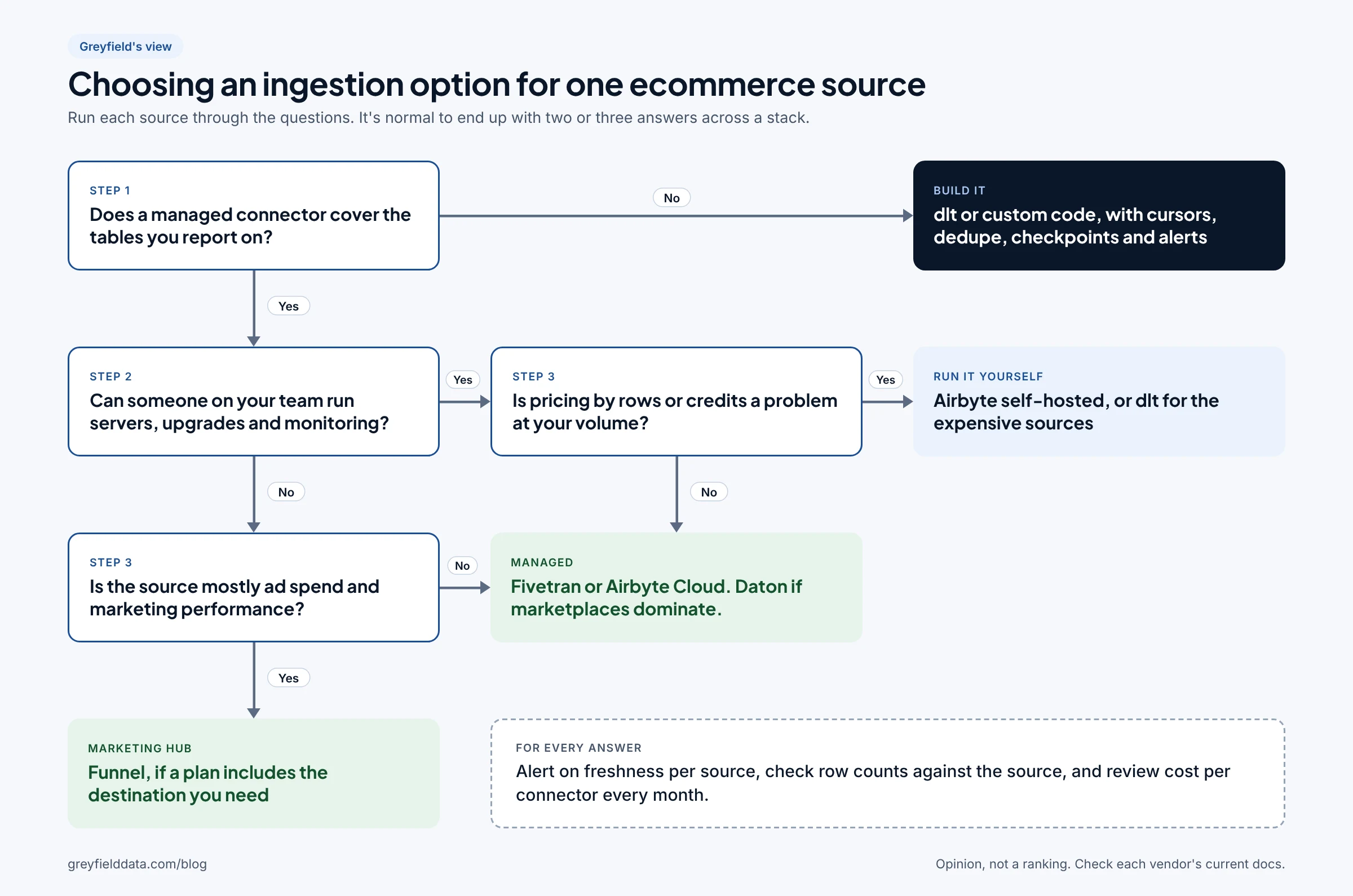
What are your options for getting ecommerce data into a warehouse?
There are three kinds of option: a managed connector service, open-source software you run yourself, and code you write. The table below lists how each one is priced, as each vendor describes it on its own site. Prices change often, so the link is the source of truth.
| Option | How you run it | Pricing model | Source |
|---|---|---|---|
| Fivetran | Managed service | Monthly active rows (MAR), priced per connection; a free plan covers low volumes | Fivetran pricing |
| Airbyte Cloud | Managed service | Credits on Standard (volume-based on Standard and Plus); capacity-based "Data Workers" on Pro and Enterprise Flex | Airbyte pricing |
| Airbyte self-hosted | Your servers | Airbyte Core is free to self-host; you pay for servers and the time to run them | Airbyte pricing |
| Daton (Saras Analytics) | Managed service | Rows loaded into your warehouse per month, with a row allowance per plan and overage per million rows; a free Lite plan | Daton pricing |
| Funnel | Managed marketing data hub | Plan tier plus Flexpoints, spent on connectors, accounts, and destinations; Snowflake as a destination is on Enterprise | Funnel pricing |
| Portable | Managed service | Fixed monthly fee by number of data flows, with no data volume caps | Portable pricing |
| Stitch | Managed service | Rows per month, in plan tiers | Stitch pricing |
| dlt or custom code | Your code, your scheduler | dlt is an Apache 2.0 open-source Python library; you pay for compute and engineering time | dlt on GitHub |
Two notes on the table. Fivetran counts inserts, updates, and deletes toward MAR, but not unchanged rows during re-syncs or the initial load. Funnel is built for marketing data and includes harmonization and dashboards, so it isn't a like-for-like price with a plain loader.
Which tools cover Shopify, Amazon, TikTok Shop, and the rest?
All of them cover Shopify, Meta, and Google Ads. The differences are TikTok Shop, Amazon, Recharge, and NetSuite. We checked each vendor's own connector catalog on November 4, 2026.
| Source | Fivetran | Airbyte (Cloud and self-hosted) | Daton | Funnel | Portable | Stitch | dlt |
|---|---|---|---|---|---|---|---|
| Shopify | Yes | Yes | Yes | Yes | Yes | Yes | Verified source |
| Amazon Seller (SP-API) | Yes | Yes | Yes | Yes | Yes | Not found | Build it |
| Amazon Ads | Yes | Yes | Yes | Yes | Yes | Not found | Build it |
| TikTok Shop | Private preview | Not found | Yes | Yes | Yes | Not found | Build it |
| Meta (Facebook) Ads | Yes | Yes | Yes | Yes | Yes | Yes | Verified source |
| Google Ads | Yes | Yes | Yes | Yes | Yes | Yes | Verified source |
| Klaviyo | Yes | Yes | Yes | Yes | Yes | Yes | Build it |
| Recharge | Yes | Yes | Yes | On request, Business or Enterprise plan | Yes | Yes | Build it |
| NetSuite | Yes (SuiteAnalytics) | Yes | Yes | Not found | Not found | Yes (SuiteAnalytics) | Build it |
| GA4 | Yes | Yes | Yes | Yes | Not confirmed | Yes | Verified source |
"Not found" means the source wasn't in that vendor's public catalog when we checked, not that it can never be done. "Build it" for dlt means using its REST API source or your own code. Portable lists a Google Analytics connector but its page doesn't say whether it reads GA4.
Where each "Yes" comes from:
- Fivetran: Shopify, Amazon Selling Partner, Amazon Ads, TikTok Shop Partner Center (Lite, private preview), Facebook Ads, Google Ads, Klaviyo, Recharge, NetSuite SuiteAnalytics, GA4.
- Airbyte: Shopify, Amazon Seller Partner, Amazon Ads, Facebook Marketing, Google Ads, Klaviyo, Recharge, NetSuite, GA4. Each page lists the connector as available on both self-hosted Core and Cloud plans.
- Daton: Shopify, Amazon SP-API, Amazon Ads, TikTok Shop, Facebook Ads, Google Ads, Klaviyo, Recharge, NetSuite, GA4.
- Funnel: Shopify, Amazon Seller Central, Amazon Ads, TikTok Shop, Facebook Ads, Google Ads, Klaviyo, Recharge (data request), Google Analytics.
- Portable: Shopify, Amazon Selling Partner, Amazon Ads, TikTok Shop, Facebook Ads, Google Ads, Klaviyo, Recharge.
- Stitch: Shopify, Facebook Ads, Google Ads, Klaviyo, Recharge, NetSuite, GA4.
- dlt: verified sources include Shopify, Facebook Ads, Google Ads, and Google Analytics (GA4).
A listed connector is a starting point. It doesn't tell you whether the tables you report on are included, how far back history goes, or how the connector handles late changes. Test those with your own account before you commit. For which sources are worth connecting at all, see 9 ecommerce data sources worth connecting to a warehouse.
What would we use for each ecommerce source?
This is Greyfield's view from the builds we've run, not a ranking. It assumes a brand loading into Snowflake or BigQuery with no full-time data engineer.
| Source | What we'd start with | Why | Watch for |
|---|---|---|---|
| Shopify | A managed connector (Fivetran, Airbyte, or Daton) | Every option covers it, and orders, refunds, and customers are the core of every report | Edited orders and late refunds; re-read a trailing window rather than only new orders |
| Amazon SP-API and Ads | Daton or Fivetran when Amazon is a large channel | Amazon reports are slow to request and fees arrive after the sale | Settlement and fee timing; see where Amazon seller fees live in the SP-API |
| TikTok Shop | Daton, Funnel, or Portable | The broad tools list it as preview or not at all | Check the tables offered against what finance needs |
| Meta and Google Ads | Whatever loader you already use; Funnel if marketing owns the data and wants harmonized spend | Volumes are modest and every tool covers them | Platforms can update recent days' results, so re-sync a trailing window |
| Klaviyo | A managed connector first; custom code or Klaviyo's own warehouse export once profiles get large | Profile volume and API limits are where managed connectors struggled for us | Profile updates that change nothing you report on (below) |
| Recharge | A managed connector | Fivetran, Airbyte, Daton, Portable, and Stitch all list it | Funnel needs a data request on Business or Enterprise |
| NetSuite | Fivetran, Airbyte, Stitch, or Daton | Coverage is narrower, so the choice is smaller | Setup usually needs a NetSuite admin to grant access |
| GA4 | Google's own BigQuery export, then load it where you need it | It's raw events from Google itself | Standard properties have a daily export limit of 1 million events |
For joining these sources once they land, see how to combine Shopify, Klaviyo, and Recharge data and how to track a customer across platforms.
When is custom code worth it?
Custom code is worth it when a managed connector can't load a source completely and on time, or loads far more than you need. It's rarely worth it to save a modest connector bill: you swap a vendor invoice for engineering and on-call time.
The clearest case we've run is a DTC apparel brand we work with. Airbyte loads most of its raw sources into Snowflake on a scheduled window. Custom Java and Python jobs load Klaviyo profiles and email events, plus several other sources, into the tables reports read. These are the lessons from running them.
Respect the API's rate limits by design
Klaviyo limits API requests per account, with a one-second burst window and a one-minute steady window, and returns HTTP 429 with a Retry-After header when you hit either. Our incremental sync waits as long as that header says, retries server errors with increasing delays, and work inside a fixed time budget per run, so one slow stream can't starve the others.
Pick the incremental cursor carefully
An incremental sync reads only records changed since the last run, usually by an updated timestamp. Klaviyo's profile updated field changes on any property change, including activity timestamps such as last_event_date. In one catch-up we measured, more than 99.9% of profiles marked as updated had no change in email or marketing consent, the fields reports used.
That doesn't make the cursor wrong. Filtering to subscribed profiles only would have missed unsubscribes. But it means the load is much bigger than the business change, and under row-based pricing you'd pay for every one of those updates.
Dedupe on the source's own ID
APIs repeat records across pages and retries, and a crash can replay a batch. We merge events on the event ID and keep one row per profile ID with the latest updated timestamp. When we cleaned up duplicates already in the tables, we took a zero-copy backup first and wrote a rollback script before the cutover.
Checkpoint in the same transaction as the data
The pipeline commits the merged rows, the cursor, and the watermark together, so a crash replays at most one group of pages and never skips one. Retries never reset a cursor. Grouping 100 API pages into one merge, instead of several smaller merges, cut the measured merge time by 60 to 75% in two trials, with identical output.
Run backfills as a separate, supervised job
A catch-up after an outage runs as its own job, with a lock so it can't collide with the scheduled sync and a hard time limit. We don't call it fixed after one green run. We wait for three scheduled batches in a row that finish with time to spare.
Monitor freshness, not job status
The incidents that hurt were the quiet ones:
- A single order note with unusual characters made the warehouse reject a whole Shopify batch. Every downstream job still ran on time, on stale data. Bad records should be quarantined, not allowed to fail the batch.
- An alert that was already open for a Klaviyo backlog absorbed a new, unrelated Shopify failure, so no email went out. The client noticed stale numbers in a dashboard first. Each new failure now alerts on its own.
- An ad platform token was read from a shared spreadsheet that someone edited. Credentials now live in a protected file, and a missing or malformed token file stops the load before it touches the warehouse.
Check what the vendor offers before you build
Before writing more code, check whether the source can push data to you. Klaviyo, for example, offers a managed Snowflake export under its Advanced KDP subscription, which is separate from the standard marketing plan. If the entitlement and fields fit, that can replace custom pagination entirely.
What does each option cost to run?
Cost is the subscription plus the warehouse plus people's time, and each pricing model grows with a different thing. We don't publish example totals here because they depend on your volumes and your negotiated rates.
| Pricing model | What makes the bill grow | Where it bites in ecommerce |
|---|---|---|
| Monthly active rows (Fivetran) | Rows inserted, updated, or deleted each month, per connection | Sources that update many rows without real change, such as email profiles |
| Rows loaded (Daton, Stitch) | Rows written to your warehouse | The same churny sources, plus full re-syncs of large tables |
| Credits or capacity (Airbyte Cloud) | Sync volume on Standard and Plus, or reserved capacity on Pro | Frequent syncs of large sources |
| Connectors, accounts, destinations (Funnel) | Each new connector, ad account, and destination | Many ad accounts or several destinations |
| Flat per data flow (Portable) | Number of source and destination pairs | Fine for high volume; less so for many small sources |
| Self-hosted or custom (Airbyte Core, dlt, your code) | Servers, warehouse compute, engineering and on-call time | Upgrades, API changes, and incidents land on your team |
Brands often question Funnel's cost against Airbyte's. They are priced on different things: Funnel's price includes harmonized marketing data and dashboards, while Airbyte only moves data. If marketing uses Funnel's dashboards and harmonization every day, compare it to what building those would cost. If you only need raw data in a warehouse, compare it to a loader.
Don't forget the warehouse side. Loaders that merge into large tables use warehouse compute on every sync, and that cost sits on your warehouse bill, not the connector's.
How do you decide? A checklist
Work through this per source, then look at the stack as a whole.
- List the tables and fields your reports actually use for this source.
- Confirm the connector loads those tables, with enough history, on the vendor's own docs.
- Run a trial on your own account and compare row counts and totals to the source for a recent week.
- Estimate monthly volume under the vendor's pricing model, including updates, not just new rows.
- Decide who gets the alert when the source is stale, and how stale is too stale.
- Check whether the source offers its own export to your warehouse.
- Prefer one or two loaders across the stack. Each extra tool is another bill, login, and failure mode.
- Write down what would make you switch: a coverage gap, a cost threshold, or repeated incidents.
Frequently asked questions
Is Airbyte cheaper than Fivetran for ecommerce?
It depends on your volumes, because they bill differently. Fivetran charges by monthly active rows per connection, and Airbyte Cloud by credits or capacity; self-hosted Airbyte is free software you pay to run. Price both with your own row counts, especially for Klaviyo and Shopify.
Which ingestion tools support TikTok Shop?
Daton, Funnel, and Portable list TikTok Shop connectors. Fivetran has a TikTok Shop Partner Center connector in private preview, and we didn't find one in Airbyte's or Stitch's catalogs when we checked in November 2026.
Can I use more than one ingestion tool?
Yes, and most brands do. A managed loader for the core sources plus custom code or a native export for one or two hard sources is a common, sensible setup. Keep monitoring in one place so every source reports freshness the same way.
When should I self-host Airbyte?
Self-host when someone on your team can own servers, upgrades, and monitoring, and when row or credit pricing would be large at your volume. Without that owner, Airbyte Cloud or another managed tool is usually cheaper once you count time.
Does Funnel load data into Snowflake?
Yes, but Funnel's pricing page lists Snowflake as a destination on its Enterprise plan. BigQuery and other cloud destinations are on Business. Compare the plan you'd need with a loader if a warehouse is your only destination; see Funnel vs a custom data warehouse.
What to do next
If you're choosing between a marketing data tool and a warehouse, the comparisons with Supermetrics, Windsor.ai, and Improvado show where each fits. For the rest of the stack around ingestion, see the ecommerce data stack, mapped and the modern data stack, mapped.
Not sure which setup fits? Take the ecommerce analytics setup quiz, read about ecommerce data warehouses with Greyfield, or book a call with Linus to talk through your sources.
Part of the Ecommerce reporting guides, a reading path through related articles.
Related
The 10 best ecommerce data consultancies in 2026
Ten data and analytics consultancies for DTC, Shopify, and marketplace brands, compared on warehouse builds, attribution, and margin and retention reporting.
The ecommerce data stack: how to choose tools and plan the build (free white paper)
A free white paper for DTC and omnichannel brands on choosing ecommerce data stack tools by stage, plus a five-phase plan with owners and checks.

Ecommerce semantic layer: a metric dictionary for gross sales to LTV
Definitions for gross sales, net sales, net revenue, contribution margin, CAC, repeat rate, and LTV, with grain, date, sources, owner, and a free template.