How do you track a customer across Shopify, Klaviyo, Recharge, and your ad platforms?
Build one customer view by stitching IDs into an identity table and loading every touchpoint into one events table. With a schema, SQL, and a working demo.

Greyfield Data
In this article 10 sections
To track a customer across platforms, give every system's customer ID a home in one identity table, then load every touchpoint into one events table keyed to that identity. Orders, emails, texts, subscription changes, support tickets, and the ad click that started it all end up on one timeline you can query.
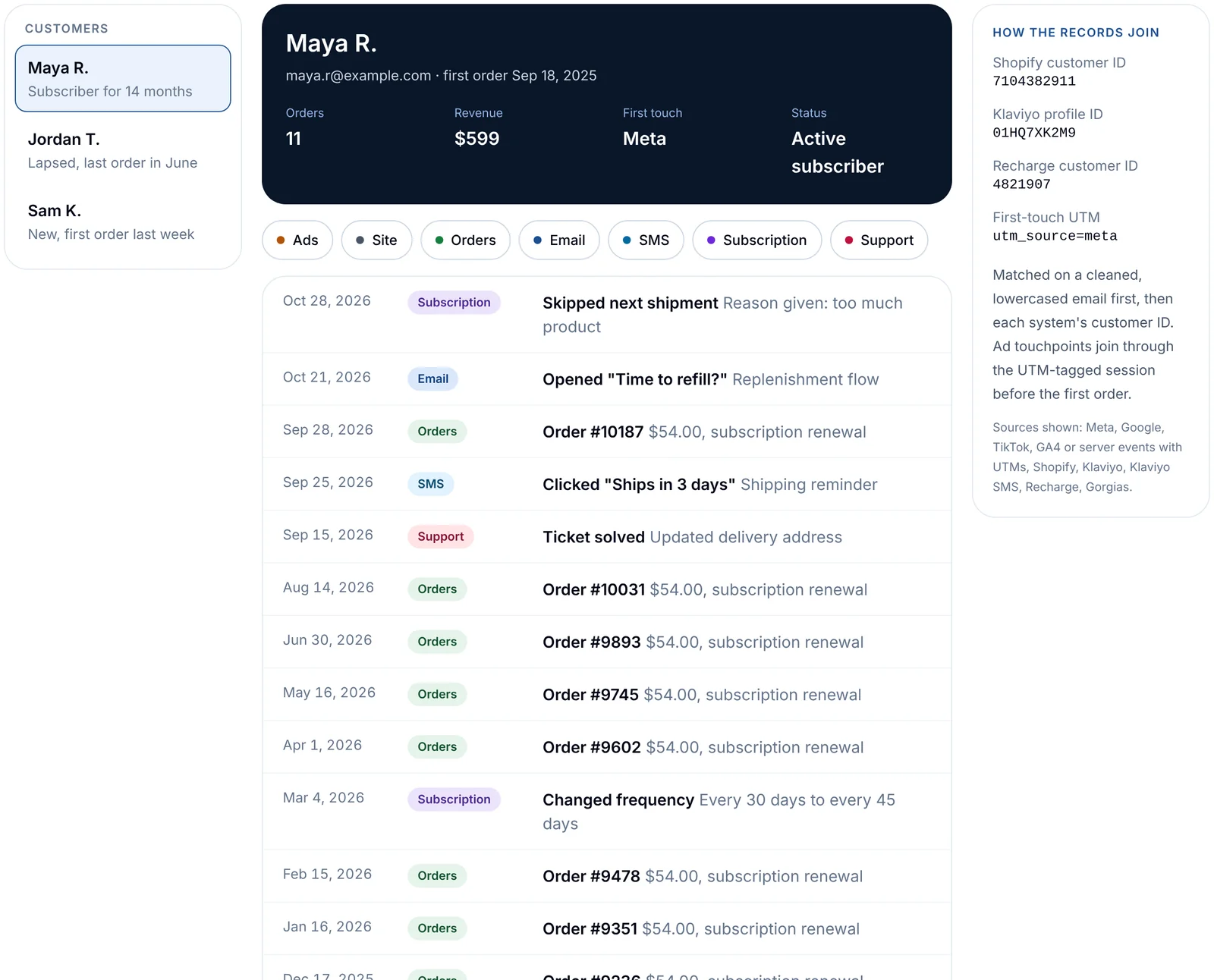
Open the customer timeline demo to see the end result on synthetic data. If you want it on your own customers, that is the warehouse and modeling work Greyfield does for ecommerce brands.
Key takeaways
- Every tool has its own customer ID. A unified view starts with an identity table that maps them to one person.
- Put every touchpoint in one events table with the same five columns: who, when, which system, what happened, and details.
- Ad platforms report at the campaign level. Person-level acquisition comes from UTMs and click IDs captured on the landing session and the order.
- Email is the usual join key, so clean it once (trim, lowercase) and keep each system's own ID alongside it.
- Once the timeline exists, lifetime value, CAC by channel, and win-back lists are queries on top, not separate projects.
Why is a single customer view so hard?
Because each system only sees its own slice. Shopify knows orders, Klaviyo knows messages, Recharge knows skips and pauses, the help desk knows complaints, and the ad platforms know clicks but rarely who clicked. Each also uses its own customer ID, and the same person can show up with two emails or as a guest checkout.
The questions brands care about cross those lines. Did the customers who skipped twice get a win-back email? Which acquisition channel brings subscribers who stay a year? You can't answer either from one tool.
Which IDs does each system use?
| System | What it records | Its customer key | How it joins |
|---|---|---|---|
| Shopify | Orders, refunds, customers | Customer ID | Email, and the ID other tools store as an external ID |
| Klaviyo | Email and SMS sends, opens, clicks, profiles | Profile ID | Email, phone, or an external ID you set to the Shopify customer ID |
| Recharge | Subscriptions, skips, pauses, cancels | Customer ID | Email, and the Shopify customer ID it stores |
| Help desk (e.g. Gorgias) | Tickets and messages | Customer ID | |
| Ad platforms | Spend, impressions, clicks | Usually none at person level | UTMs and click IDs on the landing session and order |
Check each tool's API docs for the exact field names: Shopify, Klaviyo, and Recharge.
How do you build the identity table?
Start from Shopify customers, since every buyer exists there, then attach each other system's ID by the strongest match you have. For the details of the Shopify, Klaviyo, and Recharge join (counting each renewal once, keeping skips as events), see how to combine Shopify, Klaviyo, and Recharge data. This post covers the wider picture: every system, ad touchpoints, and what the finished view is for.
create table customer_identity as
select
  s.customer_id                          as shopify_customer_id,
  lower(trim(s.email))                   as email_clean,
  k.profile_id                           as klaviyo_profile_id,
  r.customer_id                          as recharge_customer_id,
  coalesce(s.customer_id::varchar, lower(trim(s.email))) as person_key
from shopify_customers s
left join klaviyo_profiles k
  on k.external_id = s.customer_id::varchar
  or lower(trim(k.email)) = lower(trim(s.email))
left join recharge_customers r
  on r.shopify_customer_id = s.customer_id;
Two rules keep it honest:
- Prefer IDs over emails. If a tool stores the Shopify customer ID, join on that first and fall back to email.
- Keep the match type. Store whether a row joined by ID or by email, so you can measure how much of the view rests on the weaker match.
Guest checkouts and people with two emails are the usual gaps. Merge them by email or phone where you can, and leave the rest as separate people rather than guessing.
What does the events table look like?
One row per touchpoint, in the same shape regardless of source.
| Column | Example |
|---|---|
| person_key | 7104382911 |
| occurred_at | 2026-10-28 14:02:11 |
| source | recharge |
| event_type | subscription_skipped |
| details | {"reason": "too much product", "charge_id": "..."} |
create table customer_events as
select person_key, created_at as occurred_at, 'shopify' as source,
       'order_placed' as event_type, object_construct('order_id', o.id, 'total', o.total_price) as details
from shopify_orders o join customer_identity i on i.shopify_customer_id = o.customer_id
union all
select i.person_key, e.datetime, 'klaviyo', e.metric_name, object_construct('message', e.message_name)
from klaviyo_events e join customer_identity i on i.klaviyo_profile_id = e.profile_id
union all
select i.person_key, r.created_at, 'recharge', r.event_type, object_construct('reason', r.reason)
from recharge_events r join customer_identity i on i.recharge_customer_id = r.customer_id;
The SQL is Snowflake-flavored (object_construct). Other warehouses have an equivalent JSON function.
How do you get acquisition data at the person level?
Ad platforms report spend and conversions by campaign, not by customer. To know how each customer arrived:
- Capture UTMs and click IDs on landing. Store them on the session, and on the order where your storefront allows it.
- Keep first touch and last touch. First touch answers "which channel brings good customers"; last touch answers "what closed the order".
- Treat model-based attribution as an input. Tools like Triple Whale or Northbeam can add impression-level and modeled data. Load their outputs next to your own touchpoints instead of replacing them. See the ecommerce data stack map for the options.
This is also where CAC by channel comes from: spend by channel from the ad platforms, divided by new customers whose first touch was that channel. Four kinds of CAC covers which one to use when.
What breaks first when you load Klaviyo and Recharge?
From building these pipelines, the same few problems come up:
- Duplicates from overlapping syncs. Incremental loads usually re-read a time window to be safe. Deduplicate on the event's own ID, not on timestamp.
- Opens you can't trust. Mail privacy features can register opens that no person made. Weight clicks, orders, and replies more than opens.
- Large event volumes. Email events grow fast. Load only the event types you'll use, and partition by date.
- Changed emails. People update their email in one tool and not another. Joining on stored IDs first avoids splitting them in two.
What can you do once the timeline exists?
| Question | Built from |
|---|---|
| Lifetime value by acquisition channel | Orders plus first-touch UTM |
| Which subscribers are about to churn? | Skips, pauses, and support tickets in the last 60 days |
| Did the win-back flow bring anyone back? | Email events followed by an order within 30 days |
| Which first product leads to a subscription? | First order lines plus subscription events |
These are the same questions behind the customer retention dashboard in Sigma and contribution margin LTV by channel. Put a number on the retention side with the retention value calculator.
Frequently asked questions
Do I need a CDP to get a single customer view?
Not necessarily. A warehouse with an identity table and an events table does the reporting job. A CDP adds real-time audiences and activation; if you need those, a warehouse-native option can sit on the same tables.
What should the join key be?
The Shopify customer ID where other tools store it, with a cleaned email as the fallback. Keep every system's own ID in the identity table so you can trace each match.
Can this work for brands that also sell on Amazon?
Partly. Amazon shares little customer-level data with sellers, so Amazon buyers rarely join to your DTC customers. Report Amazon at the order and product level, and keep the unified view for channels where you own the customer.
How long does the data take to show up?
As fresh as your slowest loader. Most brands run hourly or daily loads, which is plenty for retention and LTV reporting.
What to do next
Open the demo and click through the three customers, then map your own systems against the ID table above. If you want help building it on your data, book a call.
Part of the Ecommerce reporting guides, a reading path through related articles.
Related

Ecommerce semantic layer: a metric dictionary for gross sales to LTV
Definitions for gross sales, net sales, net revenue, contribution margin, CAC, repeat rate, and LTV, with grain, date, sources, owner, and a free template.

The ecommerce data stack, mapped: 57 tools from storefront to dashboard
A map of the ecommerce data stack in 9 categories, from Shopify and Amazon to connectors, warehouses, packaged analytics, and BI, with what each tool does.
How do you combine Shopify, Klaviyo, and Recharge data into one customer view?
Join Shopify, Klaviyo, and Recharge on the right keys, count each renewal once, and keep skips as events so one customer timeline holds up.