How do you combine Shopify, Klaviyo, and Recharge data into one customer view?
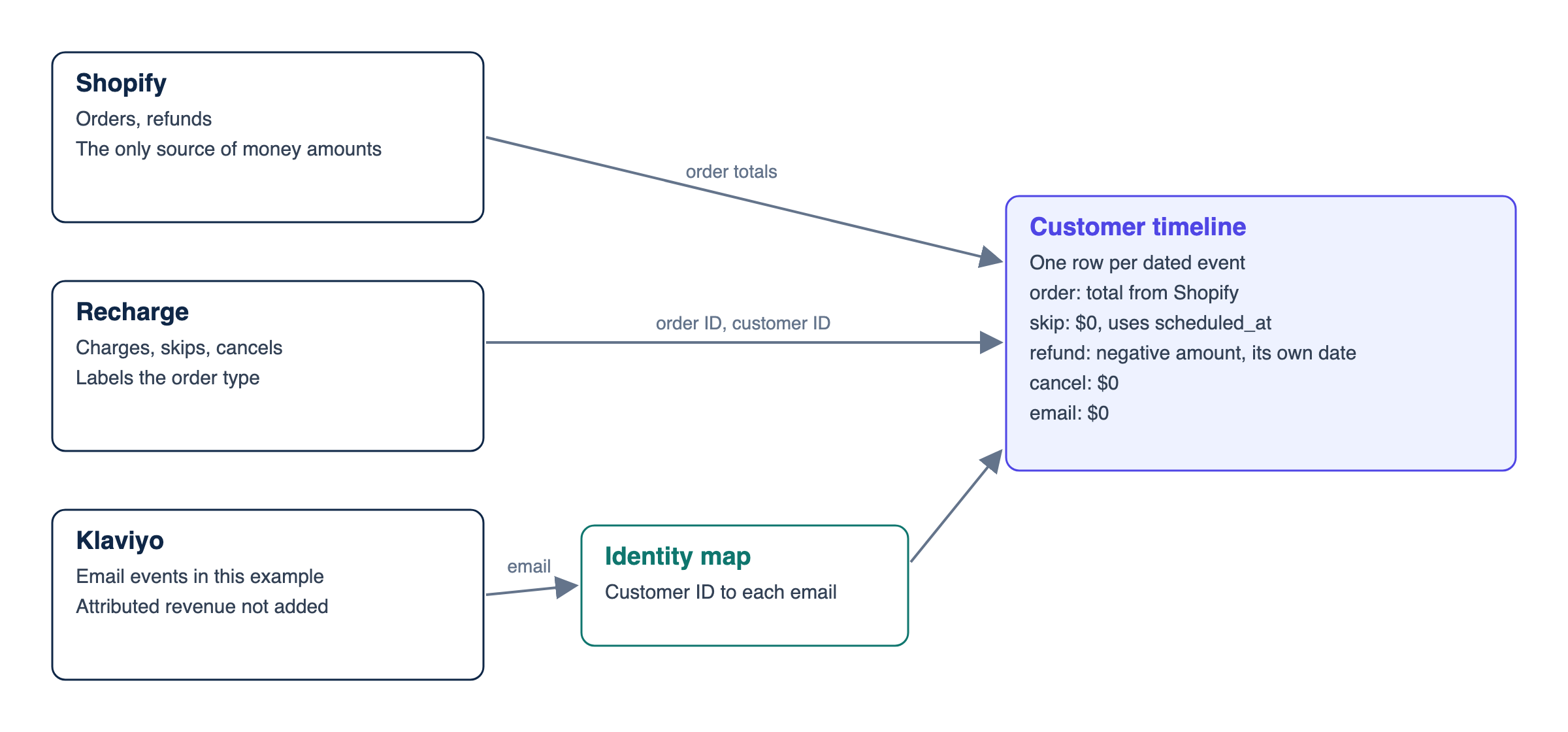
Join Shopify, Klaviyo, and Recharge on the right keys, count each renewal once, and keep skips as events so one customer timeline holds up.

Greyfield Data
In this article 7 sections
Use Shopify as the record of orders, Recharge as the record of subscription intent, and Klaviyo as the record of messages. Then build one customer timeline in your warehouse.
The join is the easy part. The hard part is keeping three things apart: money, subscription state, and marketing touches. If you mix them, a renewal counts twice and a skip looks like churn.
Here's how.
1. Pick one job for each system
Each source answers a different question.
| Source | What it owns | Main join key |
|---|---|---|
| Shopify | Orders, refunds, customer ID | Customer ID, order ID |
| Recharge | Charges, skips, subscription changes | Shopify customer ID, Shopify order ID |
| Klaviyo | Email and SMS events | Email or phone |
Don't sum revenue across Shopify and Recharge. A successful Recharge charge can point to a Shopify order, so the same sale shows up in both places. Take money from Shopify. Use Recharge to label what kind of order it was.
This example covers pay-as-you-go subscriptions. A prepaid charge can generate several orders when the charge's orders_count is above 1, so add Recharge's orders as a bridge before labelling those orders.
2. Load the history before it ages out
Check this first. Both APIs can quietly cut your backfill short.
Shopify's Order object only exposes the last 60 days of orders unless the app has been granted all-orders access through the read_all_orders scope.
The 2021-11 Recharge API docs say charges with success, refunded, or partially_refunded status and a processed_at date more than 90 days old no longer appear in charge responses, and that the data stays available through the Exports tool in the merchant portal. Check how your API version and connector handle older charges before you plan the backfill, and confirm that any export and API load meet without a gap.
3. Build the identity map
Recharge makes the Shopify side simple. A charge carries the Shopify customer in the ecommerce value of customer.external_customer_id, and the Shopify order in the ecommerce value of external_order_id.
Klaviyo needs more care. Its Profiles API docs recommend email as the primary identifier and warn that external_id isn't involved in profile merging, so using it can create duplicates. In most stores you'll join on normalized email.
Keep a table with one row per Shopify customer and email address. A customer who changes email then keeps both histories. Lowercase and trim every address before you compare it. Send anything you can't match to an exception report, and don't drop it.
4. Keep events, not just current state
A subscription row tells you where a customer is today. It doesn't tell you what happened.
That matters because Recharge history can change. The API reference says changing a subscription's interval settings removes skipped charges. Reactivating a cancelled subscription sets cancelled_at back to null.
Build one append-only recharge_subscription_events table with subscription_id, shopify_customer_id, event_type, and event_date. Populate it from webhooks or from distinct state changes between dated snapshots. Deduplicate on subscription ID, event type, and event date. Without that history, last month's skip can disappear from this month's report.
The timeline query runs on one row per event. For skips, event_date is the charge's scheduled_at. Keep recharge_charges, which is used for order labels, as the latest copy with one row per charge. One detail to test: a charge can hold several subscriptions, and a customer can skip just one of them.
5. Build the timeline
This query creates one row per event. It takes money from Shopify, labels orders with Recharge, and adds refunds, skips, cancels, and Klaviyo events. This example covers email only. SMS needs a normalized phone mapping and its own event logic.
with events as (
  select o.shopify_customer_id, date(o.ordered_at) as event_date,
         case when c.charge_id is null then 'one_time_order'
              when c.type = 'checkout' then 'subscription_first_order'
              else 'subscription_renewal' end as event_type,
         o.total_price as amount
  from shopify_orders o
  left join recharge_charges c on c.shopify_order_id = o.order_id
  union all
  select o.shopify_customer_id, date(r.processed_at), 'refund', -r.amount
  from shopify_refunds r
  join shopify_orders o on o.order_id = r.order_id
  union all
  select shopify_customer_id, date(event_date), 'subscription_skip', 0
  from recharge_subscription_events where event_type = 'skip'
  union all
  select shopify_customer_id, date(event_date), 'subscription_cancel', 0
  from recharge_subscription_events where event_type = 'cancel'
  union all
  select m.shopify_customer_id, date(k.occurred_at),
         'email_' || lower(replace(k.metric, ' Email', '')), 0
  from klaviyo_events k
  join customer_emails m on lower(trim(k.email)) = m.email
)
select * from events order by shopify_customer_id, event_date, event_type
A worked example
Here's one made-up customer. Call them Sam.
| Date | Event | Amount |
|---|---|---|
| Mar 3 | First subscription order | $40 |
| Apr 3 | Renewal | $36 |
| May 1 to 2 | Reminder email received, then clicked | $0 |
| May 3 | Skip | $0 |
| Jun 3 | Renewal | $36 |
| Jun 9 | Refund | -$10 |
| Jul 3 | Skip | $0 |
| Aug 3 | Skip | $0 |
| Aug 20 to 21 | Email received at the old address, clicked at a new one | $0 |
| Aug 22 | One-time order | $58 |
| Aug 25 | Subscription cancelled | $0 |
Sam has four orders, three skips, and $160 of order totals after refunds. I ran the query above on these rows in SQLite and it returned 13 events that total $160. This is a local test on sample data, not a run against live accounts.
The naive version adds $170 of Shopify orders to $112 of successful Recharge charges and reports $282. That's a $122 overstatement from a single customer: the $112 counted twice, plus the $10 refund that was never taken out.
Sam also shows why you need two state columns. On Aug 25 the subscription is cancelled, but the customer bought something three days earlier. A single "churned" flag gets that wrong. Keep subscription_state and customer_state apart, and write down the rule for each one.
Whether two skips in a row predict a cancel is a question for your own data. Sam alone proves nothing. Test it across all subscribers before you turn it into an alert.
Gotchas that change the numbers
Clicks and opens need filters. When Apple Privacy Open is true, Klaviyo can't tell whether the person opened the message or Apple preloaded it. It has a separate bot click setting. Check the Apple Privacy Open and Bot Click properties on your events before you read engagement as intent.
Recharge metrics can live in Klaviyo too. The Recharge and Klaviyo integration sends subscription data into Klaviyo. Don't load those as a second subscription history. Recharge's started metric fires once per subscription, so one checkout can fire it more than once.
A touch isn't a cause. Sam clicked an email and bought the next day. The timeline shows the order of events. It doesn't prove the email caused the sale. For that you need a holdout, and the same limit applies when you compare customer value by channel.
Klaviyo events can arrive late. Klaviyo creates events asynchronously, so a recent event may take a few minutes to appear. Re-read a recent window on each load.
If you're still choosing tools, check that a connector has the Recharge tables you need before you buy it. The connector comparison covers the wider choice.
I checked these details against current vendor docs and ran the SQL on sample data. I haven't tested this exact query in a live Recharge account, so check it on a small customer sample first. If you know a cleaner way to handle skip history, I'd like to hear it. If you want help working out which reports should come first, the ecommerce data warehouse page shows how I'd start.
Related
Why do Shopify, finance, and marketing report different revenue numbers?
Each team counts a different thing on a different date. An ecommerce semantic layer names each revenue metric, its grain, time zone, and owner.
EcommerceBronze, silver, and gold data layers explained with an ecommerce order
Bronze keeps the data as it arrived, silver cleans and matches it, and gold shapes it for business use. Follow one order, a duplicate, and a late refund.
Ecommerce9 ecommerce data sources worth connecting to a warehouse
Nine source types to consider for an ecommerce warehouse, with the question each answers, its useful key, a caveat, and when it's worth connecting.