9 ecommerce data sources worth connecting to a warehouse
Nine source types to consider for an ecommerce warehouse, with the question each answers, its useful key, a caveat, and when it's worth connecting.

Greyfield Data
In this article 11 sections
Here are nine source types an ecommerce warehouse may need: commerce platforms, marketplaces, subscriptions, lifecycle messaging, ad platforms, attribution and surveys, finance systems, fulfillment and returns, and files people maintain by hand.
You rarely need them all at once. Start with the sources behind your first reports, and add one when it answers a question you can't answer today. The list below isn't a ranking, and connector support changes, so check any tool against the tables you need.
On experience: Greyfield's published case study covers Shopify, Klaviyo, Triple Whale, and Redo in a live reporting stack, and the Amazon fees guide covers Seller Central data. Other tools named here are examples, not a claim of completed work.
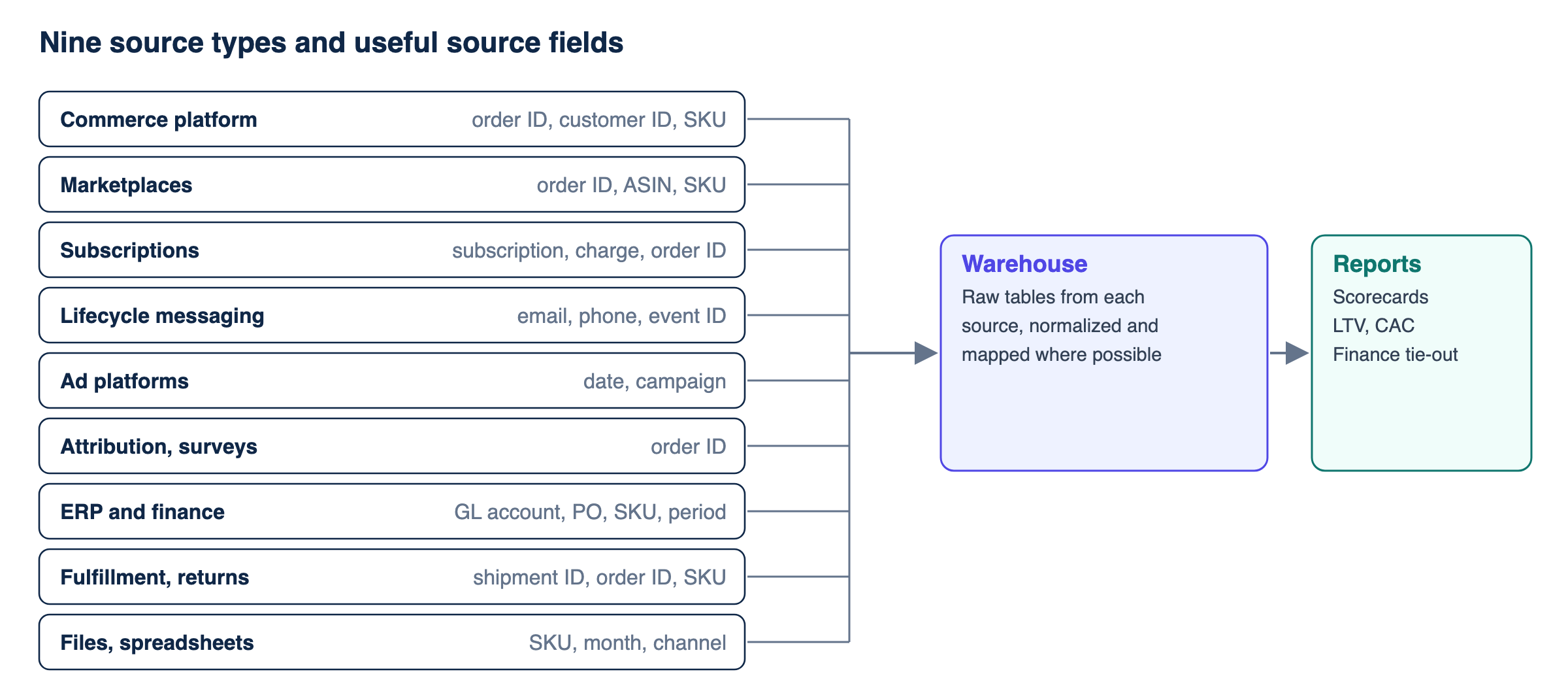
IDs from different systems aren't shared keys, and each section below repeats these fields as text.
1. Commerce platform
Examples: Shopify, plus other storefront platforms.
- Question: What sold, to whom, at what price, and what was refunded?
- Useful keys: order ID, line item, customer ID, SKU.
- Caveat: Shopify limits default order access to 60 days, so check history before you plan a backfill.
- Connect when: Nearly always first.
2. Marketplaces
Examples: Amazon Seller Central.
- Question: What sold on the marketplace, and what did it cost after fees?
- Useful keys: marketplace order ID, ASIN and SKU.
- Caveat: Fees come from several sources, and buyer data needs approved roles, so don't expect to match marketplace buyers to your site's customers.
- Connect when: The channel matters to your margin or your plan.
3. Subscriptions
Examples: Recharge, Shopify Subscriptions.
- Question: Who's subscribed, who skipped, and who cancelled?
- Useful keys: subscription ID, charge ID, the Shopify customer and order IDs.
- Caveat: Current state can overwrite history. Recharge's 2021-11 API docs say processed charges more than 90 days old no longer appear in charge responses, so check your API version, and keep your own event history.
- Connect when: Subscriptions are a real share of revenue, and your commerce data can't explain skips.
4. Lifecycle messaging
Examples: Klaviyo.
- Question: Who received and clicked what, and when?
- Useful keys: email or phone, event ID, campaign or flow.
- Caveat: Keep Klaviyo's profile ID, and map identities when profiles split or other systems use different identifiers. Opens can include Apple preloads.
- Connect when: You want to study retention at the customer level, not just campaign totals.
5. Ad platforms
Examples: Google Ads, Meta, Amazon Ads.
- Question: What did we spend, by channel, campaign, and day?
- Useful keys: date, account, campaign, ad.
- Caveat: Spend is the reliable part. Conversions are each platform's own credit, and they can overlap, so don't add them up.
- Connect when: You need CAC or spend by channel, which is usually early.
6. Attribution tools and surveys
Examples: Triple Whale, plus post-purchase survey tools.
- Question: What does a model say drove the order? What did the buyer say?
- Useful keys: order ID.
- Caveat: A model's credit and a buyer's memory are both evidence, not proof of cause. Keep the source and model name on every row, since exports vary by tool.
- Connect when: You already use one, and want it next to your orders instead of in a separate tab.
7. ERP and finance
Examples: NetSuite, QuickBooks.
- Question: What did we book, what did things cost, and what do wholesale accounts owe?
- Useful keys: GL account, invoice, purchase order, SKU, period.
- Caveat: The numbers follow accounting rules, so they won't match sales reports by default. Finance teams often need a named metric for each view. Access can be harder here, so ask early.
- Connect when: You need true costs, wholesale sales, or a tie to the closed month.
8. Fulfillment and returns
Examples: ShipBob and other 3PLs, Redo and other returns tools.
- Question: What did it cost to ship, how fast did it go, and what came back?
- Useful keys: shipment ID, order ID, SKU, tracking number.
- Caveat: One order can have several shipments, so joins can repeat rows. Invoiced costs can land after the order.
- Connect when: You need contribution by order, or you want to study delivery and returns.
9. Files and spreadsheets
Examples: cost sheets, sales targets, product mappings, promo calendars.
- Question: What does the business know that no system holds?
- Useful keys: SKU, month, channel.
- Caveat: Files break quietly. Give each one an owner, a fixed format, and a check for missing rows.
- Connect when: A report needs it, which is often sooner than people expect. Plan to replace a file if it starts to matter a lot.
What isn't on this list
Warehouses and transformation tools. Snowflake, BigQuery, and dbt store or shape data. They aren't sources. Ingestion tools move data, but they don't create it, so a tool on your stack diagram isn't a new source.
Before you connect a new source
Ask four questions:
- What decision does this change?
- Which key joins it to what we already have?
- How far back can we get its history?
- Who owns it when it breaks?
If you can't answer the first one, wait. Every source adds history, matching, and rules to maintain.
Start small, and let reports pull in the next source. If you're deciding which sources come first, the ecommerce data warehouse page has a suggested order.
Related
Bronze, silver, and gold data layers explained with an ecommerce order
Bronze keeps the data as it arrived, silver cleans and matches it, and gold shapes it for business use. Follow one order, a duplicate, and a late refund.
EcommerceHow do you combine Shopify, Klaviyo, and Recharge data into one customer view?
Join Shopify, Klaviyo, and Recharge on the right keys, count each renewal once, and keep skips as events so one customer timeline holds up.
EcommerceWhy does building reliable ecommerce reporting take time?
Connecting sources is often the quick part. The time goes to history, matching records, business rules, cost timing, validation, and getting people to use it.