How to plan a Qlik to Sigma migration
Plan a Qlik to Sigma migration: move load script logic into the warehouse, map set analysis and section access, and agree what replaces selections.

Written by Linus Tse, founder of Greyfield Data
· 7 min read
On this page 11 sections
A Qlik to Sigma migration moves the work from inside the app to the warehouse. In Qlik Sense, the load script pulls data into the app and every sheet reads that copy. In Sigma, the data stays in a warehouse such as Snowflake and each workbook queries it live. Plan the load script first, then the expressions, then the sheets.
We scope and run these moves as part of our Sigma consulting work. Linus is Sigma-certified, and Greyfield is an independent consultancy.
Key takeaways
- Qlik apps hold their own copy of the data. Sigma reads the warehouse directly, so the load script's joins and transforms need a new home upstream.
- QVD files and in-app data must be loaded into a warehouse Sigma connects to before any sheet can be rebuilt.
- Set analysis overrides the user's selection for named fields. In Sigma, put that logic in formulas or in elements a control does not filter.
- Section access becomes Sigma row-level security based on user attributes.
- The green, white and gray selection states are Qlik behavior. Agree with users on what replaces them before you rebuild.
What changes when you move from Qlik to Sigma?
The biggest change is where data lives and where the work happens. Qlik's load script documentation says the script connects to sources, specifies the fields and tables to load, and stores the loaded data in the app. Refreshing it means running the script again.
Sigma has no app-level copy. Workbooks and data models send queries to your warehouse when someone opens or filters them. Transforms that ran in the load script move to the warehouse, where they run on a schedule you own.
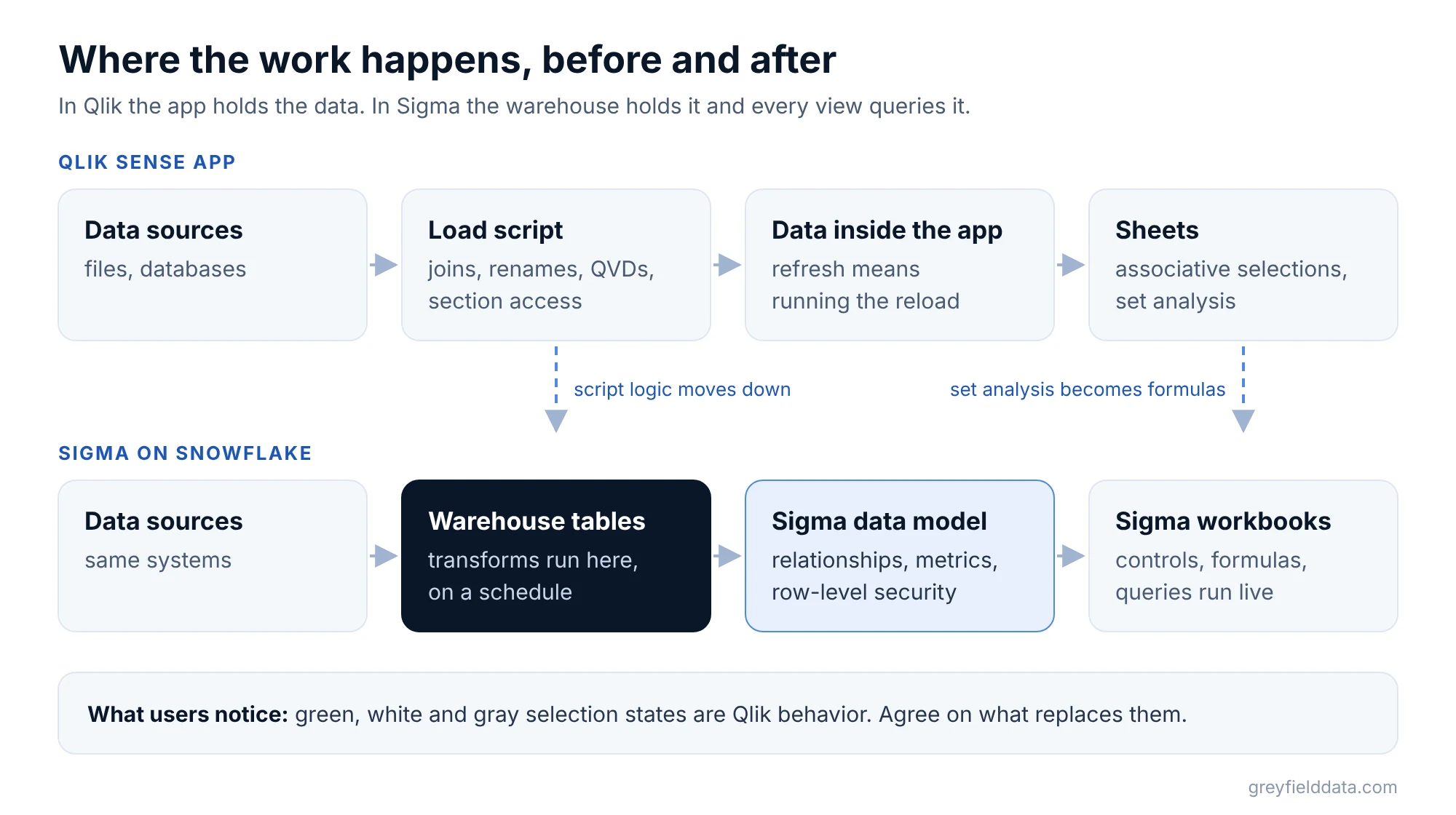
This shift is the reason to plan carefully. A Qlik app can look simple on the surface while its script does most of the work. Tableau and Power BI moves have their own starting points, covered in our Tableau and Power BI migration plans.
What should the Qlik inventory include?
The inventory should cover each app's script, data model, reusable items and security, not just its sheets. Record these for every app people still use:
- Load script. Sources, joins, concatenations, renames, mapping loads and any calculated fields.
- QVD files. Qlik defines a QVD as "a file containing a table of data exported from Qlik Sense". List which apps write each QVD and which read it.
- Master items. These are reusable dimensions, measures and visualizations. They are your shared definitions.
- Set analysis expressions. Copy each one out with the chart that uses it.
- Section access. Record the security table and which fields reduce the data.
- Reload schedule. Note when each app reloads and what data cutoff readers expect.
- Sheets and owners. Who uses each sheet, and for which decision.
Apps that share QVDs usually share logic. Group them, and move the shared layer once. Retire sheets that nobody opens; our guide on which dashboards to migrate, consolidate or retire covers that call.
Where does load script logic go?
Load script logic goes into warehouse tables, built by a tool such as dbt or by scheduled SQL. Sigma reads finished tables; it does not run a Qlik-style load.
| Qlik piece | Sigma on Snowflake | Notes |
|---|---|---|
| Load script joins and transforms | Warehouse tables or views | Owned and scheduled outside the BI tool |
| QVD staging files | Warehouse staging tables | Keep the history readers expect |
| App data model (associations) | Data model relationships | Check keys that Qlik linked by field name |
| Master measures | Sigma metrics | Reusable aggregates on the data model |
| Set analysis | Formulas with conditions, or a separate element | See the next section |
| Section access | Row-level security with user attributes | Test every role |
| Sheets | Workbook pages with controls | Agree on selection behavior first |
Watch for field names. Qlik associates tables on fields that share a name. A field called Date in two tables links them, whether or not you meant it. In Sigma, every relationship is declared, so list the links your app relies on and declare only the ones that are correct.
Sigma's AI-assisted migration states that "if the source data exists only in an extract or an imported model, you must load it into your data platform before you migrate". The same applies to data that exists only in QVDs.
How does set analysis translate to Sigma?
Set analysis translates to a formula with conditions, or to an element that the relevant control does not filter. Qlik says set analysis defines "a scope that is different from the set of records defined by the current selection".
A synthetic example: Sum({<Region={'East'}>} Sales) returns East sales even when the user has selected West. The Sigma formula SumIf([Sales], [Region] = "East") returns East sales from the rows the element still holds.
That difference matters. If a region control filters the element to West, the East rows are gone before SumIf runs, so the result is empty. As our Excel to Sigma cheat sheet notes, a conditional sum does not restore records already removed upstream. When a number must ignore a selection, put it in an element that control does not target.
Write down the expected result for each expression under at least two selections. That record is what you test the rebuild against.
What replaces the associative model?
Sigma controls replace Qlik selections, but the behavior is not the same, so agree on it with users. Qlik's associative selection model shows selected values in green, possible values in white and excluded values in gray. Many users rely on the gray values to see what is missing.
In Sigma, a control filters the elements it targets. List the questions people answer with gray values, such as "which customers bought nothing this quarter?", and build those as explicit views. That is often clearer than the original.
How do section access rules move?
Section access rules become Sigma row-level security. Qlik describes section access as "a part of the data load script where you add a security table to define who gets to see what".
Sigma recommends user attributes: assign a value to each user or team, add a column that compares it to the data, and filter to true. Rebuild the Qlik security table as user attribute assignments, then test as each role before go-live.
Can Sigma's AI migration tool convert Qlik apps?
Partly, and in beta. Sigma's AI-assisted migration lists a qlik-to-sigma skill for Qlik Sense and Qlik Cloud apps, "including expressions and set analysis". The page marks it as a public beta, and it does not mention load scripts or QlikView.
So plan the warehouse layer yourself. The tool can draft the sheets and expressions, which saves rebuild hours, but the data has to be in Snowflake, Databricks, BigQuery, Redshift or PostgreSQL first.
How should you pilot and validate?
Pilot one app whose script feeds a shared QVD, uses set analysis and has section access. Validate at the same data cutoff, because a Qlik app shows data as of its last reload while Sigma shows the warehouse now.
Compare totals, then a few detailed rows, then each role's view. Our validation guide and the pilot selection tests cover both steps.
What to do next
Export the load script and a list of set analysis expressions for your most used Qlik app. Run the Sigma migration readiness check to see where the effort sits. To talk it through, book a call with Linus and bring that app.
Frequently asked questions
Can I migrate QlikView to Sigma?
Yes, but plan it as a rebuild. Sigma's AI-assisted migration lists Qlik Sense and Qlik Cloud, not QlikView. The script logic still moves to the warehouse, and the sheets are rebuilt in Sigma.
What happens to QVD files in a Sigma migration?
QVDs are tables exported from Qlik. Sigma cannot read them, so load their data into warehouse tables and rebuild the scripts that write them as scheduled warehouse jobs.
Does Sigma support set analysis?
Not with Qlik syntax. Express each set as a formula with conditions, such as SumIf, or place it in an element the user's control does not filter, and test it under several selections.
Does Sigma have an associative model like Qlik?
No. Sigma controls filter the elements they target. Build the questions people answered with gray, excluded values as explicit views instead.
Part of the Sigma guides, a reading path through related articles.
Linus Tse
Founder of Greyfield Data. Built 400+ dashboards. Certified in Sigma, Snowflake, Tableau, and Power BI.
About Linus