How to plan a Metabase to Sigma migration
Plan a Metabase to Sigma migration. Decide when to move, then sort SQL and GUI questions, models, dashboards and subscriptions into warehouse views and Sigma.

Written by Linus Tse, founder of Greyfield Data
· 6 min read
On this page 9 sections
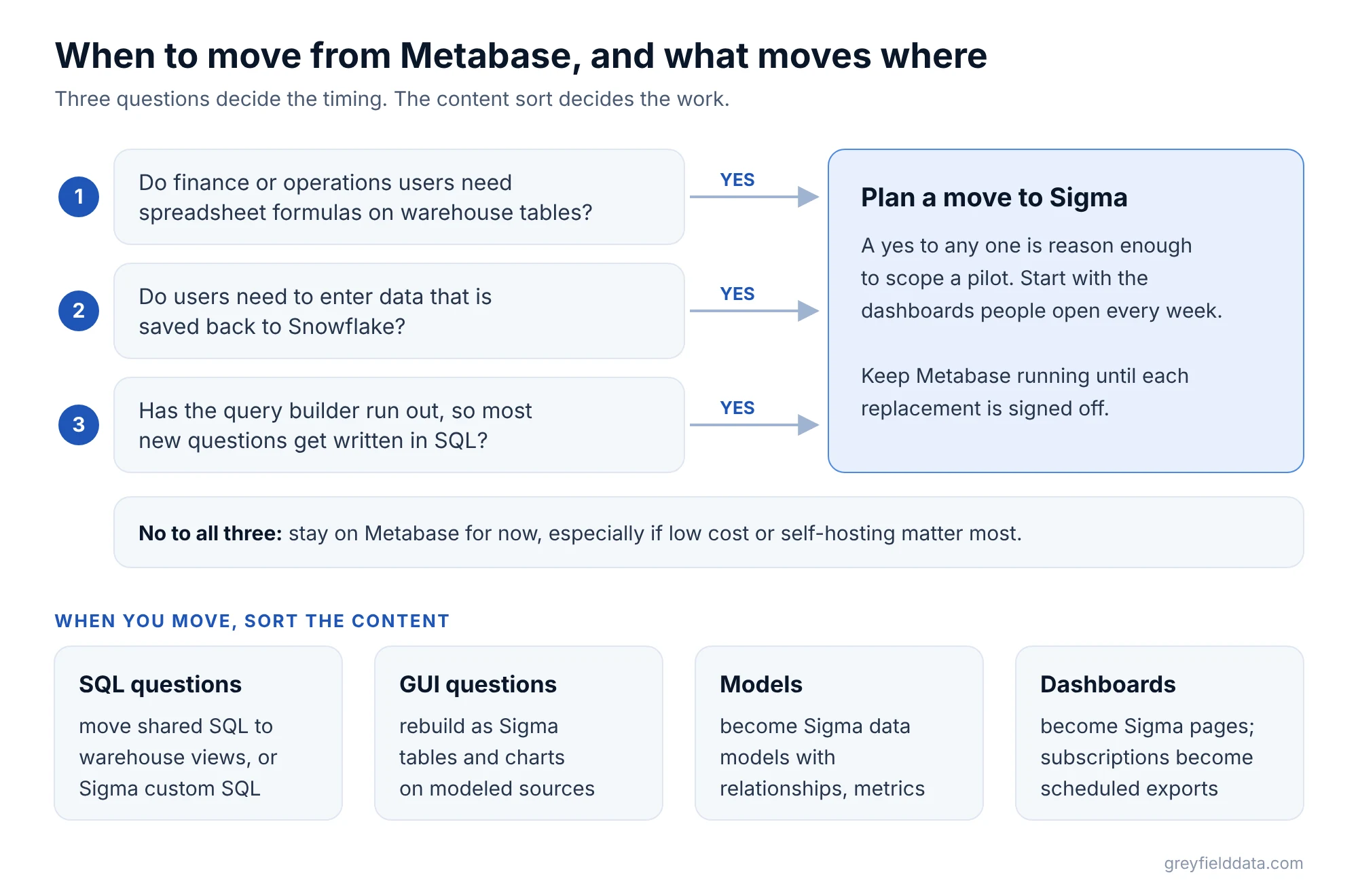
Move from Metabase to Sigma when your users have outgrown the query builder: finance and operations need spreadsheet formulas on warehouse tables, or people need to enter data that is saved back to Snowflake. If your needs are simple charts and SQL, and low cost or self-hosting matter most, Metabase is often the right tool to keep.
When the move does make sense, we plan and run it as part of our Sigma consulting work. Linus is Sigma-certified, and Greyfield is an independent consultancy.
Key takeaways
- Move when users need spreadsheet modeling, data entry back to the warehouse, or governed models without stacking paid add-ons. Stay if cost and self-hosting matter most.
- SQL questions and GUI questions move differently. Shared SQL goes into warehouse views or Sigma custom SQL; GUI questions are rebuilt as Sigma tables and charts.
- Metabase models become Sigma data models, with relationships and reusable metrics.
- Sigma's AI-assisted migration does not list Metabase as a source, so plan for a rebuild that reuses your SQL.
- Keep Metabase running until each replacement dashboard and subscription is signed off.
When should you move from Metabase to Sigma?
Move when the work your users do has outgrown a query builder, not just because a newer tool exists. Metabase has a free open-source edition you can self-host, and published paid plans. Sigma is a paid SaaS product. That gap is real, so the reasons to move should be specific.
The common triggers we see:
- Spreadsheet work. Metabase uses a notebook-style query builder and SQL, with no cell-formula grid. Sigma workbooks combine "spreadsheet and BI capabilities", which suits finance and operations analysis.
- Data entry. Metabase editable tables need a Pro or Enterprise plan and support PostgreSQL and MySQL. Sigma input tables write entries to a schema in your warehouse, including Snowflake.
- Governance on lower plans. Metabase row and column security needs Pro or Enterprise. Sigma includes row-level security based on user attributes.
Our Sigma vs Metabase comparison covers cost, hosting and fit side by side. If you are also weighing Looker, see Looker vs Metabase.
What should the Metabase inventory include?
The inventory should list every question, model and dashboard people still use, and split questions by how they were built. In Metabase, questions are "queries plus their visualization", built either in the graphical query builder or the native SQL editor.
Record these for each item:
- Type. GUI question, SQL question, model, metric or dashboard.
- Source tables. Which warehouse tables or other saved questions it reads.
- Logic. Custom expressions, joins, filters and any SQL snippets.
- Delivery. Dashboard subscriptions and alerts, with recipients and formats.
- Embedding. Any dashboard embedded in your product or another app.
- Permissions. Which groups see it, and any row or column rules.
- Owner and use. Who relies on it, and for which decision.
To find what people actually use, Metabase usage analytics shows views and activity, but only on Pro and Enterprise plans. On the open-source edition, ask the owners. Our guide on which dashboards to migrate, consolidate or retire helps cut the list down.
How do SQL questions and GUI questions move differently?
SQL questions carry their logic as text, so you can reuse it. GUI questions carry their logic as clicks in the query builder, so you rebuild them.
| Metabase content | Sigma destination | What to check |
|---|---|---|
| SQL question used by several dashboards | Warehouse view, then a Sigma table | One owner for the SQL |
| SQL question used once | Sigma custom SQL element | Parameters and filter widgets |
| GUI question | Sigma table, pivot or chart on a modeled source | Joins, custom expressions, filters |
| Model | Sigma data model element | Column types and descriptions |
| Metric or segment | Sigma metric or data model filter | Same result at each grouping |
| Dashboard | Workbook page with controls | Filter wiring to each element |
| Subscription or alert | Scheduled export or conditional export | Recipients, format and timing |
Move shared SQL into the warehouse first. A SQL question that five dashboards read is really a table definition. As a warehouse view, it serves Sigma and anything else, and it stops depending on a BI tool.
Metabase SQL can use field filters and SQL templates for dashboard filters. Sigma can reference control values in SQL, but the syntax is different. Rewrite each parameter and test it with real filter values.
GUI questions are usually quicker to rebuild than to translate. Point a Sigma table at the same source and repeat the grouping and filters. The Sigma functions list helps with custom expressions.
What happens to Metabase models?
Metabase models become Sigma data models. Metabase models "curate data from one or more tables" and carry column metadata such as display names, descriptions and types.
Sigma data models "provide a semantic layer for your data". Rebuild each model as a data model element, declare relationships between them, and copy the column descriptions across. If a model is built on heavy SQL, move that SQL into a warehouse view and point the data model at it.
Build in data models, not Sigma datasets. Sigma's metrics page states that datasets can no longer be created or edited as of June 2, 2026.
Is there an automated Metabase to Sigma migration tool?
Not from Sigma at the time of writing. Sigma's AI-assisted migration, a public beta, lists sources such as Tableau, Power BI, Looker and Qlik. Metabase is not on that list.
That is less of a problem than it sounds. Metabase already queries your database live, so the data is usually in a warehouse Sigma can connect to. The reusable part is the SQL. The rest is rebuild time, which is why trimming unused content first matters. For the sources the tool does cover, see our Tableau, Power BI and Looker migration plans.
How should you pilot and validate?
Pilot one dashboard that mixes a SQL question, a GUI question and a model, and has a subscription. That covers every row in the table above. The pilot selection tests help you choose.
Run Metabase and Sigma side by side for the same filters. Compare totals, then detailed rows, then what each group sees. The migration validation guide turns that into a sign-off record.
What to do next
List your Metabase dashboards with an owner and a type next to each question. Then run the Sigma migration readiness check to see where the effort sits. If you want a second opinion on whether to move at all, book a call with Linus.
Frequently asked questions
Should I replace Metabase with Sigma?
Replace it if business users need spreadsheet modeling on warehouse tables or data entry back to Snowflake. Keep it if your needs are simple dashboards and SQL, and low cost or self-hosting matter most.
Can I reuse my Metabase SQL in Sigma?
Yes. Move shared SQL into warehouse views, or paste one-off queries into a Sigma custom SQL element. Rewrite Metabase field filters and template variables, because Sigma references control values with its own syntax.
Do Metabase models carry over to Sigma?
Not automatically. Rebuild each model as a Sigma data model element, declare relationships, and copy column descriptions across. Heavy model SQL is better as a warehouse view.
Does Sigma have a free version like Metabase?
No. Metabase has a free open-source edition you can self-host. Sigma is paid software sold as a hosted service; it offers a free trial, not a free edition.
Part of the Sigma guides, a reading path through related articles.
Linus Tse
Founder of Greyfield Data. Built 400+ dashboards. Certified in Sigma, Snowflake, Tableau, and Power BI.
About Linus