Every Sigma function, explained: the complete list with syntax and examples
All 239 Sigma workbook functions in 13 categories, each with its syntax, a one-line explanation, and a link to Sigma's docs, plus worked examples.

Greyfield Data
In this article 21 sections
Sigma has 239 workbook functions across 13 categories. This page lists every one with its syntax and what it does, links each to Sigma's own documentation, and works through the 15 to learn first.
If you are moving formulas from another tool, start with the free Tableau to Sigma formula translator or the DAX to Sigma formula translator. If you are moving whole dashboards, that is what Greyfield's Sigma consulting is for.
Key takeaways
- Sigma's function index lists 234 functions in 13 categories, and Sigma documents 5 more on their own pages, for 239 in total as of November 2026.
- Every formula works on whole columns, referenced by name in square brackets like
[Revenue]. There are no cell addresses or ranges. - Aggregates such as
SumandCountIfreturn one value per grouping. Where you put the column in the table decides the level, so there is no GROUP BY or CALCULATE to write. - Window functions (
CumulativeSum,MovingAvg,Lag,Rank) follow the table's sort order and work inside each grouping. LookupandRolluppull values from another element by matching keys, which covers most of what VLOOKUP, XLOOKUP and RELATED do elsewhere.
Sigma functions, mapped
The four posters below show every function by category, numbered 1 to 239. Each links to a full-size PNG you can download.
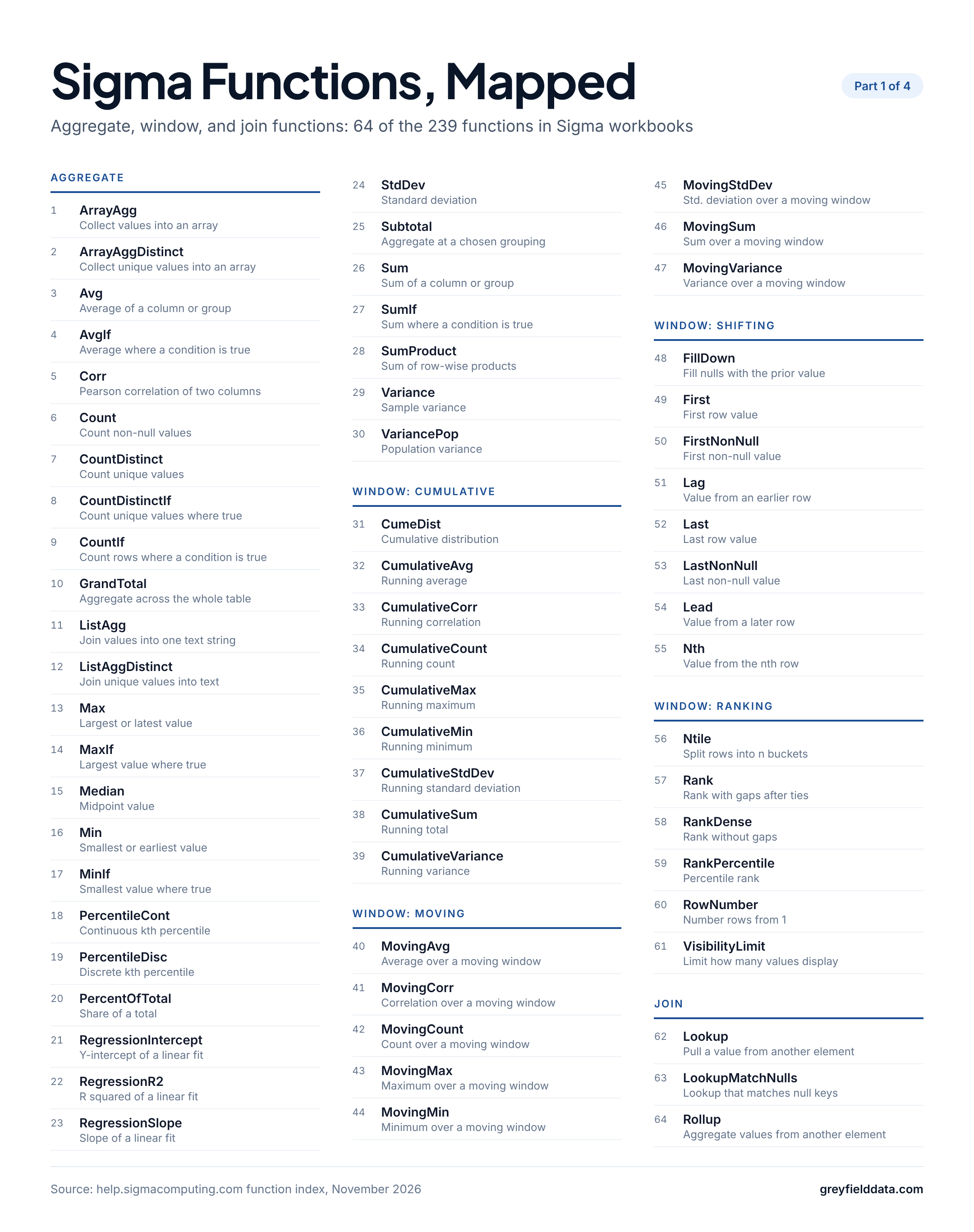
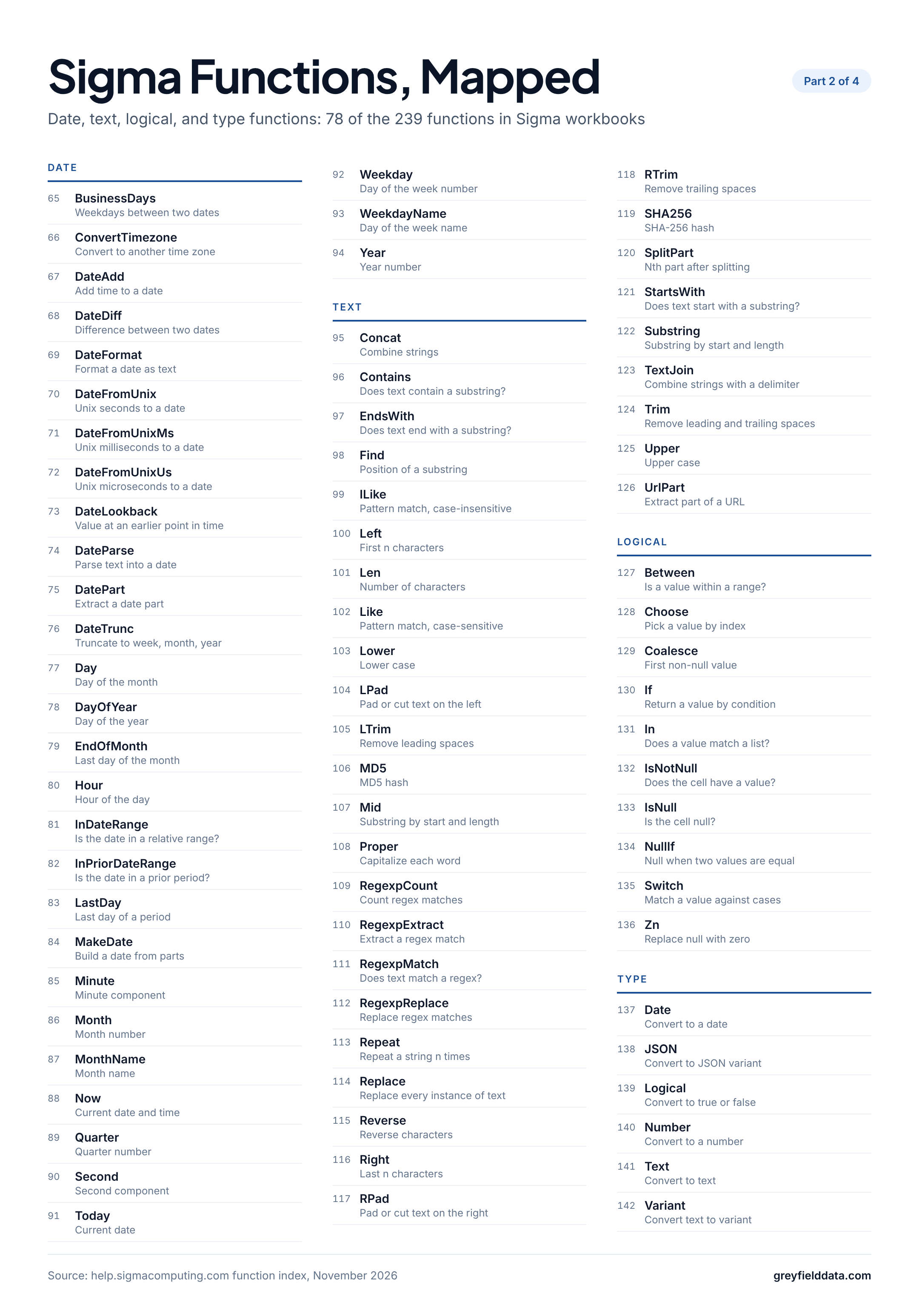
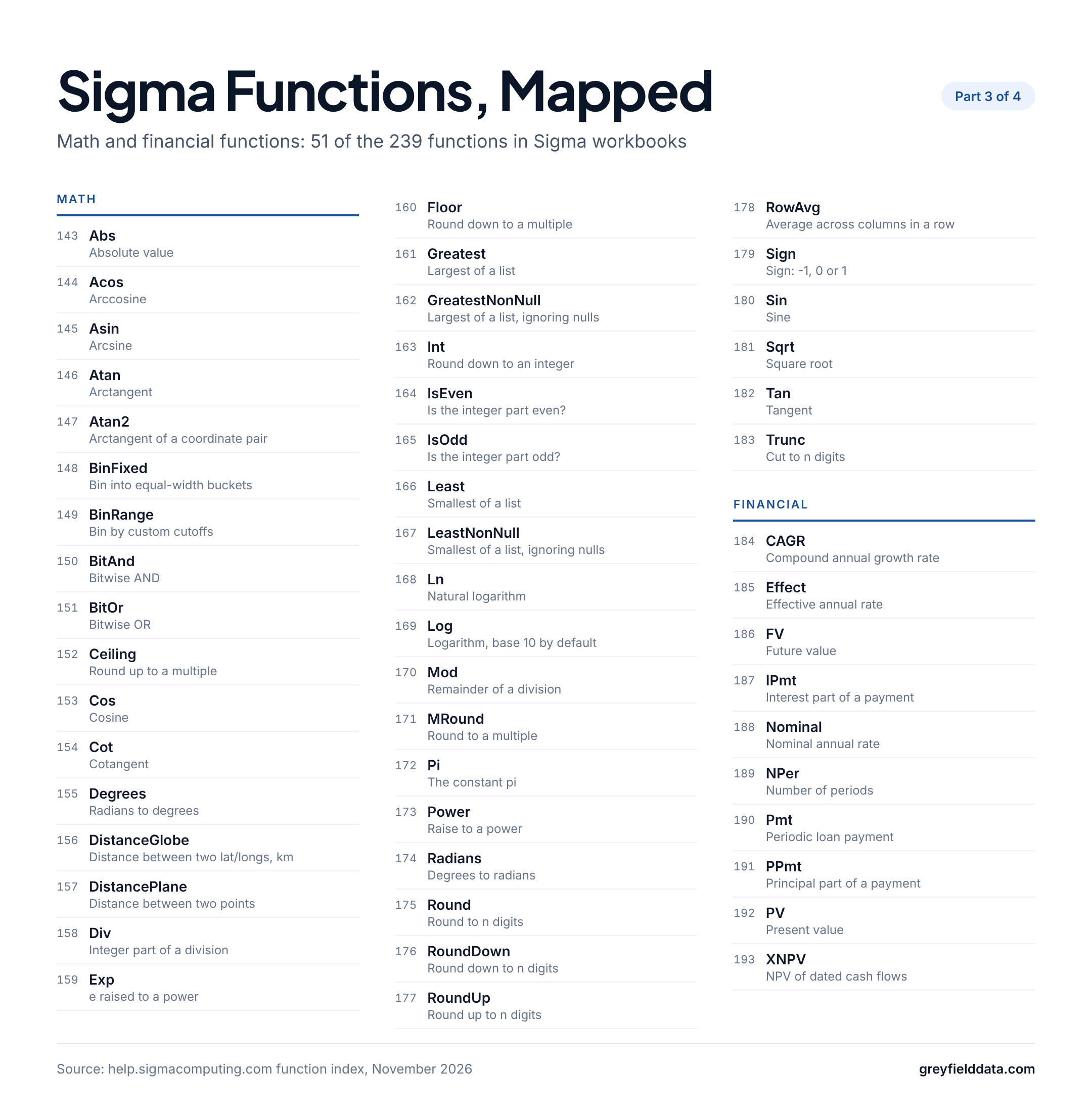
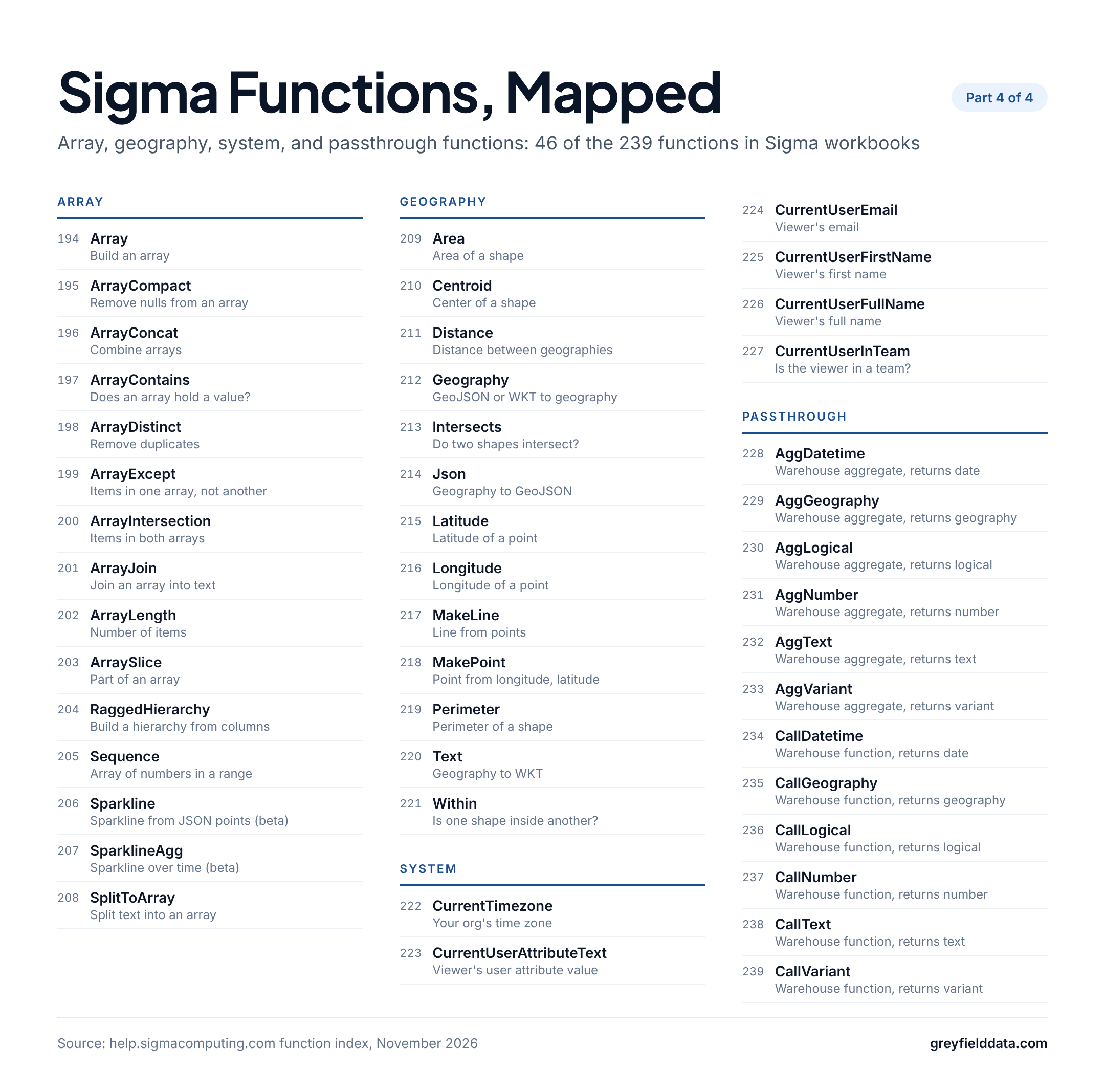
Download the full-size PNGs: part 1, part 2, part 3, part 4.
| Category | Functions | Use it to |
|---|---|---|
| Aggregate | 30 | Total, count, average, and summarize |
| Window | 31 | Running totals, moving windows, prior rows, ranks |
| Join | 3 | Pull or aggregate values from another element |
| Logical | 10 | Branch on conditions and handle nulls |
| Date | 30 | Truncate, shift, compare, and format dates |
| Text | 32 | Clean, search, split, and match strings |
| Math | 41 | Round, bin, and calculate across a row |
| Type | 6 | Convert between data types |
| Array | 15 | Build, combine, and search lists |
| Geography | 13 | Build shapes and measure distances |
| Financial | 10 | Loan payments, present value, growth |
| System | 6 | Personalize by viewer or team |
| Passthrough | 12 | Run warehouse functions Sigma lacks |
| Total | 239 |
How do you read a Sigma formula?
A Sigma formula is a function name, arguments in parentheses, and column names in square brackets. Columns from another element carry the element name as a prefix, like [Targets/Target], and text values go in double quotes.
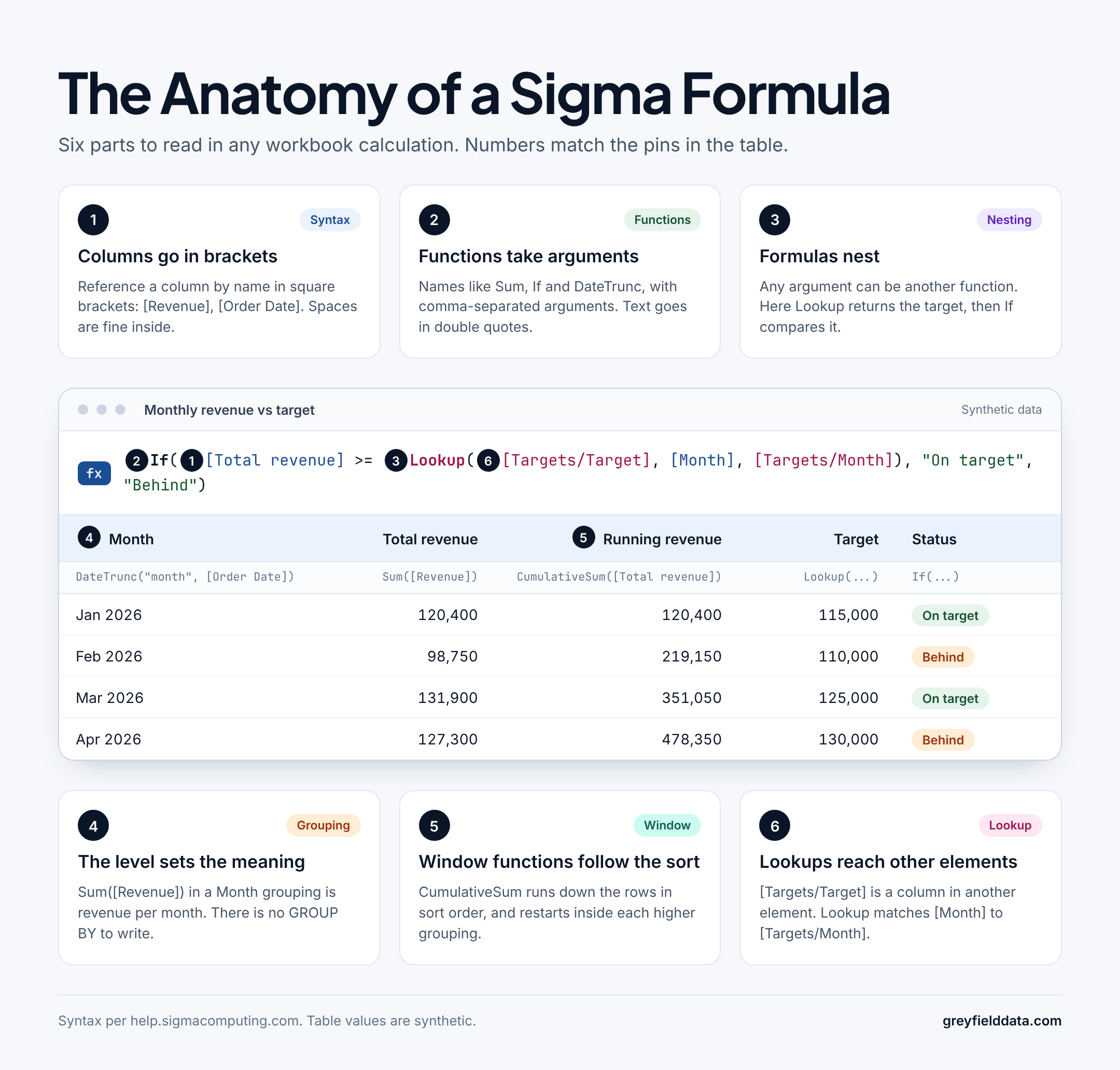
The table in the image uses synthetic numbers. The six parts:
- Column references.
[Total revenue]is a column in the same table. Spaces inside the brackets are fine. - Functions.
If,Lookup,Sum,DateTrunc: each takes comma-separated arguments. - Nesting. Any argument can be another function.
Lookupreturns the target first, thenIfcompares it. - Grouping level.
Sum([Revenue])in a table grouped by Month returns revenue per month. - Window functions.
CumulativeSum([Total revenue])runs down the rows in sort order. Sigma's CumulativeSum page notes that in a grouped table it restarts for each grouping above its level. - Lookups across elements.
Lookup([Targets/Target], [Month], [Targets/Month])matches the local key to the key in the Targets element and returns one value per row.
How are Sigma functions different from Excel?
Sigma functions look like Excel's, but they run on columns in a table, not on cells in a grid. These are the differences that trip people up most:
| In Excel | In Sigma |
|---|---|
=SUM(C2:C500) points at a range |
Sum([Sales]) names a column, and the result depends on the grouping level |
SUMIFS(C:C, B:B, "East") pairs ranges with criteria |
SumIf([Sales], [Region] = "East") takes the column, then conditions, combined with AND |
VLOOKUP or XLOOKUP against a sheet range |
Lookup([Products/Name], [SKU], [Products/SKU]) against another element |
| Fill a formula down a column | A formula already applies to every row of the column |
EDATE(A2, 1) or EOMONTH |
DateAdd("month", 1, [Date]) and EndOfMonth([Date]), with the unit as text |
=A2&" "&B2 or CONCAT |
[First] & " " & [Last], or Concat and TextJoin |
Running totals with mixed references like $C$2:C2 |
CumulativeSum([Sales]), which follows the table sort |
The Excel to Sigma cheat sheet works through these with downloadable sample data. If you come from Tableau or Power BI, the Tableau to Sigma cheat sheet covers LOD expressions and table calculations, and the DAX to Sigma cheat sheet covers CALCULATE and filter context.
Which Sigma functions should you learn first?
These 15 cover most of what a reporting workbook needs: totals, conditions, dates, lookups, and running or ranked values. Column names are illustrative.
Sum and SumIf
Sum([Revenue])
SumIf([Revenue], [Channel] = "Online", [Status] != "Refunded")
Sum totals a column for each grouping. SumIf adds one or more conditions after the column, and all of them must be true. Use OR inside one condition for either-or logic.
CountIf and CountDistinct
CountIf([Status] = "Refunded")
CountDistinct([Customer ID])
CountIf counts rows where the condition is true. CountDistinct counts unique non-null values, so it gives customers, not orders.
If
If([Revenue] >= 1000, "Large", [Revenue] >= 100, "Medium", "Small")
If takes condition and value pairs and an optional final else value. Sigma returns the value for the first condition that is true, so you rarely need to nest one If inside another.
Switch
Switch([Region], "NA", "North America", "EU", "Europe", "Other")
Switch tests one value against a list of cases. It reads more cleanly than a long If when every condition compares the same column.
Coalesce and Zn
Coalesce([Discount Code], [Campaign], "None")
Zn([Shipping Fee]) + Zn([Handling Fee])
Coalesce returns the first non-null value. Zn turns null into zero, which matters because Sigma's operators page notes that adding a null returns null.
DateTrunc
DateTrunc("month", [Order Date])
DateTrunc rounds a date down to the start of its week, month, quarter or year. Group by the result to report by month.
DateDiff
DateDiff("day", [Order Date], [Ship Date])
DateDiff returns the difference between two dates in the unit you name. Pass the start date first and the end date second, so a later end date gives a positive number.
DateAdd
DateAdd("month", 1, [Invoice Date])
DateAdd moves a date forward by a quantity of a unit. Use a negative amount to move it back.
Lookup
Lookup([Products/Category], [SKU], [Products/SKU])
Lookup finds the matching row in another element and returns one of its columns. Add more local and external key pairs to match on several columns.
Rollup
Rollup(Sum([Order Lines/Amount]), [Order Number], [Order Lines/Order Number])
Rollup is the other direction: it aggregates many matching rows from another element into one value per row here, such as the total of all lines on an order.
CumulativeSum
CumulativeSum([Revenue])
CumulativeSum returns a running total in the table's sort order. If you change the sort, the result in each row changes.
MovingAvg
MovingAvg([Weekly Sales], 3)
MovingAvg averages the current row and the number of rows above it that you set, here a four-week average. A third argument adds rows below.
Lag
[Revenue] - Lag([Revenue], 1)
Lag returns the value from an earlier row, which makes period-over-period change one line. Lead looks at later rows.
Rank
Rank([Revenue], "desc")
Rank gives tied values the same rank and skips the next rank. Use RankDense for no gaps or RowNumber for a unique number per row.
PercentOfTotal
PercentOfTotal(Sum([Revenue]), "grand_total")
PercentOfTotal(Sum([Revenue]), "parent_grouping", 1)
PercentOfTotal returns a share of a total. The mode sets which total: the whole table, or the grouping above the current one.
Aggregate functions: summarize a column or group
Aggregate functions return one value per grouping, or per row in a table with no groupings. Use them for totals, counts, averages, percentiles and simple regression. Sigma's aggregate functions page has the category overview. 30 functions.
| Function | Syntax | What it does |
|---|---|---|
| ArrayAgg | ArrayAgg(value) |
Identifies non-null row values in a column or group and aggregates them into a single array. |
| ArrayAggDistinct | ArrayAggDistinct(value, [direction]) |
Identifies distinct non-null row values in a column or group and aggregates them into a single array. |
| Avg | Avg([column]) |
Calculates the average value of a column or group. |
| AvgIf | AvgIf(field, condition) |
Calculates the average value of a column or group when the specified condition is True. |
| Corr | Corr(number column 1, number column 2) |
Calculates the Pearson correlation coefficient (bivariate correlation) of two columns. |
| Count | Count([Field]) |
Counts the number of non-null and non-empty values in a column or group. |
| CountDistinct | CountDistinct(column) |
Counts the number of unique non-null and non-empty values in a column or group. Does not count duplicate values. (Same as Ndv.) |
| CountDistinctIf | CountDistinctIf([field], condition 1, condition 2+...) |
Counts the number of unique non-null and non-empty values in a column or group when the specified condition is True. Does not count duplicate values. |
| CountIf | CountIf(condition 1, condition 2+...) |
Counts the number of non-null and non-empty values in a column or group when the specified condition is True. |
| GrandTotal | GrandTotal(aggregate) |
Calculates the grand total for column or group. |
| ListAgg | ListAgg([Column], separator) |
Joins the values of a group or column into a single text string. |
| ListAggDistinct | ListAggDistinct(value, [separator], [direction]) |
Joins the unique values of a group or column into a single text string. Does not include duplicate values. |
| Max | Max(field) |
Retrieves the maximum (largest or latest) value in a column or group. |
| MaxIf | MaxIf(field, condition) |
Retrieves the maximum (largest or latest) value in a column or group when the specified condition is True. |
| Median | Median(numbers) |
Determines the median (midpoint) value of a column or group. |
| Min | Min([column]) |
Retrieves the minimum (smallest or earliest) value in a column or group. |
| MinIf | MinIf(field, condition) |
Retrieves the minimum (smallest or earliest) value in a column or group when the specified condition is True. |
| PercentileCont | PercentileCont(column, k) |
Calculates the continuous kth percentile of a column or group. |
| PercentileDisc | PercentileDisc(column, k) |
Calculates the discrete kth percentile of a column or group. |
| PercentOfTotal | PercentOfTotal(aggregate, [mode], [parameters]) |
Calculates the percentage a value contributes to the specified aggregate total. |
| RegressionIntercept | RegressionIntercept(y, x) |
Calculates the y-intercept of the linear regression line. |
| RegressionR2 | RegressionR2(y, x) |
Calculates the coefficient of determination of the linear regression line. |
| RegressionSlope | RegressionSlope(y, x) |
Calculates the slope of the linear regression line. |
| StdDev | StdDev(column) |
Calculates the standard deviation of a column or group. |
| Subtotal | Subtotal(aggregate, mode, [parameters]) |
Calculates the subtotal of a column or group. |
| Sum | Sum(column) |
Calculates the sum of a column or group. |
| SumIf | SumIf(field, condition 1, [condition 2], ...) |
Calculates the sum of a column or group when the specified condition is True. |
| SumProduct | SumProduct(column, ...) |
Calculates the product of row values across specified columns, then calculates the sum of the resulting products for a column or group. |
| Variance | Variance(field) |
Estimates the sample variance (spread of distribution) of a column or group. |
| VariancePop | VariancePop(field) |
Calculates the population variance (spread of distribution) of a column or group. |
Window functions: running totals, moving averages, offsets, and ranks
Window functions calculate across rows: everything up to the current row, a moving window around it, a row before or after it, or a rank. They depend on the table sort, and in a grouped table they work within each grouping. Sigma's window functions page has the category overview. 31 functions.
Cumulative window functions
Cumulative functions return a value for every row up to and including the current one.
| Function | Syntax | What it does |
|---|---|---|
| CumeDist | CumeDist([Column], direction) |
Calculates the cumulative distribution of values relative to the current row value. |
| CumulativeAvg | CumulativeAvg([Column]) |
Calculates the running average up to and including the current row. |
| CumulativeCorr | CumulativeCorr([Column 1], [Column 2]) |
Calculates the correlation coefficient between dependent and independent data columns up to and including the current row. |
| CumulativeCount | CumulativeCount([Column]) |
Counts the number of non-null values up to and including the current row. |
| CumulativeMax | CumulativeMax([Column]) |
Returns the largest value up to and including the current row. |
| CumulativeMin | CumulativeMin(column) |
Returns the smallest value up to and including the current row. |
| CumulativeStdDev | CumulativeStdDev([Column]) |
Calculates the standard deviation of values up to and including the current row. |
| CumulativeSum | CumulativeSum([Column]) |
Calculates the sum of values up to and including the current row. |
| CumulativeVariance | CumulativeVariance([field]) |
Calculates the variance of a column up to and including the current row. |
Moving window functions
Moving functions use a window of rows above and below the current row.
| Function | Syntax | What it does |
|---|---|---|
| MovingAvg | MovingAvg(column, above, [below]) |
Calculates the numerical average of a column within a moving window. |
| MovingCorr | MovingCorr([Number Column 1], [Number Column 2], above, below) |
Calculates the correlation coefficient of two numerical columns within a moving window. See Pearson (bivariate) correlation coefficient . |
| MovingCount | MovingCount([Column], above, below) |
Counts the number of non-Null values in a moving window. |
| MovingMax | MovingMax([Column], above, below) |
Finds the maximum value of a column within a moving window. |
| MovingMin | MovingMin(column, above, [below]) |
Finds the minimum value of a column within a moving window. |
| MovingStdDev | MovingStdDev(column, above, [below]) |
Calculates the standard deviation of a column within a moving window. |
| MovingSum | MovingSum([column], above, below) |
Calculates the sum of a column in a moving window. |
| MovingVariance | MovingVariance([column], above, below) |
Calculates the statistical variance of a column in a moving window. |
Shifting window functions
Shifting functions return a value from another row, or fill gaps from one.
| Function | Syntax | What it does |
|---|---|---|
| FillDown | FillDown([Column]) |
Replaces all null values in a column or grouping with the closest prior non-null value. |
| First | First([column]) |
Returns the first row value of a column or grouping. |
| FirstNonNull | FirstNonNull(value) |
Returns the first non-null value from a column or grouping. |
| Lag | Lag(value, offset, default) |
Returns the value from a preceding offset row in a column or grouping. |
| Last | Last([Column]) |
Returns the last row value in a column or grouping. |
| LastNonNull | LastNonNull([Column]) |
Returns the last non-null value in a column or grouping. |
| Lead | Lead(value, offset, default) |
Returns the value from a subsequent offset row in a column or grouping. |
| Nth | Nth([Column], n) |
Returns the value from the nth row of a column or grouping. |
Ranking window functions
Ranking functions number or rank rows by a column.
| Function | Syntax | What it does |
|---|---|---|
| Ntile | Ntile(ranks, [Column], direction) |
Assigns the specified rank, in order, to the column rows of a column, approximately equal number of rows for each rank. |
| Rank | Rank([column], [direction]) |
Assigns ranks to unique values in a column, from rank 1 onwards. Skips duplicate values. |
| RankDense | RankDense([column], [direction]) |
Assigns ranks to all values in a column, from rank 1 onwards. Assigns the same rank to duplicate values. |
| RankPercentile | RankPercentile(column, [direction]) |
Ranks the rows in the table by percentile. |
| RowNumber | RowNumber(column, direction) |
Numbers the table rows, starting with 1. |
| VisibilityLimit | VisibilityLimit(output, limit, [rank_type]) |
Limits the values displayed in a column to the number of specified values according to an order calculated by another ranking function. |
Join functions: Lookup and Rollup across elements
Join functions pull data from another element by matching key columns. The Sigma Lookup page notes that all elements must be on the same data connection. Sigma's join functions page has the category overview. 3 functions.
| Function | Syntax | What it does |
|---|---|---|
| Lookup | Lookup(formula, local key 1, external key 1, [local key 2], [external key 2], ...) |
Finds a value in a specified target element column and returns the corresponding row value from another column in that element. |
| LookupMatchNulls | LookupMatchNulls(formula, local key 1, external key 1, [local key 2], [external key 2], ...) |
Finds a value in a specified target element column and returns the corresponding row value from another column in that element, matching null join keys. |
| Rollup | Rollup(formula, local key 1, external key 1, [local key 2], [external key 2], ...) |
Finds a value in a specified target element column and aggregates all corresponding row values from another column in that element. |
Logical functions: conditions and nulls
Logical functions test conditions and handle nulls. Most return true or false, or pick a value based on a condition. Sigma's logical functions page has the category overview. 10 functions.
| Function | Syntax | What it does |
|---|---|---|
| Between | Between(value, lower bound, upper bound) |
Determines if a value is within the specified range; True or False. |
| Choose | Choose(index, value1, ...) |
Given a specified index number, returns the matching value from a list. |
| Coalesce | Coalesce(argument 1, ...) |
Returns the first non-Null value from a list. |
| If | If(condition 1, value 1, [condition 2], [value 2],..., [else]) |
Evaluates if one or more conditions are true or false and returns the corresponding value. |
| In | In(value, candidate 1,[candidates 2+]) |
Determines if a specified value matches any candidate values; True or False. |
| IsNotNull | IsNotNull(argument) |
Determines if the cell has a value; True or False. |
| IsNull | IsNull(argument) |
Determines if the cell is Null; True or False. |
| NullIf (not in index) | NullIf(value1, value2) |
Returns Null if the first argument is equal to the second, otherwise returns the first argument. |
| Switch | Switch(value, case 1, result 1, [case 2], [result 2], ... , [else]) |
Using the SWITCH paradigm, tests the specified value against a list of conditions, and returns the matching response. |
| Zn | Zn(argument) |
Returns non-Null values, or 0 (zero) instead of Null values. |
Date functions: truncate, add, compare, and format dates
Date functions build, shift, compare, extract from and format date and time values. Most take the unit or date part as a text argument, like "month". Sigma's date functions page has the category overview. 30 functions.
| Function | Syntax | What it does |
|---|---|---|
| BusinessDays | BusinessDays(start, end) |
Counts the weekdays between two dates, excluding Saturdays and Sundays. |
| ConvertTimezone | ConvertTimezone(date, timezone, [from_timezone]) |
Converts date and time values to the specified time zone. |
| DateAdd | DateAdd(unit, amount, date) |
Adds a specified quantity of time to a date. |
| DateDiff | DateDiff(unit, start, end) |
Calculates the time difference between two dates. |
| DateFormat | DateFormat(date, format) |
Formats a date value to text based on the format provided. |
| DateFromUnix (not in index) | DateFromUnix(seconds) |
Converts a Unix timestamp in seconds to the date data type in ISO datetime format. |
| DateFromUnixMs | DateFromUnixMs(milliseconds) |
Converts a Unix timestamp in milliseconds to a date value. |
| DateFromUnixUs | DateFromUnixUs(microseconds) |
Converts a Unix timestamp in microseconds to a date value. |
| DateLookback | DateLookback(value, date, amount, period) |
Returns the value of a variable at a previous point in time (or lookback period) determined by a specified date and offset. |
| DateParse | DateParse(text, format) |
Parses a text value in a specified format and returns a datetime value (date data type) in ISO format. |
| DatePart | DatePart(precision, date, [timezone]) |
Extracts the specified date part from a date value. |
| DateTrunc | DateTrunc(precision, date, [timezone]) |
Truncates the date to the specified date part. |
| Day | Day(date, [timezone]) |
Returns the day of the month from a date value as a number. |
| DayOfYear | DayOfYear(date, [timezone]) |
Returns the day of the year from a date value as a number. |
| EndOfMonth | EndOfMonth(date) |
Returns the last day of the month from a date value. |
| Hour | Hour(date, [timezone]) |
Returns the hour component from a date value as a number. |
| InDateRange | InDateRange([date column], [direction], [period], [length], [offset], [today]) |
Determines if a date falls within a specified date range and returns True or False. |
| InPriorDateRange | InPriorDateRange([date column], [range period], [prior period], [offset], [today]) |
Determines if a date falls within the date range of a prior period and returns True or False. |
| LastDay | LastDay(date, precision) |
Evaluates a specified component in a date value and returns the last datetime value of that component in ISO format. |
| MakeDate | MakeDate(year, month, day, [hour], [minute], [second]) |
Evaluates specified values representing year, month, and day units and returns a datetime value in ISO format. |
| Minute | Minute(date, [timezone]) |
Returns an integer representing the minute component in a specified datetime value. |
| Month | Month(date, [timezone]) |
Returns an integer representing the month component in a specified datetime value. |
| MonthName | MonthName(date) |
Returns the name of the month component from a specified datetime value. |
| Now | Now() |
Returns the current date and time using your organization's account timezone. |
| Quarter | Quarter(date) |
Returns an integer representing the quarter component in a specified datetime value. |
| Second | Second(date) |
Returns an integer representing the second component in a specified datetime value. |
| Today | Today() |
Returns the current date using your organization's account timezone. |
| Weekday | Weekday(date, [timezone]) |
Returns an integer representing the day of the week in a specified datetime value. |
| WeekdayName | WeekdayName(date) |
Returns the name of the day of the week in a specified datetime value. |
| Year | Year(date, [timezone]) |
Returns an integer representing the year component in a specified datetime value. |
Text functions: clean, search, split, and match strings
Text functions change case, trim, pad, search, split and match strings, including regular expressions and hashes. Sigma's text functions page has the category overview. 32 functions.
| Function | Syntax | What it does |
|---|---|---|
| Concat | Concat(string_1, string_2, ...) |
Combines multiple strings into a single text value. |
| Contains | Contains(string, substring...) |
Searches for a specified substring in a text value. If the substring is found, the function returns True, otherwise it returns False. |
| EndsWith | EndsWith(string, substring) |
Determines if a text value ends with a specified substring. If the substring is found at the end of the text value, the function returns True, otherwise it returns False. |
| Find | Find(string, substring) |
Returns the index where it first finds the specified substring within a string. Returns 0 if not found. |
| ILike | ILike(string, pattern) |
Returns True if the string matches the pattern. Case insensitive. |
| Left | Left(string, number) |
Returns the left portion of the string (the beginning), up to specified number of characters. |
| Len | Len(string) |
Returns the number of characters in a string, including spaces. |
| Like | Like(string, pattern) |
Returns True if the string value matches the pattern. Case sensitive. |
| Lower | Lower(text) |
Converts a string to all lower case. |
| LPad | LPad(text, length, [fill]) |
Sets the string to a desired length by adding or removing characters at the front. Uses an optional fill character or defaults to extra spaces. |
| LTrim | LTrim(text) |
Removes leading spaces from a string. |
| MD5 | MD5(string) |
Calculates the hash value of a string for the MD5 message-digest algorithm (hashing function). |
| Mid | Mid(string, start, [length]) |
Returns a substring from a string, defined by offset and length. Same as Substring. |
| Proper | Proper(string) |
Converts text to proper case, capitalizing the first letter of each word. |
| RegexpCount | RegexpCount(string, pattern) |
Returns the number of times a regular expression pattern is matched in a string. |
| RegexpExtract | RegexpExtract(string, substring, [position]) |
Returns the substring that matches a regular expression within a string. |
| RegexpMatch | RegexpMatch(string, pattern) |
Returns True if a string matches a regular expression. |
| RegexpReplace | RegexpReplace(string, pattern, replacement) |
Returns a string for a pattern and replaces it with a specified string. |
| Repeat | Repeat(string, number) |
Returns the result of repeating the string a specified number of times. |
| Replace | Replace(string, substring, replacement) |
Replaces every instance of a specified string with a replacement string. |
| Reverse | Reverse(text) |
Reverses the order of characters in a string. |
| Right | Right(text, number) |
Returns the right portion of a string (the end), up to the specified number of characters. |
| RPad | RPad(text, length, [fill]) |
Sets the string to a desired length by adding or removing characters at the end. Uses an optional fill character, or defaults to extra spaces. |
| RTrim | RTrim(text) |
Removes trailing spaces from the end of a string. |
| SHA256 | SHA256(string) |
Transforms text input into a 256-bit hash value. |
| SplitPart | SplitPart(string, delimiter, position) |
Splits the string into multiple parts at the positions of each appearance of the delimiter and returns the nth part of the string at the specified position. |
| StartsWith | StartsWith(string, substring) |
Determines if a string starts with the specified substring. Returns True or False. |
| Substring | Substring(string, start, [length]) |
Returns a substring from a string, defined by offset and length. Same as Mid. |
| TextJoin | TextJoin(delimiter, string_1, string_2, ...) |
Combines multiple strings into a single text value, separated by a delimiter. |
| Trim | Trim(text) |
Removes both leading and trailing spaces from a string. |
| Upper | Upper(text) |
Converts a string to upper case (all capital letters). |
| UrlPart | UrlPart(component, url) |
Extracts a component from a URL. |
Math functions: rounding, binning, logs, and trigonometry
Math functions cover arithmetic, rounding, binning, logarithms, trigonometry and distance. Row-level functions like RowAvg and Greatest work across columns in the same row. Sigma's math functions page has the category overview. 41 functions.
| Function | Syntax | What it does |
|---|---|---|
| Abs | Abs(number) |
Returns the absolute value of a number. |
| Acos | Acos(value) |
Returns the arccosine of an angle. |
| Asin | Asin(value) |
Returns the arcsine of an angle. |
| Atan | Atan(value) |
Returns the arctangent of an angle. |
| Atan2 | Atan2(y,x) |
Returns the arctangent of a coordinate pair. |
| BinFixed | BinFixed(value, min, max, bins) |
Calculates the bin of a value among the specified number of identically-sized bins. |
| BinRange | BinRange(input value, cutoff1, ... ) |
Calculates the bin for a value using the specified lower bounds. |
| BitAnd | BitAnd(number1, number2) |
Calculates the bitwise AND of two numbers. |
| BitOr | BitOr(number1, number2) |
Calculates the bitwise OR of two numbers. |
| Ceiling | Ceiling(number, factor) |
Rounds the number up to the closest multiple of equal or greater value. |
| Cos | Cos(value) |
Returns the cosine of an angle. |
| Cot | Cot(value) |
Returns the cotangent of an angle. |
| Degrees | Degrees(angle) |
Converts the angle measurement from radians to degrees. |
| DistanceGlobe | DistanceGlobe(latitude1, longitude1, latitude2, longitude2) |
Calculates the distance between two points on the globe, in kilometers. |
| DistancePlane | DistancePlane(x1, y1, x2, y2) |
Calculates the distance between two points on a plane. |
| Div | Div(dividend, divisor) |
Returns the integer component of a division. |
| Exp | Exp(number) |
Returns the mathematical constant e (Euler's number, 2.7183...) raised to the given power. |
| Floor | Floor(number, factor) |
Rounds the number down to the closest multiple of equal or lesser value. |
| Greatest | Greatest(input1, [input2], ...) |
Returns the largest value from a list. |
| GreatestNonNull (not in index) | GreatestNonNull(input1, [input2], ...) |
Returns the greatest value from two or more values with matching data types, ignoring Null values. |
| Int | Int(number) |
Rounds the integer down to the largest integer of lesser or equal value. |
| IsEven | IsEven(value) |
Returns True if the integer part of a number is even. |
| IsOdd | IsOdd(value) |
Returns True if the integer part of a number is odd. |
| Least | Least(input1, [input2], ...) |
Returns the smallest value from a list. |
| LeastNonNull (not in index) | LeastNonNull(input1, [input2], ...) |
Returns the smallest value from two or more values with matching data types, ignoring Null values. |
| Ln | Ln(number) |
Calculates the natural logarithm of a number, log_e(n). |
| Log | Log(value, base) |
Calculates the logarithm of a number. Defaults to log_10(n). |
| Mod | Mod(x, y) |
Returns the remainder component of a division. |
| MRound | MRound(number, [factor]) |
Rounds the number down to the closest multiple of the specified number. |
| Pi | Pi() |
Returns the mathematical constant π, or 3.14159.... |
| Power | Power(number, power) |
Calculates the result of a number raised to the specified power. |
| Radians | Radians(angle) |
Converts the angle measurement from degrees to radians. |
| Round | Round(number, [digits]) |
Calculates the number to the specified number of digits. |
| RoundDown | RoundDown(number, [digits]) |
Rounds a number down to the specified number of digits or decimal places. |
| RoundUp | RoundUp(number, [digits]) |
Rounds a number up to the specified number of digits or decimal places. |
| RowAvg | RowAvg(number, number, ...) |
Calculates the average value of a list of numbers. |
| Sign | Sign(number) |
Calculates the sign of a number. Returns -1 if negative, 1 if positive, or 0 if zero. |
| Sin | Sin(value) |
Calculates the sine of an angle. |
| Sqrt | Sqrt(number) |
Calculates the square root of a number. |
| Tan | Tan(value) |
Calculates the tangent of an angle. |
| Trunc | Trunc(number, [digits]) |
Truncates a number to the specified number of digits or decimal places. |
Type functions: convert between data types
Type functions convert a value from one data type to another, such as text to a number or a date. Sigma's type functions page has the category overview. 6 functions.
| Function | Syntax | What it does |
|---|---|---|
| Date | Date(value) |
Converts text or number values to the date data type in ISO datetime format. |
| JSON | Json(input) |
Converts values to the variant data type in JSON format. |
| Logical | Logical(input) |
Converts values to the logical data type in boolean format (true or false). |
| Number | Number(input) |
Converts values to the number data type. |
| Text | Text(input) |
Converts values to the text data type. |
| Variant | Variant(input) |
Converts text values to the variant data type. |
Array functions: build and work with lists
Array functions create and manipulate arrays, the list data type. Two beta functions draw sparklines from arrays. Sigma's array functions page has the category overview. 15 functions.
| Function | Syntax | What it does |
|---|---|---|
| Array | Array([values]) |
Returns an array containing specified values. |
| ArrayCompact | ArrayCompact(array) |
Removes nulls from an array. |
| ArrayConcat | ArrayConcat(array...) |
Combines multiple arrays into one array. |
| ArrayContains | ArrayContains(list, target) |
Searches for a specific value in an array. If the value is found, the function returns True, otherwise it returns False. |
| ArrayDistinct | ArrayDistinct(array) |
Returns the array without duplicate values. |
| ArrayExcept | ArrayExcept(array1, array2) |
Returns an array of all unique elements from one specified array not included in another specified array. |
| ArrayIntersection | ArrayIntersection(array1, array2) |
Compares two arrays and returns an array of all overlapping elements, without duplicates. |
| ArrayJoin | ArrayJoin(array, [separator], [nullReplacement]) |
Joins elements of an array into a single text string. |
| ArrayLength | ArrayLength(array) |
Determines the number of entries in an array, or list. |
| ArraySlice | ArraySlice(array, start, length) |
Returns a portion of an array, defined by the starting index and length. |
| RaggedHierarchy | RaggedHierarchy(level1, level2, [level3...]) |
Constructs a hierarchy with the values of the specified columns. |
| Sequence | Sequence(start, end, [step]) |
Returns an arithmetic sequence as an array of integers based on a specified range and increment |
| Sparkline (beta) | Sparkline(JSON) |
Generates sparkline charts from an array of JSON objects. |
| SparklineAgg (beta) | SparklineAgg(category, aggregate) |
Generates sparkline charts by aggregating values over time. |
| SplitToArray | SplitToArray(String, Delimiter) |
Splits a specified string by a given delimiter and returns an array of substrings. |
Geography functions: points, shapes, and distances
Geography functions work with the geography data type: build points and lines, measure area and distance, and test whether shapes overlap. Note that Text and Json here are the geography versions of the type functions with the same names. Sigma's geography functions page has the category overview. 13 functions.
| Function | Syntax | What it does |
|---|---|---|
| Area | Area(units, polygon) |
Calculates the area of a geography, in specified units. |
| Centroid | Centroid(polygon) |
Calculates the geographic center of a geography. |
| Distance | Distance(units, geog1, geog2) |
Calculates the minimum distance between two geographies, in specified units. |
| Geography | Geography(value) |
Converts GeoJSON or WKT formats to the geography data type. |
| Intersects | Intersects(geography1, geography2) |
Determines if one geography intersects another geography. |
| Json | Json(input) |
Converts geography data to GeoJSON. |
| Latitude | Latitude(point) |
Returns the latitude component of a point. |
| Longitude | Longitude(point) |
Returns the longitude component of a point. |
| MakeLine | MakeLine(geo1, geo2, ...) |
Constructs a line from a series of points and line segments. |
| MakePoint | MakePoint(longitude, latitude) |
Constructs a point from latitude and longitude data. |
| Perimeter | Perimeter(units, polygon) |
Calculates the perimeter of a geography, in specified units. |
| Text | Text(input) |
Converts geography data to WKT format. |
| Within | Within(geography1, geography2) |
Determines if one geography is fully within another geography. |
Financial functions: loans, investments, and growth
Financial functions calculate loan payments, present and future values, interest rates and growth rates, with arguments in the familiar spreadsheet order. Sigma's financial functions page has the category overview. 10 functions.
| Function | Syntax | What it does |
|---|---|---|
| CAGR | CAGR(n, bv, ev) |
Returns the compound annual growth rate of an investment. |
| Effect | Effect(nominal_rate, num_per_year) |
Returns the effective annual interest rate. |
| FV | FV(rate, nperiods, pmt, [pv], [type]) |
Returns the future value of an investment. |
| IPmt | IPmt(rate, period, nperiods, pv, [fv], [type]) |
Returns the interest portion of a periodic payment for a loan based on the amount, number of periods, and constant interest rate. The portion of the payment allocated to interest decreases over time. |
| Nominal | Nominal(effective_rate, num_per_year) |
Returns the nominal annual interest rate. |
| NPer | NPer(rate, pmt, pv, [fv], [type]) |
Returns the number of periods for a loan or investment based on known amount, interest rate, and periodic payment amount. |
| Pmt | Pmt(rate, nperiods, pv, [fv], [type]) |
Returns the periodic payment for a loan based on the amount, number of periods, and constant interest rate. |
| PPmt | PPmt(rate, period, nperiods, pv, [fv], [type]) |
Returns the principal portion of a periodic payment for a loan based on the amount, number of periods, and constant interest rate. The portion of the payment allocated to principal increases over time. |
| PV | PV(rate, nperiods, pmt, [fv], [type]) |
Returns the present value of a loan or an investment, when using constant and regular periodic payments. |
| XNPV | XNPV(rate, values, dates) |
Returns the net present value of an investment for payments or incomes at irregular intervals. |
System functions: who is viewing, and where
System functions return details about the signed-in user and your organization. They are the usual building blocks for row-level filters and personalized views. Sigma's system functions page has the category overview. 6 functions.
| Function | Syntax | What it does |
|---|---|---|
| CurrentTimezone | CurrentTimezone() |
Returns your organization's IANA time zone as configured in the Administration portal. |
| CurrentUserAttributeText | CurrentUserAttributeText("attrName") |
Returns the value of a specific attribute for the current (signed-in) user. |
| CurrentUserEmail | CurrentUserEmail() |
Returns the email address associated with the current (signed-in) user's account. |
| CurrentUserFirstName | CurrentUserFirstName() |
Returns the current (signed-in) user’s first name as configured in the user’s profile. |
| CurrentUserFullName | CurrentUserFullName() |
Returns the current (signed-in) user’s first and last name as configured in the user’s profile. |
| CurrentUserInTeam (not in index) | CurrentUserInTeam(team) |
Returns True if the current user is a member of any of the given teams. |
Passthrough functions: call your warehouse directly
Passthrough functions run a function that exists in your data platform but not in Sigma. Pick the one that matches the data type the function returns: Call for row-level functions, Agg for aggregates. Sigma's passthrough functions page has the category overview. 12 functions.
| Function | Syntax | What it does |
|---|---|---|
| AggDatetime | AggDatetime(function name, arguments...) |
Calls a data platform aggregate function that returns a date data type. Aggregate version of CallDatetime. |
| AggGeography | AggGeography(function_name, arguments...) |
Calls a data platform aggregate function that returns a geography data type. Aggregate version of CallGeography. |
| AggLogical | AggLogical(function name, arguments...) |
Calls a data platform aggregate function that returns a logical data type. Aggregate version of CallLogical. |
| AggNumber | AggNumber(function name, arguments...) |
Calls a data platform aggregate function that returns a number data type. Aggregate version of CallNumber. |
| AggText | AggText(function name, arguments...) |
Calls a data platform aggregate function that returns a text data type. Aggregate version of CallText. |
| AggVariant | AggVariant(function name, arguments...) |
Calls a data platform aggregate function that returns a variant data type. Aggregate version of CallVariant. |
| CallDatetime | CallDatetime(function_name, argument) |
Calls a data platform function that returns a date data type. |
| CallGeography | CallGeography(function_name, argument1, ...) |
Calls a data platform function that returns a geography data type. |
| CallLogical | CallLogical(function name, argument1, argument2, ...) |
Calls a data platform function that returns a logical data type. |
| CallNumber | CallNumber(function name, argument1, argument2, ...) |
Calls a data platform function that returns a number data type. |
| CallText | CallText(function_name, argument) |
Calls a data platform function that returns a text data type. |
| CallVariant | CallVariant(function name, argument1, argument2, ...) |
Calls a data platform function that returns a variant data type. |
Where does this list come from?
Every function, signature and description above comes from Sigma's documentation at help.sigmacomputing.com, read on November 4, 2026. The one-line descriptions are shortened from Sigma's own. Five functions (DateFromUnix, NullIf, GreatestNonNull, LeastNonNull and CurrentUserInTeam) have their own documentation pages but were not in the function index table when I checked, so they are included and marked. Sigma ships new functions often, so check the linked page before you rely on an argument order.
Frequently asked questions
How many functions does Sigma have?
As of November 2026, Sigma's documentation covers 239 workbook functions: 234 in the function index and 5 more with their own pages. They fall into 13 categories, with math (41), text (32), window (31), aggregate (30) and date (30) the largest.
What is the difference between Lookup and Rollup in Sigma?
Lookup returns one value from a matching row in another element, like XLOOKUP. Rollup aggregates every matching row in the other element, like a SUMIFS against another table, and returns one value per row.
Can I use my warehouse's SQL functions in Sigma?
Yes, through passthrough functions. CallNumber, CallText and the other Call functions run a row-level function from your data platform, and the Agg functions run an aggregate one. You pick the one that matches the data type the function returns.
Do Sigma functions work like Excel functions?
Many have the same names and a similar shape, but they work on whole columns, not cell ranges, and aggregates return one value per grouping. Conditional functions such as SumIf take conditions instead of range and criteria pairs.
Does Sigma have a VLOOKUP?
Not by that name. Use Lookup, which matches one or more key columns between two elements and returns a column from the other element.
What to do next
Translating formulas from another tool? Paste them into the Tableau to Sigma or DAX to Sigma formula translator. Planning a full move to Sigma? See Sigma consulting or book a call with Linus.
Part of the Sigma guides, a reading path through related articles.
Related
Power BI DAX to Sigma formulas: a practical cheat sheet
Rebuild DAX calculations in Sigma with step-by-step setup, CALCULATE filter patterns, blank-count rules and ratio tests using downloadable sample data.
Tableau to Sigma functions and concepts: a practical cheat sheet
Rebuild Tableau calculations in Sigma with worked FIXED denominator, running-total and parameter examples, copyable formulas and filter-validation steps.
Excel to Sigma functions: a practical formula cheat sheet
Translate Excel formulas into Sigma with step-by-step setup, lookup diagnostics, monthly date filters, conditional totals and downloadable validation examples.