Sigma Lookup and Rollup: How to Do a VLOOKUP in Sigma
How to use Lookup in Sigma Computing to pull a column from another table like VLOOKUP, Rollup to sum matching rows like SUMIFS, and fix null and duplicate keys.

Written by Linus Tse, founder of Greyfield Data
· 7 min read
On this page 9 sections
In Sigma, Lookup is the VLOOKUP you reach for when one table needs a column from another. Rollup is the other direction: it adds up the many matching rows in another table, the job SUMIFS does in Excel. Both match on key columns, not cell ranges, and both have a few rules that trip up people coming from spreadsheets.
If you're rebuilding spreadsheet or Tableau logic in Sigma and want it done once and checked, that's part of our Sigma Computing consulting work. The free Tableau to Sigma formula translator and DAX to Sigma formula translator handle single formulas.
Key takeaways
- Lookup returns one value per row from another element:
Lookup([Customers/Region], [Customer ID], [Customers/Customer ID]). - Rollup aggregates every matching row:
Rollup(Sum([Order Lines/Amount]), [Order Number], [Order Lines/Order Number]). - Both elements must be in the same workbook and on the same data connection, and the target can't be a child of the element you're adding the column to.
- A null key never matches another null key. Use LookupMatchNulls when blank keys should match a row such as "Unassigned".
- One Lookup can only reference one other element. Name your elements clearly so the
[Element/Column]references stay readable.
Quick answers
- VLOOKUP or XLOOKUP in Sigma:
Lookup. - SUMIFS or COUNTIFS against another sheet:
RollupwithSumorCountinside. - Power BI RELATED:
Lookup. RELATEDTABLE with SUMX:Rollup. - Without writing a formula: the column menu's Add column via > Lookup.
- Who can add one: anyone with Can Edit or Can Explore access to the workbook.
How do you do a VLOOKUP in Sigma?
Add a calculated column with Lookup(formula, local key, external key). The formula is the column you want back, the local key is the matching column in your table, and the external key is the matching column in the other element.
Here is a synthetic example. An Orders table holds a customer ID on each order, and a Customers table holds each customer's region.
| Order Number | Customer ID | Region (Lookup) |
|---|---|---|
| 1001 | C1 | West |
| 1002 | C2 | East |
| 1003 | C3 | West |
| 1004 | (blank) | (blank) |
The Region column is:
Lookup([Customers/Region], [Customer ID], [Customers/Customer ID])
Columns from the other element carry its name as a prefix, like [Customers/Region]. That's why unique element names matter: "Table 3/Region" tells the next person nothing.
Add a Lookup without the formula bar
Sigma's Add columns through Lookup page describes the menu route:
- Open the workbook for editing and select the table you want to add a column to.
- Open any column's menu with the caret next to its name, then choose Add column via > Lookup.
- Under Select element, pick the source element, then the column to add.
- Under Map two elements, pick the join key on each side. Click +Add another mapping to match on more than one column.
- Click Done. Sigma writes the
Lookupformula for you.
Match on two columns
Add more pairs of keys after the first. This matches orders to a price list on both product and promo code:
Lookup([Price List/Price], [Product], [Price List/Product], [Promo Code], [Price List/Promo Code])
Keys always come in pairs: local key, then the external key it should equal.
How do you sum matching rows from another table in Sigma?
Use Rollup with an aggregate inside it. For each row in your table, Sigma finds every matching row in the other element and returns one aggregated value.
Using synthetic order lines:
| Order Number | Line amounts | Lines (Rollup Count) | Order total (Rollup Sum) |
|---|---|---|---|
| 1001 | $120, $80 | 2 | $200 |
| 1002 | $45 | 1 | $45 |
| 1003 | $60, $30, $90 | 3 | $180 |
| 1004 | $75 | 1 | $75 |
The two columns are:
Rollup(Sum([Order Lines/Amount]), [Order Number], [Order Lines/Order Number])
Rollup(Count([Order Lines/Amount]), [Order Number], [Order Lines/Order Number])
The four order totals add up to $500, the same as the order lines table. Check that total whenever you build a Rollup: if it's higher, a key is matching rows it shouldn't.
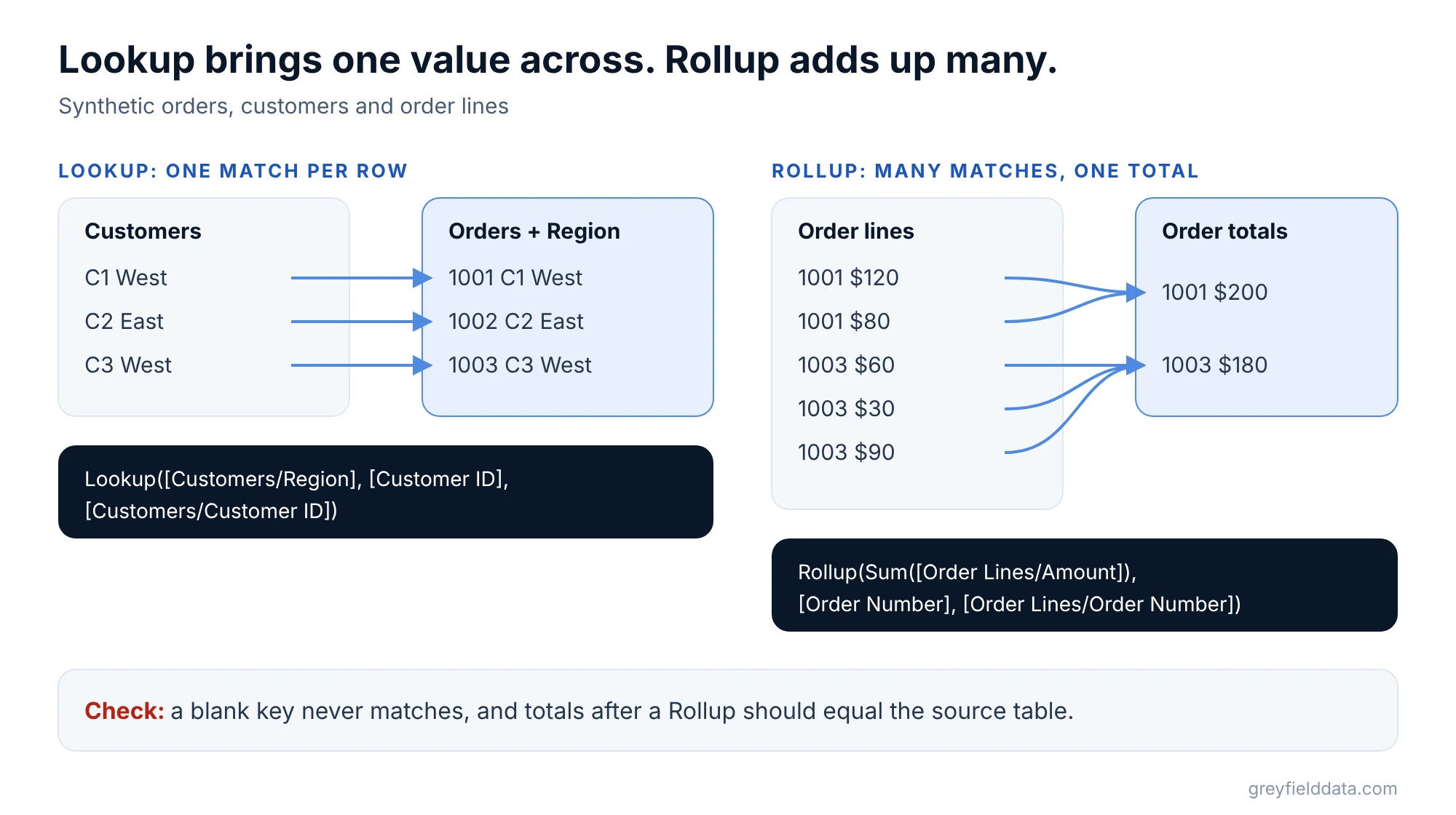
In the Add Lookup modal, picking an aggregate under Aggregate turns the Lookup into a Rollup. Sigma's Lookup docs also show Lookup(Sum(...), ...) returning the same result as the Rollup above, so either name works once there's an aggregate inside.
Self-rollups
The other element can be the same table. Sigma's docs use Rollup(Avg([Profit]), [Order Number], [Order Number]) to put each order's average profit on every one of its lines. It's a quick way to compare a row with its group without building a grouped table.
Lookup vs Rollup: which one do you need?
Ask how many rows in the other table match each row in yours.
| Question | Matches per row | Use |
|---|---|---|
| What region is this customer in? | One | Lookup([Customers/Region], ...) |
| What did this order total across its lines? | Many | Rollup(Sum([Order Lines/Amount]), ...) |
| How many lines does each order have? | Many | Rollup(Count([Order Lines/Amount]), ...) |
| What's this month's target from a targets table? | One | Lookup([Targets/Target], [Month], [Targets/Month]) |
| What group does a blank customer ID belong to? | One, with null keys | LookupMatchNulls(...) |
For a month target, the targets often live in an input table someone edits in the workbook. Sigma input tables and write-back covers setting one up.
How do Excel, Power BI and SQL lookups map to Sigma?
| Elsewhere | Sigma |
|---|---|
Excel VLOOKUP, XLOOKUP, INDEX/MATCH |
Lookup |
Excel SUMIFS, COUNTIFS, AVERAGEIFS against another sheet |
Rollup with Sum, Count or Avg |
Power BI RELATED |
Lookup |
Power BI SUMX(RELATEDTABLE(...)) |
Rollup(Sum(...)) |
SQL LEFT JOIN for one column |
Lookup |
SQL LEFT JOIN to a GROUP BY subquery |
Rollup |
The big change from Excel is that there's no range to lock with dollar signs and no column number to count. You name the column you want, and the keys do the matching. The Excel to Sigma functions cheat sheet and the Power BI DAX to Sigma cheat sheet cover the rest of each mapping.
Why does my Sigma Lookup return blank or an error?
Most broken lookups come down to keys or element setup.
- Null keys. A null never equals another null, so order 1004 above gets no region. If blank keys should match a row such as "Unassigned", switch to
LookupMatchNulls, or tick Match null values in the Add Lookup modal. - More than one match. Sigma's LookupMatchNulls page notes that a match that isn't unique returns Multiple values. Either fix the duplicate rows in the other table, or use
Rollupand say how they should combine. - Two other elements in one formula. Lookup can only reference one external element at a time. Referencing two gives the error "Rollup cannot reference more than one external relation." Split it into two columns.
- Different connections. Both elements must come from the same data connection and sit in the same workbook.
- Child elements. You can't look up into an element built from the one you're adding the column to.
- Keys that look equal but aren't. A text "1001" and a number 1001, or a trailing space, won't match. Make both keys the same type and clean them before matching.
If you find yourself adding ten Lookup columns from the same table, it's usually cleaner to join the tables once in the data source or the warehouse. That's the kind of modeling we set up in Snowflake consulting work.
What to do next
Start with the table that needs the extra column, pick the key that should match, and decide whether each row expects one match or many. Then check the totals against the source table before anyone uses it. The Sigma functions list has every other function with syntax, running totals in Sigma covers window functions, and the Sigma pivot table guide shows grouping. More Sigma how-tos are on the Sigma resources page. If you'd rather have someone rebuild your workbooks, book a call.
Frequently asked questions
Is there a VLOOKUP function in Sigma?
No, Sigma's equivalent is Lookup. It matches a key column in your table with a key column in another element and returns the column you name, such as Lookup([Customers/Region], [Customer ID], [Customers/Customer ID]).
What is the difference between Lookup and Rollup in Sigma?
Lookup returns one matching value per row. Rollup aggregates all matching rows, such as summing every order line for an order. Adding an aggregate to a Lookup makes it behave like a Rollup.
Can a Sigma Lookup match on more than one column?
Yes. Add more pairs after the first: local key 2, then external key 2, and so on. In the Add Lookup modal, click +Add another mapping.
Why does my Sigma Lookup return Multiple values?
The other element has more than one row for the same key. Remove the duplicates, add another key pair so each match is unique, or switch to Rollup with an aggregate.
Can I use Lookup between two different data connections?
No. Sigma requires both elements to be on the same data connection and in the same workbook.
Part of the Sigma guides, a reading path through related articles.
Linus Tse
Founder of Greyfield Data. Built 400+ dashboards. Certified in Sigma, Snowflake, Tableau, and Power BI.
About Linus