How I learned Sigma and got certified in 4 weeks, and why I'd pick it over Tableau and Power BI
The four resources I used to learn Sigma Computing in 4 weeks, a week-by-week plan to follow, and five reasons I'd pick Sigma over Tableau and Power BI.

Written by Linus Tse, founder of Greyfield Data
· 10 min read
On this page 7 sections
I've built 400+ dashboards in Tableau and Power BI over seven years, and Sigma is the most intuitive BI tool I've ever used. I picked it up and got certified in 4 weeks with four resources, most of them free. This post is the plan I'd follow again, week by week, plus the five reasons Sigma made me excited about BI again.
If you're weighing a move off Tableau or Power BI, the free Tableau to Sigma migration assessment and Power BI to Sigma migration assessment give you a readout of size, rebuild risks, and a phase plan in a few minutes.
Key takeaways
- You can learn Sigma in about 4 weeks with four resources: DataCamp's Sigma Fundamentals track, Sigma Public, Sigma QuickStarts, and Sigma's free trial. The Builder Challenge is a good final test.
- Start with structured lessons, then take apart other people's apps on Sigma Public, then go deeper with QuickStarts, and save the trial for when you're ready to build with your own data.
- Sigma's free trial is 7 days according to its help docs, so start it late in your plan, not on day one.
- My five reasons for picking Sigma over Tableau and Power BI: live queries instead of extracts, dashboards that can write back and take action, workbooks you can edit through the Sigma MCP server, AI agents on the dashboard, and speed.
- If you already know Tableau or Power BI, most of the work is translating habits, not starting over. Formula translators and cheat sheets cut that time down.
What are the 4 resources I used to learn Sigma?
I used four resources, in this order. Each one does a different job, so skipping one leaves a gap.
| # | Resource | What it is | Why I used it | Cost |
|---|---|---|---|---|
| 1 | DataCamp's Sigma Fundamentals track | Five courses: Introduction to Sigma, Visualizations, Calculations, Introduction to AI Apps, and Data Modeling | Structured, hands-on, with a ton of interactive quizzes. This is where I'd start. | DataCamp subscription |
| 2 | Sigma Public | Sigma's free sandbox, where people publish apps and dashboards anyone can open | The fastest way to level up is taking apart other people's apps | Free |
| 3 | Sigma QuickStarts | 100+ guided walkthroughs grouped by topic: Fundamentals, Tables, Agents, AI Apps, Embedding, Administration, and more | Going deeper on writeback, data apps, and AI agents | Free to read |
| 4 | Sigma free trial | A trial organization with most core features | Building with your own data in a real org | Free |
| Bonus | Builder Challenge | Public competitions with a dataset and a scenario | A deadline and a brief make you finish something | Free to enter (terms) |
DataCamp's Sigma Fundamentals track
The Sigma Fundamentals track is a collaboration between DataCamp and Sigma, and most of the courses are taught by instructors from Aimpoint Digital. Aimpoint did a great job with it. It's hands-on, and the quizzes keep you honest about what you actually understood. DataCamp lists a certificate for completing the track.
Sigma Public
Sigma Public is Sigma's free sandbox for building apps and dashboards, and it reminds me of Tableau Public in the early days. Open an app, click into an element, and look at how the builder set up the controls, the calculations, and the layout. If you don't know whose work to start with, I keep a list of Sigma experts to follow with the app to open first from each.
Sigma QuickStarts
QuickStarts are free step-by-step guides. The library is grouped into topics like Fundamentals, Tables, Agents, AI Apps, Embedding, and Administration, so you can pick the ones that match what you want to build. Writeback, data apps, AI agents: it's all in there.
Sigma's free trial
The trial gives you your own Sigma organization. Sigma's help docs currently list it as a free 7-day trial with some limits: up to 20 user invitations, 50 exports, no email bursts, and no API keys. When I first wrote about this it was 14 days, so check the current length before you plan around it.
Bonus: the Builder Challenge
Sigma runs public Builder Challenges. They give you a dataset and a scenario, you build something, and there are prizes. The 2026 to 2027 competition terms describe qualifier rounds leading to a final at Sigma's Workflow 2027 conference. I'll definitely be submitting.
What does a 4-week plan to learn Sigma look like?
This is the plan I'd follow if I were starting again. It only uses the four resources above plus the Builder Challenge. I haven't put hours on it, because that depends on how much time you have each week.
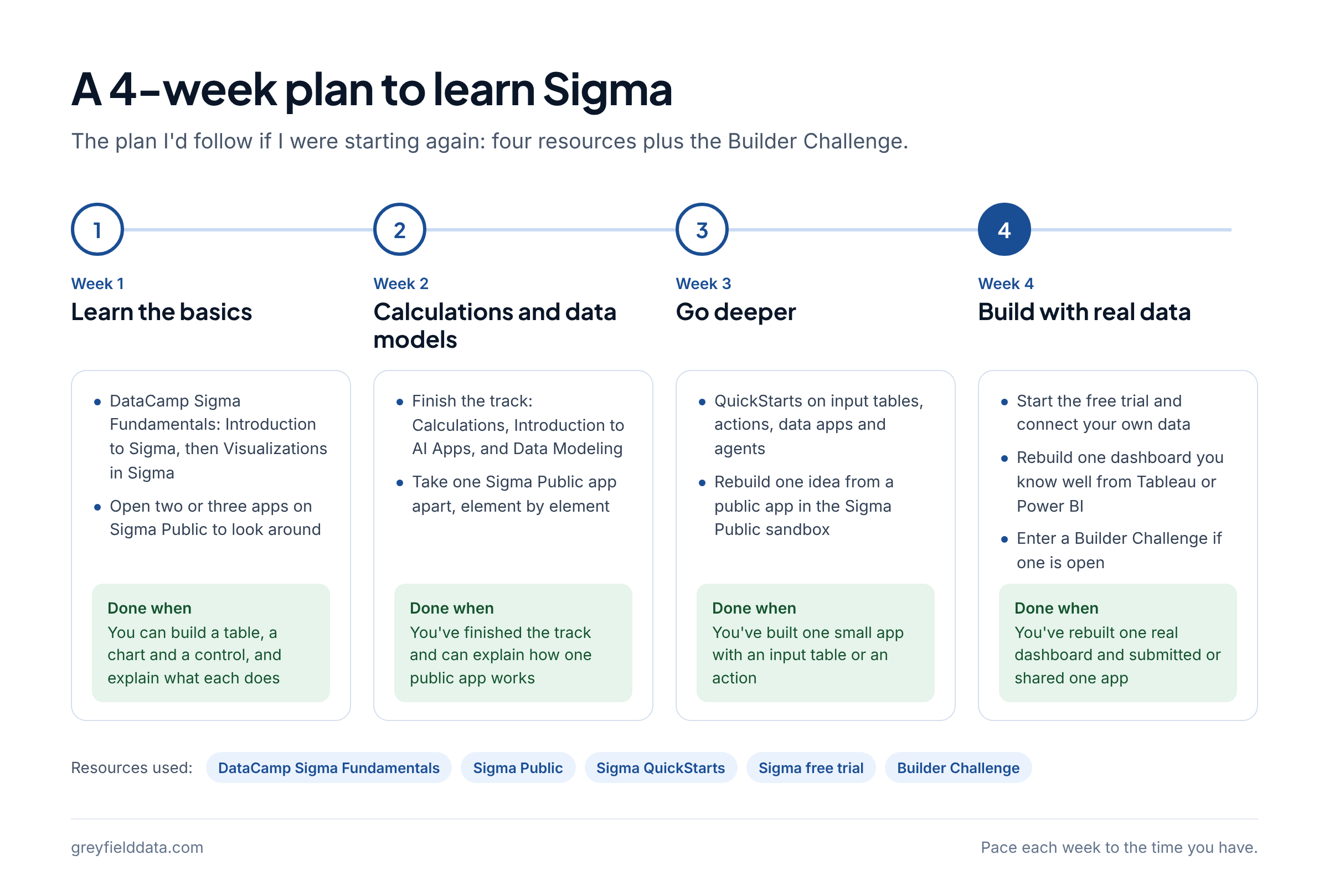
Here is the plan as a timeline, with what done looks like each week.
| Week | Focus | What to do | You're done when |
|---|---|---|---|
| 1 | Learn the basics | Start the DataCamp Sigma Fundamentals track: Introduction to Sigma, then Visualizations in Sigma. Open two or three apps on Sigma Public just to look around. | You can build a table, a chart, and a control, and explain what each does. |
| 2 | Calculations and data models | Finish the track: Calculations in Sigma, Introduction to AI Apps in Sigma, and Data Modeling in Sigma. Pick one Sigma Public app and take it apart element by element. | You've finished the track and can explain how one public app works. |
| 3 | Go deeper | Work through QuickStarts on the features you'll actually use: input tables, actions, data apps, and agents. Rebuild one idea from a public app in the free Sigma Public sandbox. | You've built one small app with an input table or an action. |
| 4 | Build with real data | Start the free trial and connect your own data. Rebuild one dashboard you know well from Tableau or Power BI. Enter a Builder Challenge if one is open. | You've rebuilt one real dashboard and submitted or shared one app. |
Checklist to save
- Week 1: Introduction to Sigma and Visualizations in Sigma on DataCamp
- Week 1: Open three Sigma Public apps
- Week 2: Calculations, AI Apps, and Data Modeling courses on DataCamp
- Week 2: Take one Sigma Public app apart, element by element
- Week 3: QuickStarts on input tables, actions, data apps, and agents
- Week 3: Build one small app on Sigma Public
- Week 4: Start the free trial and connect your own data
- Week 4: Rebuild one dashboard you know from Tableau or Power BI
- Week 4: Enter a Builder Challenge, or publish your app on Sigma Public
How do I translate what I already know from Tableau or Power BI?
Formulas are where Tableau and Power BI users lose the most time. Paste a calculated field into the Tableau to Sigma formula translator or a measure into the DAX to Sigma formula translator to see the Sigma version and what changes. Keep the Sigma functions list open while you build.
Why would I pick Sigma over Tableau and Power BI?
Sigma has made me excited about BI again, and I didn't think I'd say that after seven years and 400+ dashboards in Tableau and Power BI. BI software has felt outdated for a long time. Sigma reminds me of Tableau in the early days, when the product felt new and full of possibility. Here are my five reasons.
| Reason | What Sigma does | What it changed for me |
|---|---|---|
| 1. No extracts | A data source connection lets Sigma run live queries against your data platform | No stale extracts and no failed extract refreshes to troubleshoot |
| 2. Actionable dashboards and writeback | Input tables write data to schemas in your warehouse, and actions can update rows, call APIs, and send exports | Business users can kick off workflows without leaving the dashboard |
| 3. Workbooks as code | The Sigma MCP server lets Claude, ChatGPT, and other AI assistants build workbooks or edit ones you can edit | No more manually editing 1,000 tiny things |
| 4. AI agents on the dashboard | Sigma agents add AI to a workbook, with a chat element users can talk to | People ask questions where they already are: looking at the dashboard |
| 5. Speed | Sigma generates SQL that runs in your warehouse, in a browser, with no desktop app to install | No more waiting five minutes for a dashboard to load |
1. No extracts
Sigma connects directly to your data platform and queries it live. No more stale data sitting in random dashboard extracts. There are few things I hate more than troubleshooting failed extract refreshes.
To be fair, Tableau and Power BI can connect live too, through live connections and DirectQuery. In my work, extracts and imports were the default, and they were the thing that broke.
2. Actionable dashboards and writeback
Dashboards are great. Dashboards that can actually do things are much better. With input tables, users enter data that Sigma writes to designated schemas in your warehouse. With actions, a button can insert or update rows, call a third-party API, run a stored procedure, or send an export. Can you imagine business users kicking off workflows and updating other systems without leaving their dashboard? You probably can't if you've only used Tableau and Power BI.
3. Workbooks as code
Manually editing 1,000 tiny things in Tableau and Power BI kills me. Sigma lets you connect Claude or ChatGPT to the Sigma MCP server and build or update a workbook. It saves a lot of time and, more importantly, your sanity. Some of this is still marked beta in Sigma's docs, including the API key connection and the code representation of a workbook, so check the current status before you rely on it. It's still a game changer.
4. AI agents on your dashboard
Everyone should be able to ask questions of their data. But training business users on another app is hard. And when do people want to ask questions most? When they're already looking at a dashboard. Sigma agents put an AI agent right there, in a chat element on the workbook.
5. It's fast
No more waiting five minutes for a dashboard to load. Sigma runs in the browser and sends the query to your warehouse, so there's no clunky desktop app and no massive extract to build first. In my experience it handles far larger data than I could comfortably put in a Tableau or Power BI extract. How fast it feels for you depends on your warehouse and how your data is modeled.
For a side-by-side on pricing, governance, and features, see Sigma vs Tableau and Sigma vs Power BI.
Is moving from Tableau or Power BI to Sigma hard?
In my experience the transition from Tableau and Power BI to Sigma has been smooth. I'm seeing more teams move, and that used to be unthinkable: migrating BI tools cost too much, took too long, and retraining your team was never worth it.
The hard part isn't learning the interface. It's the inventory: which dashboards to rebuild, which formulas change behavior, and how to prove the new numbers match. That's what the Tableau and Power BI migration assessments are for. If you'd rather hire help, here are the best Sigma consulting firms, by fit and size.
Frequently asked questions
How long does it take to learn Sigma Computing?
It took me 4 weeks to pick it up and get certified, coming from seven years of Tableau and Power BI. If you're new to BI, plan for longer, and spend more time on the DataCamp track and QuickStarts.
Is there a Sigma certification?
DataCamp's Sigma Fundamentals track, built with Sigma, lists a certificate for completing it. Check Sigma's and DataCamp's pages for the current options, since training programs change.
Is Sigma free to learn?
Mostly. Sigma Public and QuickStarts are free, and the trial is free for 7 days. The DataCamp track needs a DataCamp subscription.
Is Sigma better than Tableau?
For my work, yes: live queries, writeback, the MCP server, and agents on the dashboard. Tableau is the more established tool, and your team may already know it well. See Sigma vs Tableau for the full comparison.
Do I need SQL to learn Sigma?
No. Sigma uses a spreadsheet-style formula language, and the functions list covers every function with examples. SQL helps when you model data or write custom SQL elements.
What to do next
If you're learning Sigma, start week 1 today with the DataCamp track and Sigma Public. If you're planning a move, run the free Tableau or Power BI migration assessment first. If you want help building or migrating, see Sigma consulting or book a call with me.
Part of the Sigma guides, a reading path through related articles.
Linus Tse
Founder of Greyfield Data. Built 400+ dashboards. Certified in Sigma, Snowflake, Tableau, and Power BI.
About Linus