Sigma experts to follow in 2026: the best builders on Sigma Public
Ten Sigma Computing experts worth following in 2026, with the Sigma Public apps, tutorials, and videos to open first from each builder and educator.

Greyfield Data
In this article 17 sections
The fastest way to get good at Sigma is to open a working app someone else built and take it apart. Sigma Public makes that possible: it is a free version of Sigma where people publish real apps, with input tables, actions, and AI features, that anyone can open in a browser. This list is ten people whose public Sigma work is worth following in 2026, and the one thing to open first from each.
If you are moving to Sigma from another tool, two free tools help you read what these builders do: the Tableau to Sigma formula translator and the DAX to Sigma formula translator. If you want a hand building your own, see Sigma consulting.
Disclosure. Greyfield Data wrote this list. Linus Tse, who runs Greyfield Data, is on it and listed first. Everyone else is in no particular order. Every detail about each person comes from a public page we link: their Sigma Public profile, their own site, or their published posts and videos. We did not use follower counts, rankings, or anything we could not see on a public page. If something here is out of date, email us and we will fix it.
Key takeaways
- Sigma Public profiles are the best place to find Sigma experts, because each profile lists working apps you can open, not just claims.
- Sigma runs a Builder Champions program and a featured builders page. Seven people on this list appear on one or both.
- Monthly competitions are where a lot of the best public apps come from: each one gives every builder the same dataset and brief, so you can compare approaches side by side.
- For learning, follow people who publish tutorials and challenge solutions (Sean Miller, Astha Bilimoria) alongside people who publish full business apps (Lynda Chao, Michal Shaffer).
- Some of the best Sigma teaching happens off Sigma Public, in videos and long-form posts (Tim Ngwena, Ivett Kovács).
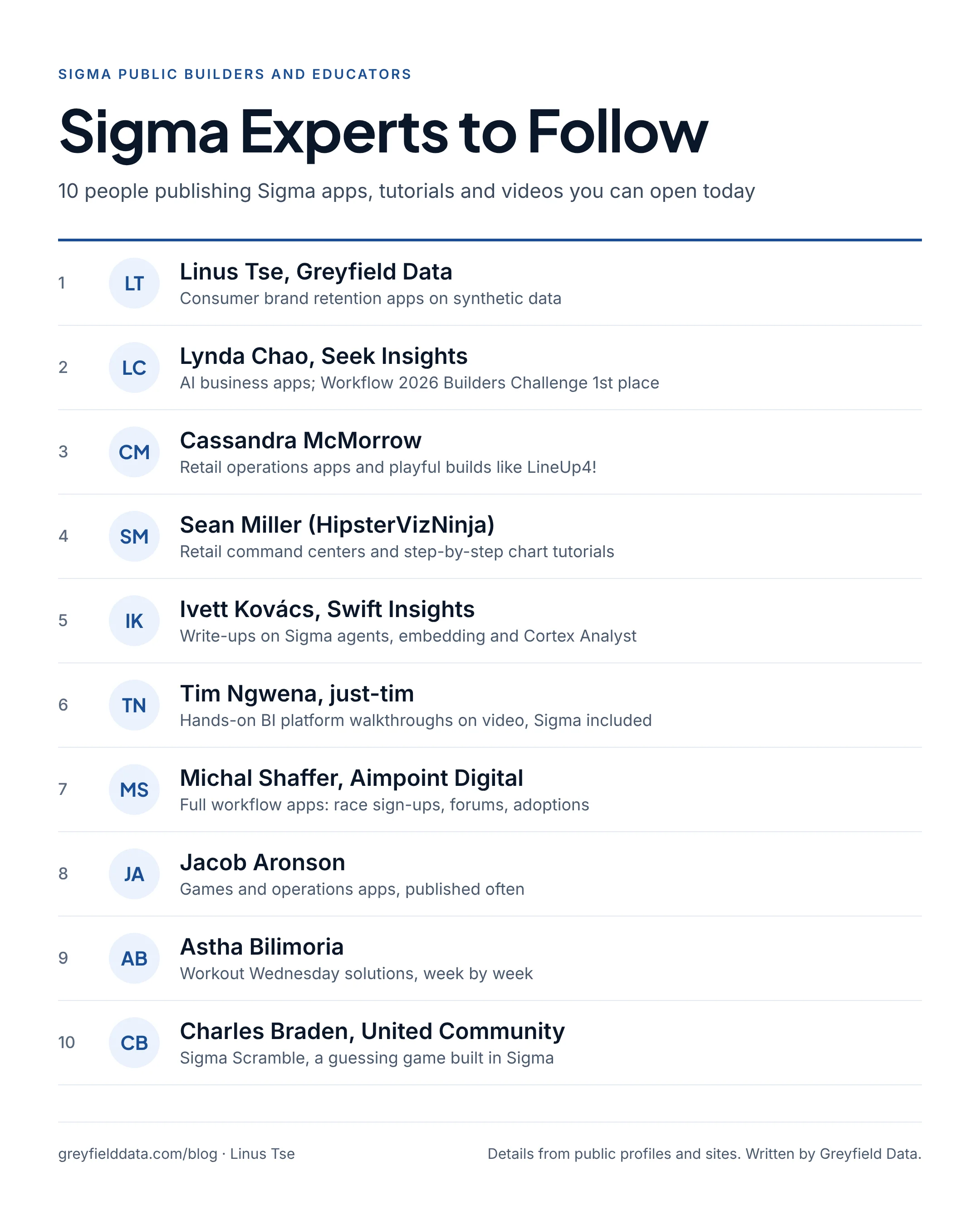
Download the full-size list (PNG)
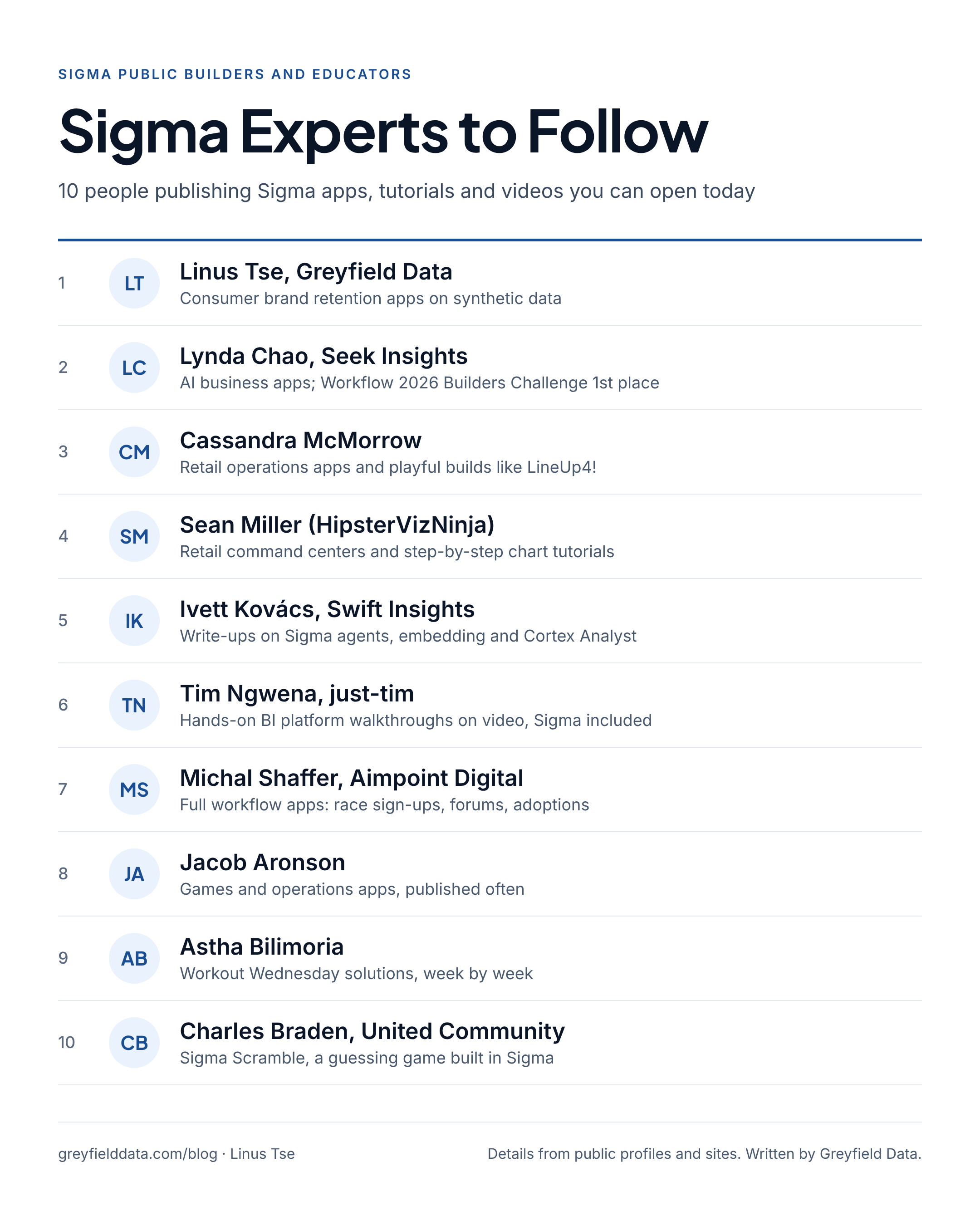
How did we pick these Sigma experts?
We looked for people whose Sigma work you can see and use today, and kept those who met most of these criteria:
- Public, working examples. Apps on Sigma Public you can open, or videos and posts that walk through Sigma step by step.
- Range. Business apps, tutorials, challenge solutions, games, and platform reviews, so there is something for beginners and for experienced builders.
- Recent activity. Work published in 2026.
- Recognition we could check. Sigma's own featured builders page, Builder Champions list, and competition results, where they apply.
We left out anything we could not confirm on a public page, including job titles that only appear on LinkedIn.
Who are the best Sigma experts to follow?
| # | Name | Known for | Where to follow |
|---|---|---|---|
| 1 | Linus Tse, Greyfield Data | Consumer brand retention apps on synthetic data | Sigma Public: @linustse |
| 2 | Lynda Chao, Seek Insights | AI business apps; Workflow 2026 Builders Challenge 1st place | Sigma Public: @Lynda, YouTube |
| 3 | Cassandra McMorrow | Retail operations apps and playful builds | Sigma Public: @Cassandra_McMorrow |
| 4 | Sean Miller (HipsterVizNinja) | Retail command centers and step-by-step chart tutorials | Sigma Public: @Sean_HipsterVizNinja, blog |
| 5 | Ivett Kovács, Swift Insights | Write-ups on Sigma agents, embedding, and Cortex Analyst | Medium: @yvette110 |
| 6 | Tim Ngwena, just-tim | Hands-on BI platform walkthroughs on video, Sigma included | just-tim.com, YouTube |
| 7 | Michal Shaffer, Aimpoint Digital | Full workflow apps: race sign-ups, forums, adoptions | Sigma Public: @Michal_Shaffer |
| 8 | Jacob Aronson | Games and operations apps, published often | Sigma Public: @Jacob_Aronson |
| 9 | Astha Bilimoria | Workout Wednesday solutions, week by week | Sigma Public: @Astha_Bilimoria |
| 10 | Charles Braden, United Community | Sigma Scramble, a guessing game built in Sigma | Sigma Public: @Charles_Braden |
Company names are the ones shown on each person's public profile or site when we checked in November 2026.
1. Linus Tse, Greyfield Data
Linus Tse runs Greyfield Data, an independent consultancy that builds Snowflake, dbt, and Sigma reporting for consumer brands. His Sigma Public work is aimed at ecommerce and retention questions.
- Open first: Consumer Brand Retention Starter Pack, five connected reports (Customer Activity, 90-Day Retention, 24-Month Frequency, Product Mix, and Reactivation) on synthetic data for a demo menswear brand.
- Read alongside it: A customer retention dashboard in Sigma, in five reports, which explains how each report is built.
- Also from Linus: a guide to every Sigma function, free Tableau and DAX to Sigma formula translators, and Tableau and Power BI to Sigma migration assessments.
- Follow: @linustse on Sigma Public
2. Lynda Chao, Seek Insights
Lynda builds complete business apps in Sigma, the kind a team could use on Monday. Her profile shows Seek Insights in Minneapolis, she is on Sigma's featured builders page and its current Builder Champions list, and her winning entry is titled "Builders Challenge 1st Place | Workflow 2026".
- What she builds: InnovationOS (idea management, from submission to impact), Vendor & Contract Tracker, Sales Commission & Quota Tracker, Customer Health & Expansion, Sales Pipeline App, and a World Cup 2026 Activity Guide.
- Open first: her Workflow 2026 Builders Challenge app, a hiring control center. Then watch her YouTube demos, where she walks through most of these apps, starting with InnovationOS.
- Follow: @Lynda on Sigma Public
3. Cassandra McMorrow
Cassandra builds practical operations apps and has fun doing it. Her profile lists Cleveland, she is a current Builder Champion and featured builder, and one of her apps is titled "Workflow 2026 | Builders Challenge 3rd Place".
- What she builds: Floorplan Insights, Retail Store Inspection (submit an inspection, then see scores by store and date), FUNdraising!, and LineUp4!, a two-team game.
- Open first: Retail Store Inspection, a clean example of a form and its reporting living in one app. Then play LineUp4! to see how far Sigma's controls stretch.
- Follow: @Cassandra_McMorrow on Sigma Public
4. Sean Miller (HipsterVizNinja)
Sean Miller is both a builder and a teacher. His profile, @Sean_HipsterVizNinja, lists Concord and Kansas City, and his bio reads "That's what I do, I build apps and I know things." He is a current Builder Champion and featured builder, and writes about Sigma on his blog.
- What he builds: retail apps such as Retail Command Center and RETAIL STARTER, customer analysis like CLTV Matrix and Comparing YoY Order Frequencies, and his newest, Floor Triage Tower.
- Open first: his "Let's" tutorial series: Let's Understand Sigma Groupings, Let's create a KPI chart, Let's Create a Drillable Bar Chart, and Let's Create an Area Trend Chart. The groupings one is set up as a challenge with a solution, which makes it a good self-test.
- Read: Sigma Public Is Coming And That Changes Everything and Sigma MCP Server: How to and When to.
- Follow: @Sean_HipsterVizNinja on Sigma Public
5. Ivett Kovács, Swift Insights
Ivett Kovács writes some of the clearest long-form explanations of Sigma's newer features. Her Tableau Public bio describes her as an information designer and Tableau Zen Master, and her posts point readers to Swift Insights, a boutique data consultancy that lists itself as a Sigma Partner. We did not find a Sigma Public profile for her, so follow her writing.
- What she writes: How to Write Good Instructions for Sigma Agents, Beyond Sigma Embed: Build Your Own Customer Portal or Buy One?, Beyond Analytics with Sigma, and From Question to Query: How Snowflake Cortex Analyst Powers Sigma.
- Read first: the Sigma agents post. If you are setting up an agent in a workbook, it is a practical guide to the instructions that shape its answers.
- Follow: medium.com/@yvette110 and Swift Insights
6. Tim Ngwena, just-tim
Tim Ngwena reviews data tools on video with no vendor allegiance. His site, just-tim.com, describes him as formerly "TableauTim" and a five-time Tableau Visionary, and lists consulting at Aimpoint Digital since 2023. He has a dedicated Sigma page that collects his Sigma videos and his take on where Sigma fits.
- Watch first: Sigma analytics walkthrough: building a dashboard from scratch (on YouTube as Sigma Analytics Dashboard Experience in 30 minutes). He builds a workbook from a blank page and explains lineage, data pages, layout, and actions as someone coming from Tableau. He notes that it was recorded in a sandbox from Sigma's influencer program and is not sponsored.
- Then: Sigma Computing Explained to a Tableau User, a conversation with Katrina Menne.
- Follow: just-tim.com and YouTube
If you are coming from Tableau too, the Tableau to Sigma functions cheat sheet pairs well with his walkthrough.
7. Michal Shaffer, Aimpoint Digital
Michal Shaffer builds apps that behave like small products, with sign-ups, admin views, and user posts. The profile shows Aimpoint Digital, and Michal is a current Builder Champion and featured builder.
- What she builds: Starting Line, a sign-up and results app for a charity race, with a matching Starting Line Admin; The Water Cooler, a workplace forum with posts, likes, and comments; and Perfect Match Adoption Agency.
- Open first: The Water Cooler. A forum is not what most people expect from a BI tool, and it shows what input tables and actions can do.
- Follow: @Michal_Shaffer on Sigma Public
8. Jacob Aronson
Jacob Aronson is one of the most active builders on Sigma Public, and is on Sigma's featured builders page. His profile lists more than a dozen apps, from games to operations tools.
- What he builds: Sigma Deal or No Deal, Quality Control Center (Chewtopia Candy Enterprises), Hackathon Headquarters 2026, Employee Adoption Information Portal, School Cafeteria Inspections, and Spotify Analytics.
- Open first: Quality Control Center, a landing page for admins, factory workers, and engineers with defect rates, a timeline explorer, and a maintenance request manager. Then play Sigma Deal or No Deal.
- Follow: @Jacob_Aronson on Sigma Public
9. Astha Bilimoria
Astha Bilimoria is the person to follow if you learn by doing exercises. The profile, which lists Atlanta, describes working through Sigma's Workout Wednesday challenges to learn the platform and keep up with new features, and Astha is on Sigma's featured builders page. Each solution is published as its own app.
- What she builds: Workout Wednesday 2026 solutions such as Allergen Alert, Input Table Staging with Conditional Validation, Drawers, Mapping and Unnesting, and Level of Detail Calculation, plus competition entries like Hackathon HQ Organizer Dashboard.
- Open first: Level of Detail Calculation if you come from Tableau, or Input Table Staging with Conditional Validation if you are building data entry.
- Follow: @Astha_Bilimoria on Sigma Public
10. Charles Braden, United Community
Charles Braden is the current builder spotlight on Sigma Public's featured builders page. His profile shows United Community in Greenville.
- Open first: Sigma Scramble, a guessing game with a new-game button and guess submission, all built in a Sigma workbook. It is a good reminder that Sigma apps can hold state and respond to users, not just show charts.
- Follow: @Charles_Braden on Sigma Public
Who else is worth following on Sigma Public?
Sigma's Builder Champions list also includes Brian Davis, whose TripSplit app splits shared trip costs, and Hayley Hadges, whose latest workbook is a trip packing generator. The all builders directory lets you search everyone else by name.
How do you publish your own app or get featured on Sigma Public?
You can publish a Sigma app for free, with no Sigma license or company account. According to Sigma's documentation:
- Create a free account at public.sigmacomputing.com and select Create app.
- Add data from Sigma's sample connection or by uploading a CSV. You cannot connect your own warehouse, and you should never upload sensitive data.
- Build with tables, input tables, actions, layout elements, and AI apps. Every Sigma Public account has a Build license.
- Select Publish, then Make App Public. Publishing alone does not make the app visible to others.
To get noticed, enter the monthly competitions. Each one gives everyone the same dataset and brief, and recent rounds qualify the top scorer for the Workflow 2027 finals. You can also nominate yourself or someone else as a Builder Champion; Sigma lists paid content creation, early feature access, and swag as the perks.
If you are new to writing Sigma formulas, keep the Sigma functions list open while you build.
Frequently asked questions
What is Sigma Public?
Sigma Public is a free version of Sigma where anyone can build apps on sample or uploaded CSV data, publish them, and open apps other people have made. You do not need a Sigma license or a company account.
Where can I find the best Sigma workbooks?
Start with the featured builders page and the competitions page on Sigma Public, then open the apps listed for each person above. Competition entries are especially useful because many builders solved the same brief.
How do I find Sigma Computing experts to learn from?
Look for people who publish working apps or step-by-step tutorials, not just commentary. Sigma Public profiles, Sigma's Builder Champions list, and creators like Tim Ngwena and Ivett Kovács who write and record walkthroughs are good places to start.
Can I use a Sigma Public app with my own company data?
Not directly. Apps built in Sigma Public cannot be moved to another Sigma organization, and Sigma Public cannot connect to warehouses like Snowflake or Databricks. Use them as patterns to rebuild in your own Sigma account.
How do I get on Sigma's featured builders list?
Sigma does not publish a formula, but the people featured there publish often, enter competitions, and build complete apps. Entering a monthly competition or submitting a Builder Champion nomination are the two routes Sigma offers publicly.
What to do next
Open two or three of the apps above and copy one pattern into your own work this week: a form and its report in one app, a data page that feeds the visible page, or an input table with validation. If you want help building Sigma apps on your own Snowflake data, see Sigma consulting, compare firms in the best Sigma consulting firms, or book a call with Linus.
Part of the Sigma guides, a reading path through related articles.
Related

The 10 best Sigma consulting firms in 2026
Ten Sigma consulting firms compared on focus, size, HQ, and Sigma partner tier, from an independent consultancy to global firms, with sources.
Every Sigma function, explained: the complete list with syntax and examples
All 239 Sigma workbook functions in 13 categories, each with its syntax, a one-line explanation, and a link to Sigma's docs, plus worked examples.
A customer retention dashboard in Sigma, in five reports
A public Sigma workbook for a consumer brand that answers five retention questions, from who is buying to who came back after a break. Built on synthetic data you can explore.