How to build fund performance reporting and investor packs in Sigma
Fund and strategy returns, attribution in plain words, and per-investor PDF packs sent by Sigma Export Bursting, built on Snowflake instead of monthly Excel.

Written by Linus Tse, founder of Greyfield Data
· 7 min read
On this page 9 sections
Month-end performance reporting at many funds is a chain of spreadsheets. Returns come from one file, attribution from another, and each investor letter is built by copying numbers into a template. The work repeats every month, and a late correction means doing it again.
We build fund performance reporting in Sigma on Snowflake so the returns, the attribution, and the investor packs all read the same tables and go out on a schedule. That is part of our Sigma Computing consulting work for hedge funds and private equity firms.
Key takeaways
- Fund performance reporting covers three things: returns by fund and strategy, attribution (what drove the return), and investor or LP packs.
- Monthly returns are chained, not added: (1 + month 1) × (1 + month 2) × (1 + month 3), minus 1.
- Contribution to return is a strategy's weight times its return. The contributions add up to the fund return.
- Sigma Export Bursting splits one report by investor and emails each person only their own PDF, up to the limits Sigma lists.
- Keep the fund administrator's numbers as the official record and reconcile to them each month.
What goes into fund performance reporting?
Fund performance reporting shows how a fund and its strategies performed over a period, why, and what that means for each investor. Most packs have the same building blocks.
| Section | What it shows | Who reads it |
|---|---|---|
| Fund returns | Month, quarter, year-to-date and since-inception returns, gross and net of fees | Investors, management |
| Strategy returns | The same returns by strategy, sleeve or portfolio manager | Management, investment committee |
| Attribution | Which strategies or sectors added to or took away from the return | Management, investors |
| Risk and exposure | Gross and net exposure, largest positions, concentration | Risk, investors |
| Investor statement | Each investor's capital account and returns | Each investor |
Gross return is before management and performance fees. Net return is after them. Show which one each table uses, every time.
How do you calculate fund returns over several months?
Chain the monthly returns. Multiply one plus each month's return together, then subtract one. Adding monthly returns overstates or understates the result, because each month starts from a different base.
Here is a synthetic example, with made-up returns.
| Month | Return | Growth of $1 |
|---|---|---|
| Month 1 | 3.0% | $1.0300 |
| Month 2 | -2.0% | $1.0094 |
| Month 3 | 4.0% | $1.0498 |
| Quarter (chained) | 4.98% | 1.03 × 0.98 × 1.04 = 1.049776 |
| Quarter (simple sum, wrong) | 5.00% |
The gap here is small, but it grows with bigger or more volatile months. Chaining monthly returns this way is the usual approach to a time-weighted return, which removes the effect of investor contributions and redemptions.
In Snowflake, store one row per fund (or strategy) per month with the monthly return. Sigma can then chain any range the reader picks with a date range control. Our Sigma functions list covers the functions you need for the calculation.
What is performance attribution, in plain words?
Attribution explains where a fund's return came from. The simplest version is contribution: each strategy's weight in the fund times its return.
Here is a synthetic example for one month.
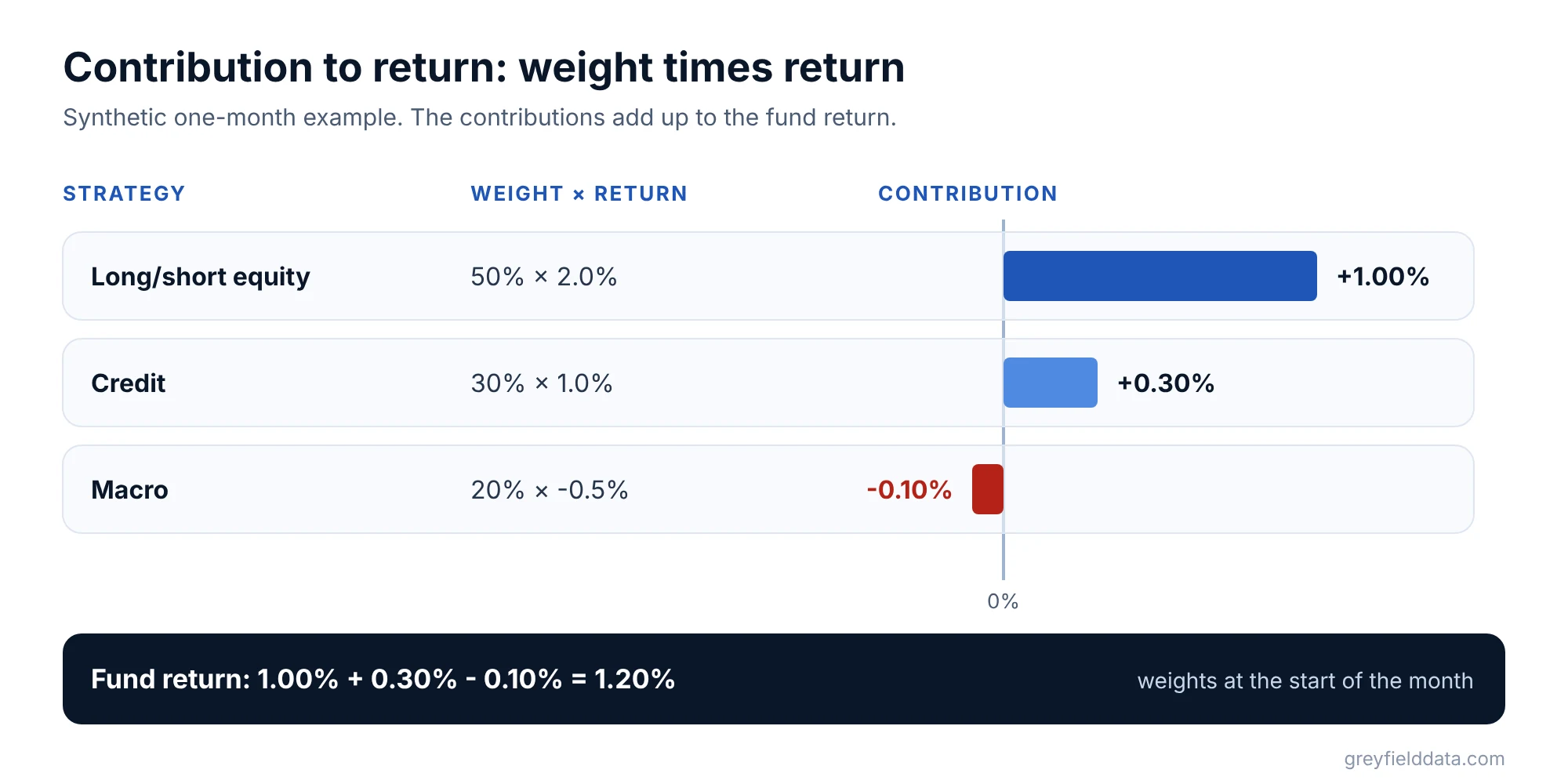
| Strategy | Weight | Return | Contribution |
|---|---|---|---|
| Long/short equity | 50% | 2.0% | 1.00% |
| Credit | 30% | 1.0% | 0.30% |
| Macro | 20% | -0.5% | -0.10% |
| Fund | 100% | 1.20% |
Contributions use each strategy's weight at the start of the period. Over several months, contributions need linking too, so they still add up to the chained fund return. Pick one linking method and write it down.
What about attribution against a benchmark?
Benchmark attribution splits the difference between your return and a benchmark's into two main parts:
- Allocation: did you put more money in the sectors that did better than the benchmark overall?
- Selection: within each sector, did your holdings beat the benchmark's holdings in that sector?
Many versions add a third part, interaction, for the overlap between the two. The common method is often called Brinson attribution. Agree the method with your investment team before you build it, because different methods give different splits.
How do you build investor and LP reporting packs?
Build one pack layout in Sigma and let the data fill it for each investor. The parts that change per investor (capital account, share class, fees) come from Snowflake tables keyed by investor.
A typical investor statement has:
| Line | Meaning |
|---|---|
| Beginning capital | The investor's balance at the start of the period |
| Contributions | New money in |
| Redemptions or distributions | Money out |
| Net P&L allocated | The investor's share of gains or losses |
| Fees | Management and performance fees charged |
| Ending capital | Beginning plus contributions, minus redemptions, plus P&L, minus fees |
| Net return | The period's net return for the investor's class or series |
If the pack needs predictable page breaks, Sigma's reports document type is built for paginated, pixel-perfect PDF output. A workbook page also works for shorter packs.
For an interactive version, Sigma's row-level security with user attributes limits each viewer to their own rows. That suits internal teams, such as each relationship manager seeing only their investors.
How does Export Bursting send a PDF to each investor?
Export Bursting splits one report by the values of a single list control and emails each recipient only the version for their value. Sigma's email burst docs describe how it works:
- Add a list control on investor ID, sourced from a column.
- Add a recipient email column from the same data source. A row can hold several addresses separated by commas.
- Schedule the export with Burst as the delivery method, split by the investor control, with the email column as dynamic recipients.
Each investor value runs its own warehouse query. Sigma lists limits of 500 split values, 500 dynamic recipients, 1,000 total recipients, and 30MB of attachments per email. A fund with more investors than that needs to split the run, for example by share class.
Our Export Bursting walkthrough covers combining attachments into one PDF, branding, and sending from your own address.
Before anything goes to investors, keep a human review step. Send the first run to your own team, check a sample of statements against the administrator, then schedule the investor run. Your compliance team decides what investors receive and when.
How much time does this save each month?
It depends on how many packs you build by hand today. Measure the current hours first, then compare. The reporting time calculator helps you set a baseline.
Our clearest example is a daily report rather than a monthly pack. For a commodity brokerage, producing a daily report went from about 5 hours a week to about 30 minutes once it ran in Sigma on Snowflake (case study). Monthly packs follow the same pattern: the assembly moves to a schedule, and people spend their time on review and commentary.
Frequently asked questions
What is fund performance reporting?
Fund performance reporting shows a fund's returns over a period, by fund and strategy, explains what drove them, and reports each investor's results. It usually covers gross and net returns, attribution, exposure, and investor statements.
Can Sigma build an investor reporting dashboard?
Yes. Sigma reads fund and investor tables in Snowflake, and row-level security with user attributes can limit each viewer to their own rows. For PDFs, Export Bursting sends each investor their own version.
How many investors can one Sigma burst send to?
Sigma's help docs list up to 500 split values, 500 dynamic recipients, and 1,000 total recipients per burst. Check the current limits before you design around them.
Should fund returns in Sigma match the fund administrator?
They should reconcile to it. The administrator's NAV is usually the official record, so build a monthly check that compares your returns with theirs and flags differences.
What to do next
List every pack you send each month, who receives it, and how long it takes to build. That list shows where a schedule saves the most time. If you want us to build the performance tables and the investor burst with you, see Sigma Computing consulting or book a call.
Part of the Sigma guides, a reading path through related articles.
Linus Tse
Founder of Greyfield Data. Built 400+ dashboards. Certified in Sigma, Snowflake, Tableau, and Power BI.
About Linus