How to find infusion drug prescribers with free Medicare data
Free CMS files show which clinicians bill or prescribe the drugs you infuse. Here is which file answers which question, and the limits to know first.

Written by Linus Tse, founder of Greyfield Data
· 9 min read
On this page 9 sections

CMS publishes free, provider-level files that show which clinicians billed Medicare for each drug code and which prescribed each Part D drug, and the national provider registry (NPPES) adds their addresses and specialties. Put together, they give an infusion center a solid first list of practices already treating patients on the therapies it gives.
The catch is in four limits. The files cover Medicare only, they are more than a year old when published, and they hide small counts. The Part B file also names the clinician who billed the service, who is not always the one who wrote the order.
I built a version of this for a multi-state ambulatory infusion center group that was opening sites in new markets. It didn't want to pay for a prescriber-data subscription for data CMS already publishes. If you want to see what your current referrals are worth before chasing new ones, the referral leakage calculator is a good first step.
Key takeaways
- The Medicare Physician and Other Practitioners by Provider and Service file lists, for each clinician, the services and drug codes billed to Medicare Part B, with counts of services and patients (data.cms.gov).
- The Medicare Part D Prescribers by Provider and Drug file lists, for each prescriber, the pharmacy-benefit drugs they prescribed (data.cms.gov).
- NPPES adds each clinician's practice address and specialty, so you can group individuals into practices (NPPES files).
- The Part B file is organized by the rendering clinician on the claim. For drugs given in an office or infusion suite, that is whoever billed the administration, not necessarily the doctor who referred the patient.
- Limits: Original Medicare only for Part B, data about a year and a half old, and rows built from 10 or fewer patients or claims are left out.
Which free file answers which question?
Each file answers a different question. Use the table to pick the right one before you download a three-gigabyte file.
| File | What one row is | Answers | Main limit |
|---|---|---|---|
| Physician and Other Practitioners, by Provider and Service | One clinician, one billing code, one place of service, one year | Who bills Medicare for this infused drug, and how much? | Original Medicare only; by rendering clinician |
| Part D Prescribers, by Provider and Drug | One prescriber, one drug, one year | Who prescribes pharmacy-benefit drugs used for the conditions you treat? | Pharmacy benefit only, not office-given drugs |
| NPPES downloadable file and NPI Registry | One provider ID (NPI) | Where does this clinician practice, and what is their specialty? | Self-reported; addresses can be out of date |
| Order and Referring | One provider ID | Is this clinician enrolled to order and refer for Medicare? | Eligibility only, no volume |
The latest year in both provider files is 2024, published in May 2026. CMS lists the release history in its public data catalog.
What does the Part B provider file actually show?
The Part B file shows each clinician's Medicare Part B services by billing code, with the number of services, the number of patients, and the amounts charged, allowed, and paid. CMS builds it from final, adjusted claims for patients in traditional fee-for-service Medicare (methodology).
For infusion, the drug billing codes (HCPCS codes, often called J-codes) are the useful part. Filter the file to the codes for the drugs you give, and you get every clinician who billed Medicare for them in a year, with a place-of-service flag for office versus facility.
Why the Part B file can point to the wrong doctor
The file is organized by the rendering provider, meaning the clinician whose ID is on the service line of the claim (data dictionary). For an infused drug, that is whoever billed the administration.
If a rheumatology practice infuses in its own suite, the rheumatologist shows up. That practice is a prescriber and also a competitor for chair time. If the same rheumatologist sends patients to a stand-alone infusion center, the center's supervising clinician may show up instead, and the rheumatologist may not appear for that drug at all. The roles are explained in ordering, rendering, referring and supervising providers.
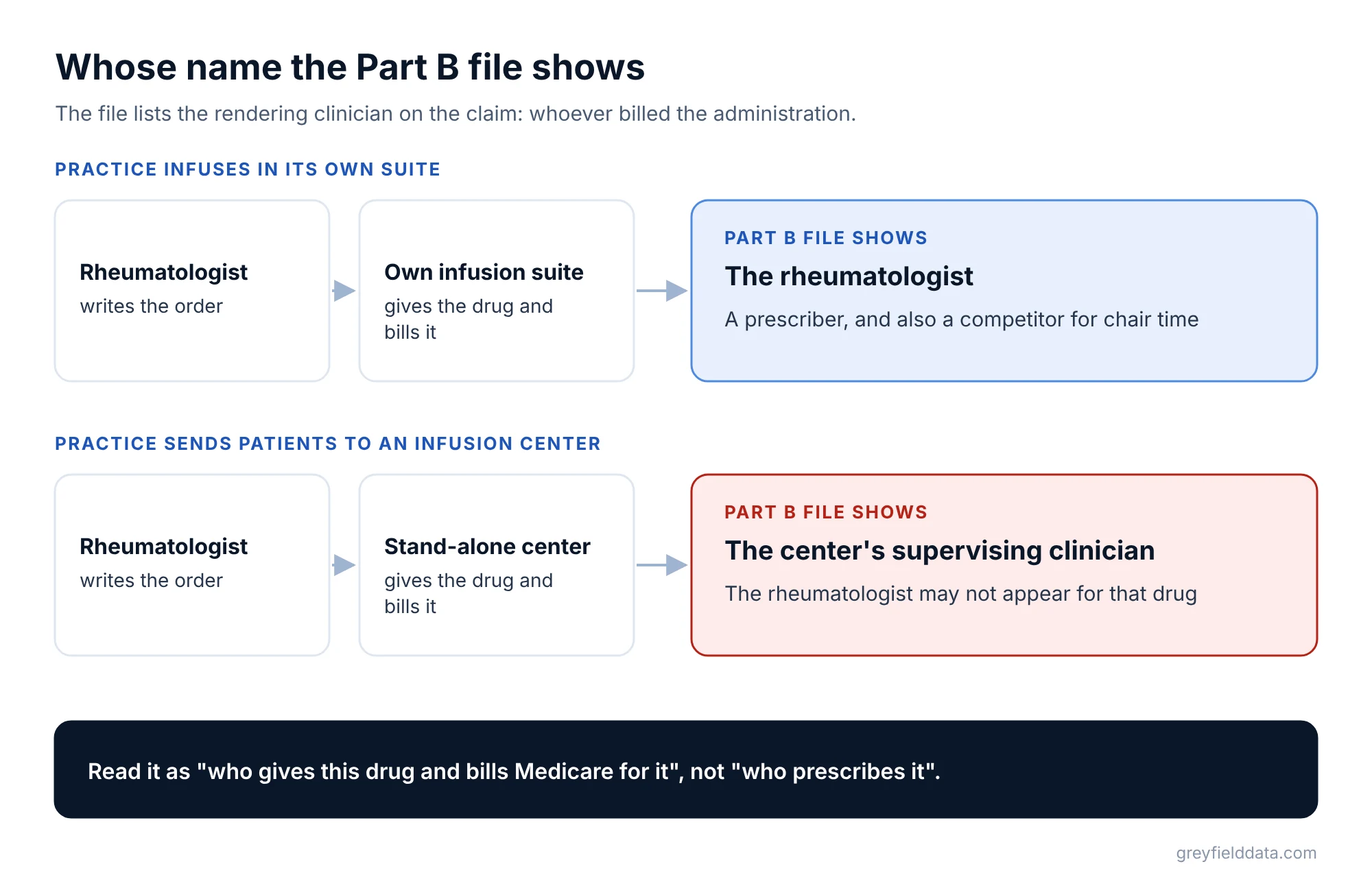
So read the Part B file as "who gives this drug and bills Medicare for it", not "who prescribes it".
When is the Part D file the better source?
The Part D file is better when you want prescribers rather than the clinicians who gave the drug. It lists the prescriber, the drug, the number of claims, and total cost for drugs filled through Medicare's pharmacy benefit, including both stand-alone drug plans and Medicare Advantage drug plans (Part D methodology).
Most drugs given in an infusion chair are billed to the medical benefit, so they won't be in Part D. Part D is useful as a signal: a clinician who prescribes many self-administered drugs for the same conditions you treat already manages those patients. That is a reasonable list to introduce yourself to. It says nothing about whether any patient needs infusion; that is a clinical decision for the prescriber.
What are the limits you need to know?
Four limits matter, and each one changes how you read the list.
- Medicare only. The Part B file covers patients in traditional Medicare, not Medicare Advantage, commercial, or Medicaid patients (methodology). A practice with mostly commercial patients can look small.
- Historical. The newest data year is 2024, released in May 2026. A clinician who moved practices or retired since then still shows up.
- Small counts are hidden. Part B rows built from 10 or fewer patients are left out, and Part D leaves out drugs a prescriber had fewer than 11 claims for. Summing the file undercounts real totals.
- Group billing hides individuals. CMS notes that some clinicians bill under both an individual ID and their organization's ID, so you can't always see one person's full volume.
None of these make the data useless. They make it a ranked list of where to start, not a census.
How do you turn the files into a target list?
Six steps get you from raw files to a list a sales rep can use. The example below shows the result.
- List the billing codes for the drugs you give. Use the codes on your own claims.
- Filter the Part B file to those codes and your states. Keep the clinician ID, name, specialty, place of service, services, and patients.
- Add addresses and specialties from NPPES. Join on the clinician's ID.
- Group clinicians into practices by address. Clinicians at the same street address are usually one practice. Check by hand for the top of the list.
- Rank practices by patients, not dollars. Patient counts compare fairly across drugs with very different prices.
- Mark the practices that already refer to you. Use your own referral records. The rest are your new-practice list.
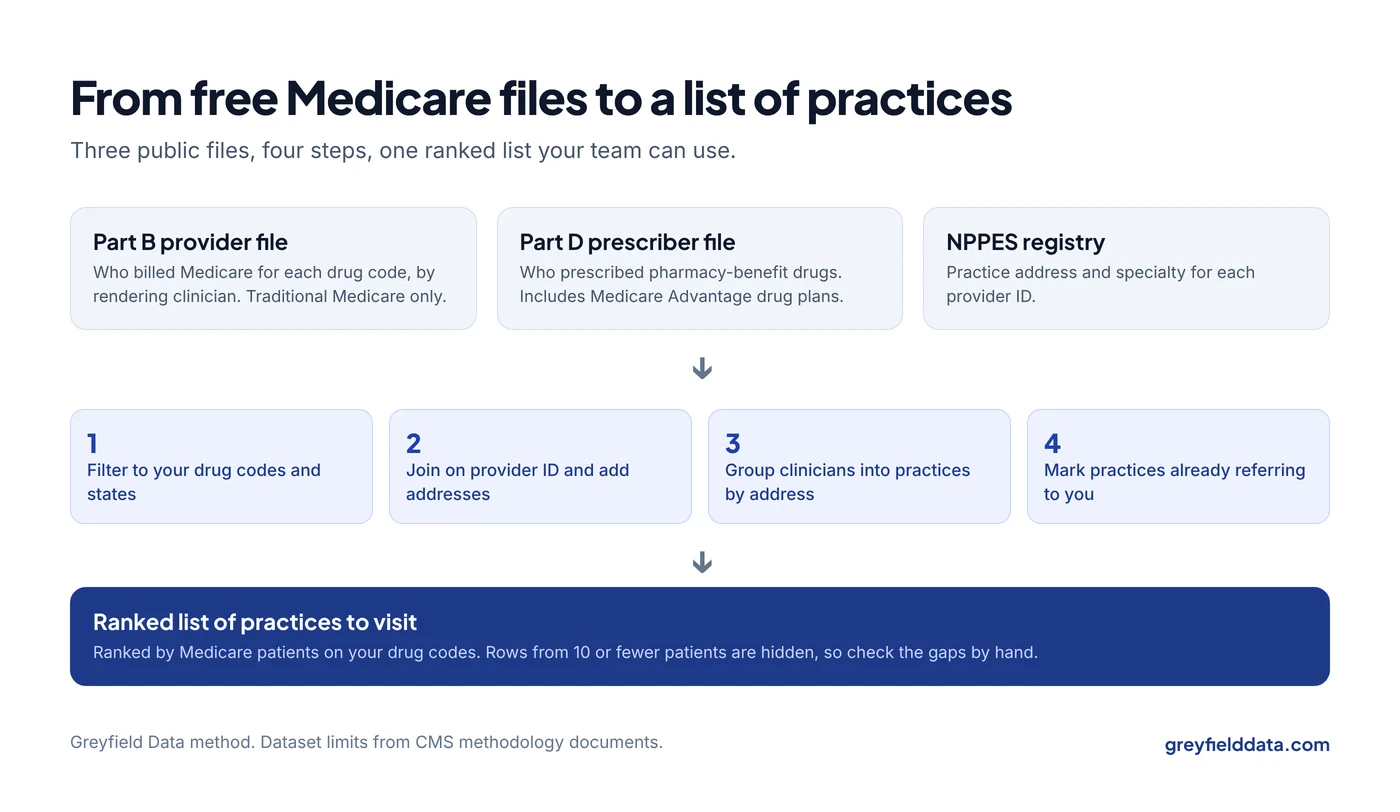
Here is what the finished list looks like. All rows are synthetic: invented practices, not real clinicians.
| Practice (synthetic) | Clinicians | Medicare patients on your drug codes | Gives drug in own office | Refers to you today |
|---|---|---|---|---|
| Practice A | 4 | 85 | Yes | No |
| Practice B | 2 | 40 | No | Yes |
| Practice C | 1 | 22 | No | No |
| Practice D | 6 | (hidden: under 11 per clinician) | Unknown | No |
Practice A gives the drug in its own office, so it may be a competitor more than a referral source. Practice C is a small practice that doesn't infuse and doesn't refer to you yet, which is often the best first visit. Practice D is the reason to check NPPES and your own data: six clinicians and nothing in the file can still be a real practice.
Before you send a rep to new practices, check that you have room to treat their patients. The infusion chair utilization calculator shows how much open chair time you have today.
How does this fit with your own referral data?
Public data tells you who is out there. Your own data tells you who already sends patients, how fast they start, and how many never do. Both matter.
- Track referrals by practice and referring clinician, as in the referral-to-first-treatment guide.
- Value each new practice the same way you value current ones, as in how to give your infusion sales team a fair value per visit.
- Use the same files to size a new market, as in deciding where to open your next infusion site.
- Give new referral sources a way to follow their patients, as in the referring provider portal guide.
- Plan how fast a new site fills, as in the new infusion site ramp guide.
The infusion center metrics playbook shows which referral measures to put in front of your sales team each week. The infusion analytics resource hub links every related guide.
What to do next
Download one year of the Part B provider file for one state, filter it to your top three drug codes, and compare the list with your referral sources. You'll see in an afternoon how much of your market you already reach.
The infusion data assistant demo shows what plain-English search over joined data looks like, using synthetic data. If you'd rather have the files cleaned, joined, and searchable in plain English for your team, book a call with me. Read more about this work on the infusion analytics page.
Frequently asked questions
What external data can tell me about referrals going to competitors?
The Part B provider file shows which clinicians and practices bill Medicare for the drugs you give, including practices that infuse in their own office. Compare it with your own referral list to see where patients are being treated somewhere else.
Is Medicare provider data free to use?
Yes. CMS publishes these files at no cost on data.cms.gov, and the NPPES files are free to download. Check each file's terms and data dictionary before you rely on a field.
Why is a doctor I know prescribes a drug missing from the data?
They may have had 10 or fewer Medicare patients for that code, or their patients may be mostly in Medicare Advantage or commercial plans. The drug may also have been billed under another clinician or the practice's ID.
How current is Medicare provider data?
The newest data year is usually about a year and a half old when released. In late 2026, the latest year in both files is 2024.
Can I use this data to see commercial patients?
No. The Part B provider file covers traditional Medicare only. For commercial volume you need your own referral data or a paid source.
Part of the Infusion analytics guides, a reading path through related articles.
Linus Tse
Founder of Greyfield Data. Built 400+ dashboards. Certified in Sigma, Snowflake, Tableau, and Power BI.
About Linus