20 checks before you trust an ecommerce profit dashboard
Twenty plain checks for Shopify, Amazon and TikTok Shop profit dashboards, covering fees, late costs, dates, time zones, channel allocation and CAC definitions.

Written by Linus Tse, founder of Greyfield Data
· 5 min read
On this page 9 sections
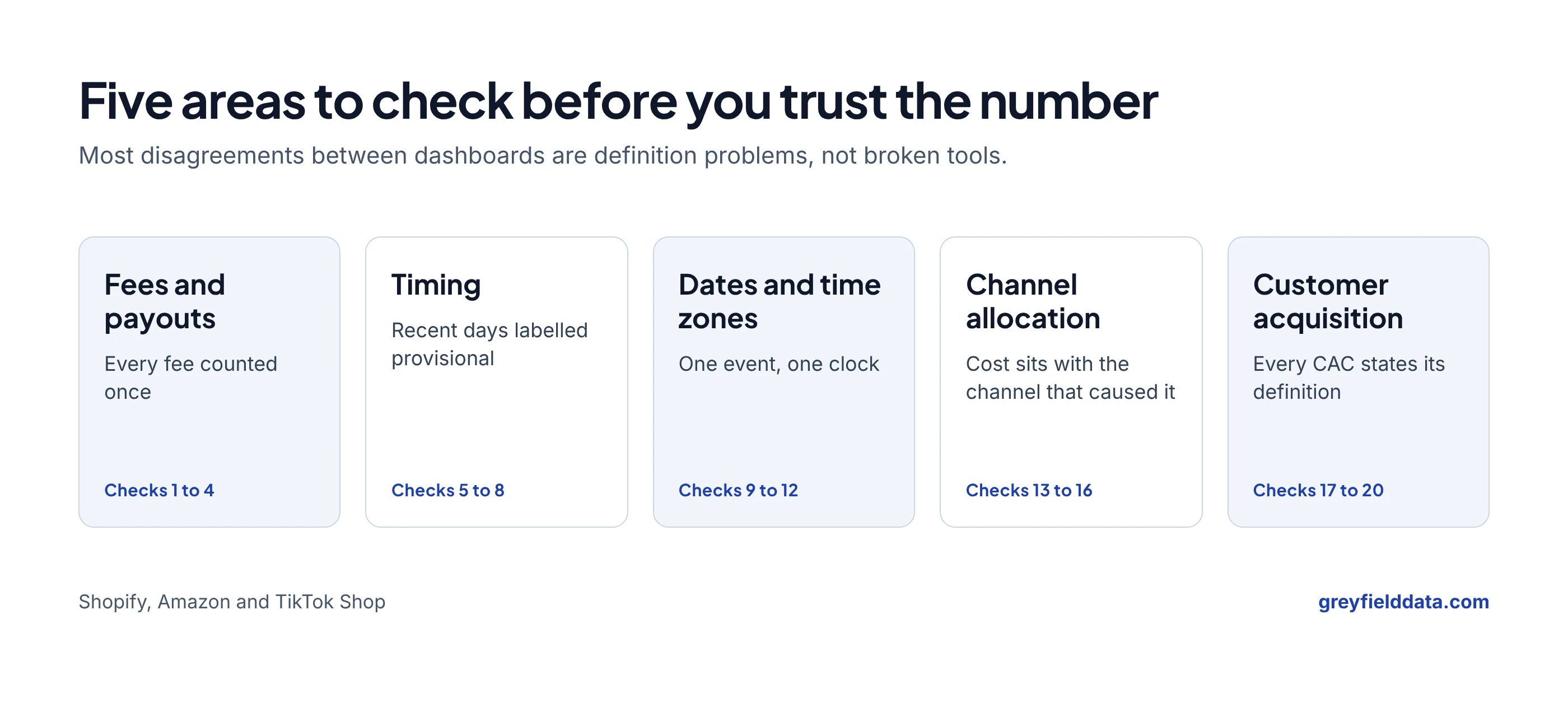
Before you trust an ecommerce profit dashboard, check five things: that every fee is counted once, that recent days are labelled as incomplete, that each date means one event in one time zone, that costs sit with the channel that caused them, and that CAC says which version it is. The 20 checks below cover those five areas.
They come from reconciling Shopify, Amazon and TikTok Shop reporting for multi-channel brands, including a multi-brand portfolio. If you would rather have someone run them with you, that is part of the ecommerce data warehouse work I do. To score your own dashboard on all 20, take the profit dashboard readiness check.
Key takeaways
- Most dashboard disagreements are definition problems, not broken tools. Two different numbers can both be right.
- Rebuilding five real orders per channel from sale price to payout finds most fee problems in an afternoon.
- The most recent days usually look too profitable because some costs post days after the sale.
- The company that bills a cost is not always the channel that caused it.
- Cost per purchase and new-customer CAC answer different questions. Every CAC number needs its definition beside it.
Are fees and payouts counted correctly?
Fees are counted correctly when you can rebuild real orders from sale price to payout and land on the platform's number.
- Rebuild five orders per channel by hand. Use a mix: full price, discounted, free shipping, affiliate-credited.
- Read every fee type, not just the commission field. In one TikTok Shop order the commission field was 0.00 and other fees still totalled 8.55. The settlement walkthrough shows it line by line.
- Keep revenue counted once when fees are split into rows. If revenue goes up when fee detail is added, rows have been multiplied.
- Don't treat settlement as profit. Product cost, other ad spend and overhead still come after it.
Is the most recent data complete?
Recent data is often incomplete, because revenue arrives when the order is placed and some costs arrive when they post.
- Compare a day's margin at two days old and at two weeks old. A consistent drop means late-arriving costs.
- Label recent days as provisional for as many days as your costs usually take to post.
- Keep estimates separate from posted actuals. Replace each estimate when its matching fee arrives. The Amazon estimated vs actual fees guide shows how.
- Don't read a green "synced" status as "complete". It means the connector ran, not that every fee has posted and been linked to its order.
Does each date mean one thing?
A date is safe to use when you know which event it records and which time zone it uses.
- Write down the event behind each daily number: order placed, cancellation requested, refund processed, fee posted or paid out.
- Check cancellations and refunds. A request-date view and a purchase-date view of the same day can both be right. The refund date vs order date guide walks through both.
- Line up time zones. If orders are in Pacific time and ad spend is in UTC, the days are 7 or 8 hours apart depending on daylight saving.
- Test one timestamp conversion against an order you know. Seconds versus milliseconds, or a missing time zone, can move a record to the wrong day or year.
Do costs sit with the right channel?
Costs sit with the right channel when every line is assigned by the order that caused it, not by the company that sent the invoice.
- List each cost line by who bills it and which channel sold the order. Any line where those differ needs a written rule.
- Check fulfilment billed by one marketplace for another channel's orders. Left on the bill, it makes one channel look worse and the other better.
- Decide every platform subsidy on purpose. Shipping incentives and promotional rebates either count as revenue, reduce a cost or sit on their own line. Pick one and keep it.
- Count each order once across platforms. The double-counting guide covers linked copies and fulfilment records.
Does every CAC number say what it is?
A CAC number is usable when the reader can see which spend, which customers and which attribution it uses.
- Separate cost per purchase from new-customer CAC. Repeat buyers make cost per purchase look lower.
- Label channel-attributed and blended CAC. The four kinds of CAC answer different questions.
- Exclude repeat buyers the same way every month, and decide whether "new" means new to the brand or new to the business.
- Expect UTM-based and ad-platform conversions to differ. Neither proves the ad caused the sale.
Which check finds which problem?
| Symptom | Start with checks | Usual cause |
|---|---|---|
| Channel margin looks too good | 1, 2, 13 | Missing fee fields or costs on the wrong channel |
| Revenue jumps after adding fee detail | 3 | Revenue repeated on fee rows |
| Yesterday looks better than last week | 5, 6, 7 | Costs that post after the sale |
| Two reports disagree on one day's orders | 9, 10 | Different event dates for cancellations |
| Daily ROAS swings for no reason | 11 | Orders and ad spend on different clocks |
| Paid social looks efficient, customer count flat | 17, 19 | Cost per purchase read as acquisition cost |
Frequently asked questions
How long does this checklist take?
Most teams can work through checks 1, 5, 9 and 13 in a day, because they only need exports and a spreadsheet. The rest depend on how many channels and brands you report on.
Do I need a data warehouse to run these checks?
No. Every check can start with platform exports. A warehouse helps you run them every day instead of once.
What if two reports still disagree after the checks?
Compare the population of orders and events behind each number, not just the formula. Our guide to why Shopify, finance and marketing report different revenue covers the definitions to agree on.
What to do next
Pick the symptom from the table that sounds most familiar and run those checks first, or take the profit dashboard readiness check to see all your gaps in order. If you want help building reporting that passes all 20, book a call or start with the metric dictionary.
Part of the Ecommerce reporting guides, a reading path through related articles.
Linus Tse
Founder of Greyfield Data. Built 400+ dashboards. Certified in Sigma, Snowflake, Tableau, and Power BI.
About Linus