Why does a TikTok Shop order settle for less than the sale price?
One real TikTok Shop order sold for 25.50 and settled for 12.25 while its commission field said 0.00. Here is the fee waterfall and how to check your own orders.

Written by Linus Tse, founder of Greyfield Data
· 6 min read
On this page 8 sections
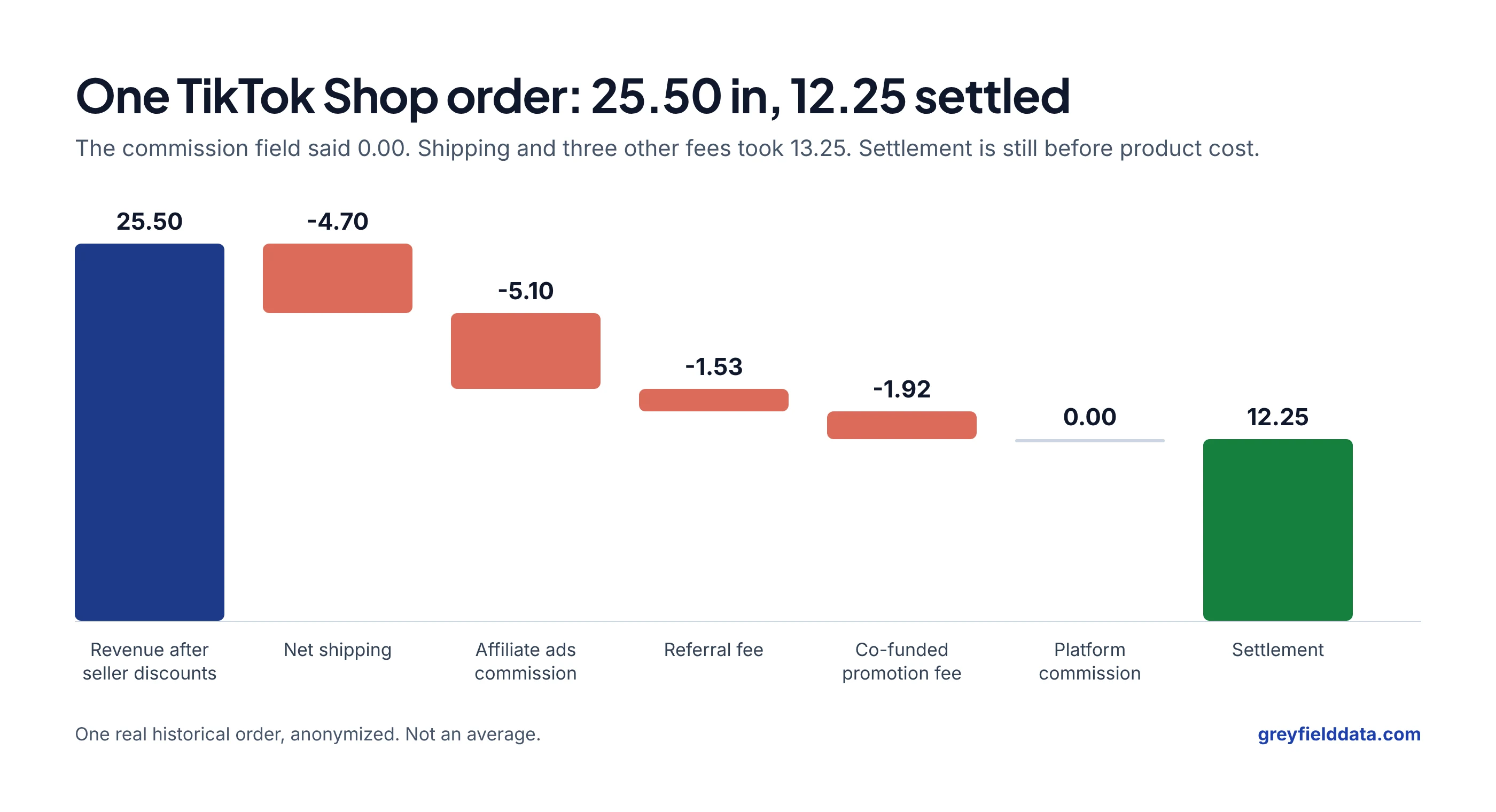
A TikTok Shop order settles for less than its sale price because shipping, affiliate commission, referral fees and promotion costs come out before the payout, and they sit in separate fields. In one order I traced, the platform commission field was 0.00 and the order still settled at about 48 cents on the dollar.
If your channel margin report reads only the headline commission field, it will make TikTok Shop look cheaper than it is. Building the fee ledger that catches this is part of the ecommerce data warehouse work I do for multi-channel brands. To run one of your own orders through the same waterfall, use the TikTok Shop payout calculator.
Key takeaways
- A zero in the platform commission field does not mean an order had no fees. Affiliate, referral and promotion fees can sit in other fields.
- In the order below, 25.50 of revenue after seller discounts became a 12.25 settlement: minus 4.70 net shipping and minus 8.55 in fees.
- Settlement is not profit. Product cost, packaging, other ad spend and overhead all come after it.
- When you expand fee detail into one row per fee, keep order revenue at order level, or one sale can be counted several times.
- Rebuild five real orders per channel from sale price to payout before trusting a margin report.
Where did the money go on one order?
The money went to shipping and three fees that were not labelled as commission. This order comes from a multi-brand reporting build I worked on. The figures are real, the brand and order ID are left out, and it is one order, not an average.
| Line | Amount |
|---|---|
| Revenue after seller discounts | 25.50 |
| Shipping line | -10.69 |
| Shipping discount | +5.99 |
| Net shipping | -4.70 |
| Platform commission | 0.00 |
| Affiliate ads commission | -5.10 |
| Referral fee | -1.53 |
| Co-funded promotion fee | -1.92 |
| Total fees | -8.55 |
| Settlement | 12.25 |
25.50 minus 4.70 minus 8.55 is 12.25. That is 48% of the revenue after seller discounts.
Is this order typical?
No single order is typical. Orders without a credited affiliate will not carry an affiliate commission. Others carry more fees. In another order from the same period, the shop ads commission alone was 8.35, more than the referral fee (1.67) and co-funded promotion fee (3.54) on that order put together.
Fee names and rates also change over time. Read the line items on your own settlement statements rather than relying on a published rate.
Why do reports miss these fees?
Reports miss them because the fee detail is nested below the headline order fields. TikTok Shop order data in this build arrived as one record per order, with revenue, shipping, subsidies, taxes and a list of fee entries inside it.
A quick report pulls the obvious top-level fields: order total, maybe the commission field, maybe the settlement. Everything inside the fee list gets skipped. The report still runs and still looks reasonable, which is why nobody notices.
How should fee detail be stored?
Store each fee as its own row with the order ID, fee type, amount and posting date. That gives you a fee ledger you can add up by type, by order or by period, and it makes a new fee type visible the first time it appears.
The same idea applies on Amazon. Our guide to where Amazon seller fees live covers the sources there, and why Amazon profit changes after a sale covers fees that arrive late.
How can expanding fees inflate revenue?
Expanding fees inflates revenue when each fee row also carries the order's revenue and someone sums revenue across those rows. Three fee rows quietly turn one 25.50 sale into 76.50.
| Row | Fee type | Fee | Order revenue repeated on row |
|---|---|---|---|
| 1 | Affiliate ads commission | -5.10 | 25.50 |
| 2 | Referral fee | -1.53 | 25.50 |
| 3 | Co-funded promotion fee | -1.92 | 25.50 |
| Sum | -8.55 | 76.50 |
The fee total is right. The revenue total is three times too high. Keep revenue in an order-level table and fees in a fee-level table, and join them only after each is added up at the level you need. The double-counting guide shows the same problem with shipments and order lines.
Why isn't settlement the same as profit?
Settlement is what the platform pays you, not what you keep. It does not include:
- product cost
- packaging and any fulfilment you pay for outside the platform
- ad spend on other channels that helped drive the sale
- overhead
With illustrative costs, say 7.00 for the product and 0.75 for packaging, the 12.25 settlement leaves 4.50 before other marketing and overhead. That is from a 25.50 sale. Our metric dictionary shows where settlement sits between net revenue and contribution margin.
None of this means TikTok Shop is a bad channel. Affiliate-driven sales can be worth paying for. It means the spend decision should use the full cost.
How do you check your own TikTok Shop orders?
Rebuild a few orders by hand and compare them with your report. It takes an afternoon.
- Pick five orders. Include a full-price order, a discounted one, one with a shipping discount and one credited to an affiliate.
- Rebuild each from revenue to settlement using the order and settlement detail in Seller Center.
- Compare with your report. If revenue minus shipping minus fees does not equal the settlement, a fee is missing or counted twice.
- List every fee type you found and confirm your report reads each one.
- Check revenue at order level. If total revenue rises when fee detail is added, rows have been multiplied.
If all five reconcile, the fee side of your margin report is in better shape than most. If they do not, you have found the gap before it reached a budget decision.
Frequently asked questions
Does a 0.00 commission on a TikTok Shop order mean it was free to sell?
No. In the order above, the commission field was 0.00 while affiliate ads commission, a referral fee and a co-funded promotion fee added up to 8.55. Check every fee field, not just the one called commission.
Is the TikTok Shop settlement amount my profit?
No. Settlement is what the platform pays out after its own deductions. Product cost, packaging, other ad spend and overhead still have to come out.
Why does my TikTok Shop revenue go up when I add fee data?
Usually because order revenue is repeated on every fee row and then summed. Keep revenue at order level and fees at fee level, and join them after aggregating.
How many orders should I reconcile by hand?
Five per channel is enough to find most gaps, as long as they cover different situations: discounts, shipping discounts and affiliate-credited orders.
What to do next
Start with the five-order check above, using the TikTok Shop payout calculator to compare each order with your settlement report. If the numbers do not reconcile and you would like a second pair of eyes on the fee ledger, book a call. For the wider list of checks, read 20 checks before you trust an ecommerce profit dashboard.
Part of the Ecommerce reporting guides, a reading path through related articles.
Linus Tse
Founder of Greyfield Data. Built 400+ dashboards. Certified in Sigma, Snowflake, Tableau, and Power BI.
About Linus