How I'd start a company's data practice from zero in 2026
My 8 steps to start a data practice from zero: Snowflake, Airbyte, dbt layers, a BI tool with an API, SSO, approved tables, AI agents, and cost limits.

Written by Linus Tse, founder of Greyfield Data
· 10 min read
On this page 14 sections
If I was starting a company's data practice from zero today, I know exactly what I'd do. It is eight steps, and none of them is a data lake.
This is the order I follow when I set up a stack for a client. If you want someone to do it with you, that is what Snowflake consulting at Greyfield covers, from the first account to the dashboards people use.
Key takeaways
- Put Snowflake in on day one. It is easy to set up and needs almost no maintenance.
- Load common sources with Airbyte and write small custom scripts for anything it doesn't cover, then model everything with dbt in bronze, silver, and gold tables that run daily.
- Pick a BI tool with an API you can build dashboards through: Metabase if you're small and watching every dollar, Sigma if you have the budget and want business users self-serving.
- Before you hand out access, turn on SSO, document which tables are approved, and set query timeouts and resource monitors. Agents running queries make the last one urgent.
- Skip the data lake unless your volume actually demands it. Most companies never get there.
What are the 8 steps, in order?
Here is the whole plan on one page. Each step gets a short why and how below.
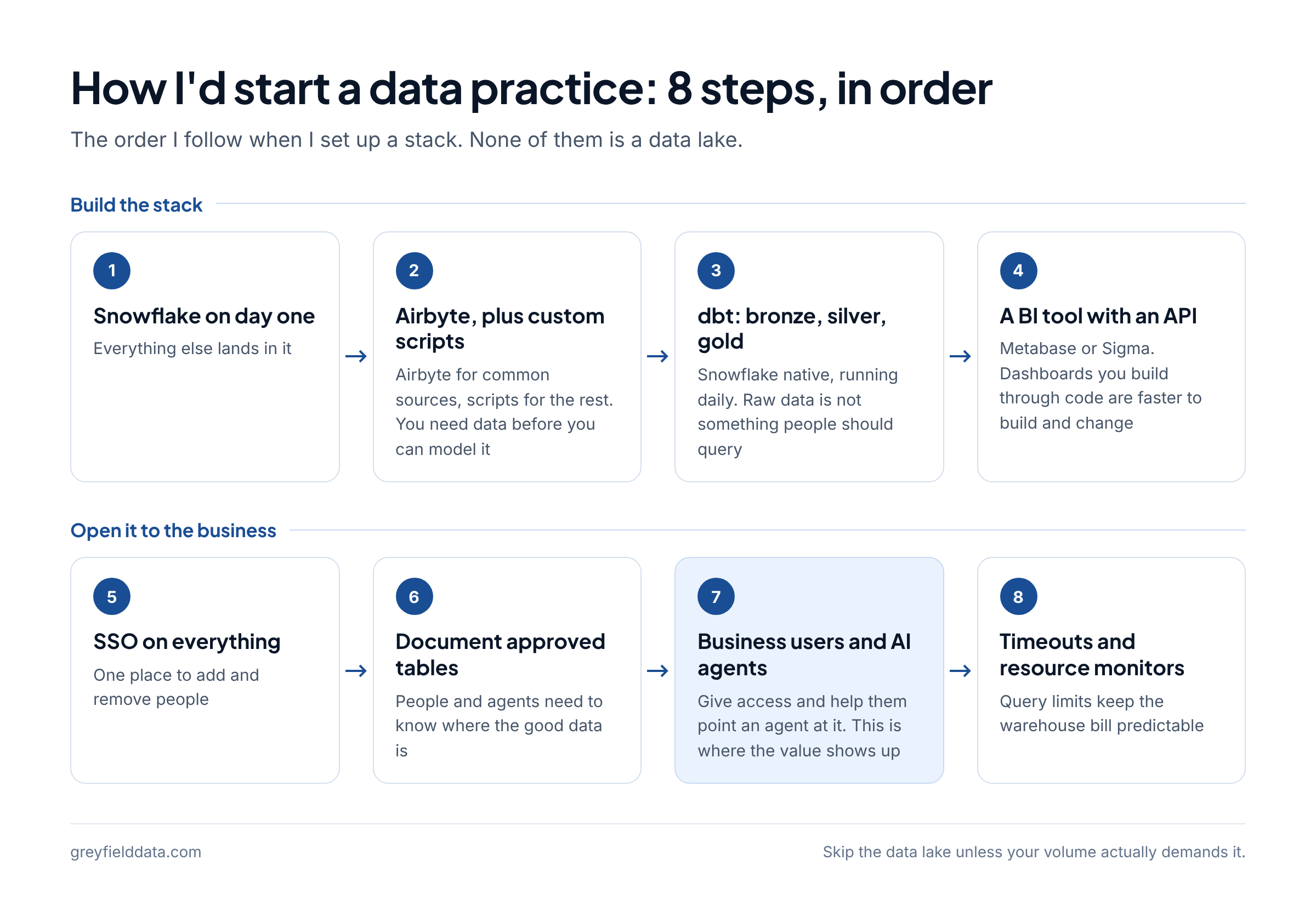
| Step | What I'd do | Why it comes here | Read more |
|---|---|---|---|
| 1 | Snowflake on day one | Everything else lands in it | My Snowflake setup |
| 2 | Airbyte for common sources, custom scripts for the rest | You need data before you can model it | Ingestion tools compared |
| 3 | dbt, Snowflake native, bronze, silver, and gold running daily | Raw data is not something people should query | Bronze, silver, and gold explained |
| 4 | A BI tool with an API: Metabase or Sigma | Dashboards you can build through code are faster to build and change | BI tool quiz |
| 5 | SSO on everything | One place to add and remove people | |
| 6 | Document which tables are approved to query | People and agents need to know where the good data is | What is a semantic layer? |
| 7 | Give business users access and help them point an AI agent at it | This is where the value shows up | Connect Claude to Snowflake |
| 8 | Query timeouts and resource monitors | Keeps the warehouse bill predictable | Snowflake credit spikes |
If you want to see where each of these tools sits among the alternatives, the data stack map puts 61 tools side by side by the job they do.
1. Why start with Snowflake on day one?
Start with Snowflake because it is easy to set up and needs almost no maintenance, which matters when the data practice is one person.
Why. You don't run servers. You can give each workload its own warehouse and let it suspend when nobody is using it.
How.
- Create workload roles first: one to load, one to transform, one to read.
- Create one small warehouse per workload with auto-suspend and auto-resume on.
- Create
RAW,DEV, andANALYTICSdatabases, with future grants at the schema level. - Add resource monitors before anyone runs a query.
I wrote up the exact order, with the SQL, in how I set up a new Snowflake account.
2. How should you get data into the warehouse?
Pipe data in with Airbyte for the common sources, and write custom scripts for anything it doesn't cover.
Why. Most of your sources (the CRM, the billing system, the ad platforms) already have a connector, so there is no reason to build those. The one or two sources that matter most to your business are often the ones without a good connector, and a short script you own is better than waiting.
How.
- Check the Airbyte connector catalog for each source before you write any code.
- Land every source in its own schema in
RAW, loaded by the loader role only. - For the gaps, write a script that loads incrementally and records where it left off. My open-source Klaviyo to Snowflake sync is an example of the pattern, and incremental loads with watermarks covers the parts that break.
If you're weighing Airbyte against Fivetran and the others source by source, see how to choose a data ingestion tool.
3. How should you model the data?
Model it with dbt, use the Snowflake native version, and build bronze, silver, and gold tables that run daily.
Why. Raw source tables have duplicates, odd names, and late changes. Bronze keeps the data as it arrived, silver cleans and matches it, and gold shapes it for the questions the business asks. When a number looks wrong, you can trace it back one layer at a time.
How.
- Use dbt Projects on Snowflake, which runs dbt inside Snowflake. You can edit the project in Snowflake Workspaces or a connected Git repository and schedule runs with Snowflake tasks.
- Keep the project in git from the first model.
- Name the layers in your folders and schemas so anyone can tell which layer a table belongs to.
- Schedule one daily run to start. Go faster only when someone needs it.
For a worked example, follow one order through all three layers in bronze, silver, and gold explained.
4. Which BI tool should you pick: Metabase or Sigma?
Pick a BI tool with an API you can build dashboards through. Metabase if you're small and watching every dollar. Sigma if you have the budget and want business users self-serving.
Why an API matters. When dashboards can be created through an API, you (or an AI assistant working with you) can build and change them from code instead of clicking through every chart. That is a big part of how one person keeps up.
| Metabase | Sigma | |
|---|---|---|
| Who it fits | Small teams watching every dollar | Teams with the budget that want business users self-serving |
| Cost to start | An Open Source edition is free; paid plans are Starter, Pro, and Enterprise | Paid; ask Sigma for pricing |
| Building through an API | The Metabase API can create a dashboard with POST /api/dashboard/ and add questions to it |
Workbooks as code can create a workbook from a code representation through the API (public beta) |
| How it reads Snowflake | Queries the warehouse | Queries the warehouse live |
How. Connect the BI tool with its own Snowflake user and the reader role, point it at the gold schema only, and build your first dashboard through the API so the pattern is there from day one. If you're still unsure, the BI tool quiz asks eight questions and gives a recommendation with reasons.
5. Why turn on SSO for everything?
Put SSO on everything so there is one place to add people, one place to remove them, and no shared passwords.
Why. A small data stack still has four or five tools: the warehouse, the loader, dbt, the BI tool, and the AI tools. Without SSO, every new hire and every departure is a checklist across all of them.
How.
- Connect Snowflake to your identity provider with federated authentication. If your identity provider supports it, use SCIM to create and remove users automatically.
- Turn on SSO in the BI tool and the loader as you set each one up, not later.
- Use key-pair authentication for service users such as the loader, as in my Snowflake setup.
6. How do you document which tables are approved?
Write down which tables are approved to query, and make that list the only place the reader role can see.
Why. Once business users and AI agents can query the warehouse, the question stops being "can I get the data?" and becomes "which table is the right one?" An approved list answers that before anyone builds on a half-finished model.
How.
- Grant the reader role
SELECTon the gold schema only, with future grants so new approved tables show up automatically. - Describe every gold table and column in dbt with descriptions, so the definitions live next to the code.
- Add a comment on each approved table in Snowflake, so people and agents see the description where they query.
- When metric definitions start to drift between dashboards, add a semantic layer. See what is a semantic layer? and semantic views in Snowflake.
GRANT USAGE ON SCHEMA ANALYTICS.MARTS TO ROLE <COMPANY>_READER;
GRANT SELECT ON ALL TABLES IN SCHEMA ANALYTICS.MARTS TO ROLE <COMPANY>_READER;
GRANT SELECT ON FUTURE TABLES IN SCHEMA ANALYTICS.MARTS TO ROLE <COMPANY>_READER;

COMMENT ON TABLE ANALYTICS.MARTS.ORDERS IS
  'Approved. One row per order. Owner: <NAME>. See dbt docs for column definitions.';
7. How do you give business users an AI agent?
Give business users access, then sit with them and help them point an AI agent at the approved tables.
Why. Most questions never become a dashboard. An agent connected to well-described gold tables lets people ask those questions themselves, and the approved list from step 6 keeps the answers on the right data.
How.
- Give each person their own user through SSO, with the reader role as the default.
- Connect the agent through Snowflake's managed MCP server. The step-by-step guides are connect Claude to Snowflake and connect ChatGPT to Snowflake.
- Run the agent on its own warehouse, so you can see what it costs and limit it separately (step 8).
- Spend the first session on their real questions, not a demo.
8. How do you keep the warehouse bill predictable?
Set query timeouts and resource monitors so the bill stays predictable, especially once agents are running queries.
Why. An agent can write a query nobody would type by hand and run it again and again. Snowflake's default statement timeout is 172,800 seconds, which is two days, so a runaway query can keep a warehouse awake for a long time unless you set your own limit.
How.
- Set
STATEMENT_TIMEOUT_IN_SECONDSon each warehouse. When it is set on both the warehouse and the session, Snowflake uses the lower non-zero value. - Pick a limit a little above your slowest legitimate query on that warehouse, and use a tighter one on the warehouse agents use.
- Add a resource monitor with notify thresholds and a suspend action. Only
ACCOUNTADMINcan create one. - Resource monitors don't cover serverless features and AI services. Snowflake points you to budgets for those.
ALTER WAREHOUSE AGENT_WH SET STATEMENT_TIMEOUT_IN_SECONDS = <SECONDS>;

CREATE RESOURCE MONITOR AGENT_WH_MONITOR
  WITH CREDIT_QUOTA = <MONTHLY_CREDITS>
  TRIGGERS
    ON 75 PERCENT DO NOTIFY
    ON 100 PERCENT DO SUSPEND;

ALTER WAREHOUSE AGENT_WH SET RESOURCE_MONITOR = AGENT_WH_MONITOR;
When credits still move in a way you can't explain, check compilation time before resizing anything. I wrote up one case in a Snowflake credit spike that came from compilation time.
Do you need a data lake?
No, not unless the volume actually demands it. Most companies never get there.
A warehouse with bronze, silver, and gold layers already keeps the raw data and the cleaned data in one place. Adding a lake on day one adds another system to run before you have a reason for it.
How long does this take now?
Five years ago, this took a data team and six months. Today, it's a few weeks and one person who knows what they're doing.
What to do next
If you're the one person setting this up, start with steps 1 and 8 together: the account and the cost limits. Then work down the list.
If your company sells online, the free ecommerce data stack white paper picks tools by stage and lays out the build in five phases. If you'd rather have help, see Snowflake consulting or book a call with me.
Frequently asked questions
What should the first data hire set up first?
The warehouse and its cost limits. I'd set up Snowflake with roles, small warehouses, and resource monitors before loading anything, then add pipelines, dbt models, and a BI tool on top.
Is Airbyte enough, or do I need custom scripts?
Usually both. I use Airbyte for the common sources and write custom scripts for anything it doesn't cover. Check the connector catalog for each source before writing code.
Should a small company use Metabase or Sigma?
Metabase if you're small and watching every dollar, since its Open Source edition is free. Sigma if you have the budget and want business users to self-serve.
Do I need a data lake to start?
No. Skip the data lake unless your volume actually demands it. Most companies never get there.
How do I stop AI agents from running up the Snowflake bill?
Give agents their own warehouse, set a statement timeout on it, and attach a resource monitor that notifies and then suspends. Point agents only at the approved tables.
Part of the Snowflake guides, a reading path through related articles.
Linus Tse
Founder of Greyfield Data. Built 400+ dashboards. Certified in Sigma, Snowflake, Tableau, and Power BI.
About Linus