Financial analysts are becoming data engineers: how to give them safe AI access to Snowflake
How to let analysts use Claude on Snowflake safely, with a read-only role, approved tables, resource monitors, query timeouts, and changes reviewed in git.

Written by Linus Tse, founder of Greyfield Data
· 8 min read
On this page 7 sections
It's 2026, and I'm watching financial analysts become data engineers.
This post is the story of one analyst, and the guardrails I'd put in place before anyone on your team does the same. If you want help setting this up, Snowflake consulting is where I do this work.
Key takeaways
- A financial analyst I worked with got Claude connected to the database and started improving the data model by the minute. That was not possible a year earlier, or even six months earlier.
- In my opinion, the models made a big jump forward in January 2026, and something started to click with AI in a very real way.
- Give analysts a read-only role on approved tables for asking questions. Changes to the data model go through git and a review, never straight to production.
- Put AI queries on their own warehouse with a statement timeout and a resource monitor, so the bill stays predictable.
- The analyst's business context is the hard part to teach. The AI closes the gap on code.
What happened with the financial analyst?
I'd been working with a financial analyst for about a year. He was involved throughout a Snowflake implementation, asked a ton of good questions, and understood the business context deeply. But he hadn't touched the codebase.
Then he got Claude connected to the database.
Within the week, he was making changes to the codebase and improving the data model by the minute. That was not possible a year earlier, or even six months earlier.
What changed since January?
This is my view, from what I've seen in client work, not a benchmark.
Since January 2026, the models made a big jump forward, and something started to click with AI in a very real way. In the two months before I first wrote about this analyst, I saw companies adopt it aggressively, and the ones that did were seeing real ROI.
What I think changed for analysts in particular:
- The code stopped being the barrier. An analyst who knows what a number should be can now get the SQL and dbt changes written with help.
- Business context became the scarce skill. The analyst already understood the business deeply. That is the part that is hard to teach.
- The data model became something analysts can improve, not just consume. That is a big change in who can contribute.
It also means the guardrails matter more. An analyst with an AI assistant can query more, and change more, than before.
How do you give analysts safe AI access to Snowflake?
Give them two separate kinds of access: read-only for asking questions, and a reviewed path in git for changing the model.
The diagram shows both paths and the guardrails on each.
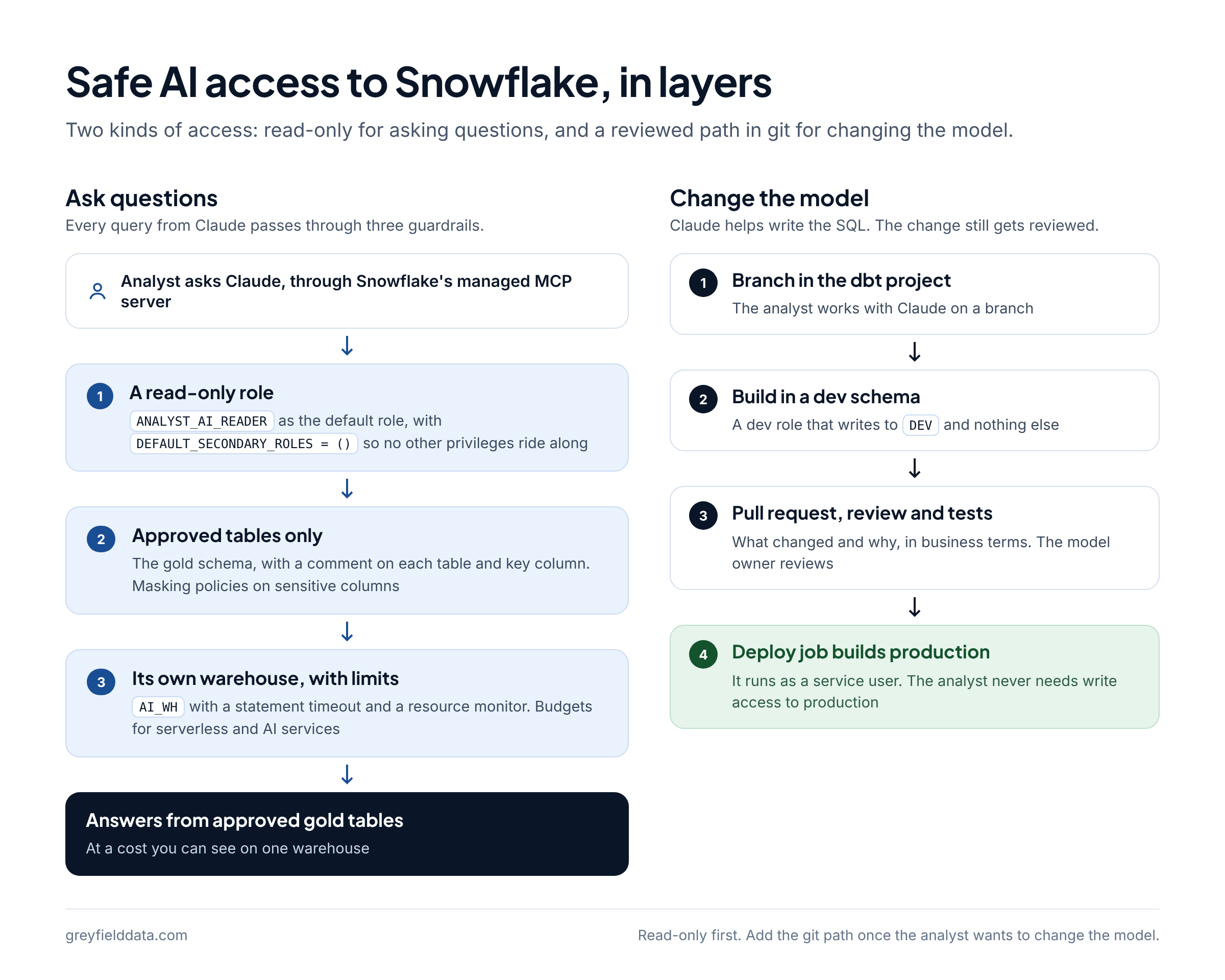
| Access | What the analyst can do | Snowflake role | Guardrail |
|---|---|---|---|
| Ask questions | Query approved tables through Claude | A read-only role on the gold schema | Approved tables only, own warehouse, timeout, resource monitor |
| Try changes | Build models in a personal dev schema | A dev role that writes to DEV only |
Nothing reaches production from here |
| Ship changes | Merge to the main branch | None directly: the deploy job runs as a service user | Pull request, review, and tests in git |
1. Create a read-only role for AI questions
Start with a role that can read approved tables and nothing else.
- Grant
USAGEon one warehouse, the analytics database, and the gold schema, plusSELECTon current and future tables there. My Snowflake setup shows the full grant pattern. - Make it the analyst's default role for the AI connection, and set
DEFAULT_SECONDARY_ROLES = ()on the user, so the session doesn't pick up privileges from other roles. Snowflake documents this on ALTER USER. - Connect Claude through Snowflake's managed MCP server. The step-by-step guide is how to connect Claude to Snowflake.
CREATE ROLE IF NOT EXISTS ANALYST_AI_READER;
GRANT USAGE ON WAREHOUSE AI_WH TO ROLE ANALYST_AI_READER;
GRANT USAGE ON DATABASE ANALYTICS TO ROLE ANALYST_AI_READER;
GRANT USAGE ON SCHEMA ANALYTICS.MARTS TO ROLE ANALYST_AI_READER;
GRANT SELECT ON ALL TABLES IN SCHEMA ANALYTICS.MARTS TO ROLE ANALYST_AI_READER;
GRANT SELECT ON FUTURE TABLES IN SCHEMA ANALYTICS.MARTS TO ROLE ANALYST_AI_READER;

GRANT ROLE ANALYST_AI_READER TO USER <ANALYST_USER>;
ALTER USER <ANALYST_USER> SET
  DEFAULT_ROLE = ANALYST_AI_READER
  DEFAULT_WAREHOUSE = AI_WH
  DEFAULT_SECONDARY_ROLES = ();
2. Point the AI at approved tables only
Only expose tables that are approved to query, and describe them so the AI picks the right one.
- Keep the read-only role on the gold schema. Bronze and silver tables are for building models, not for answering business questions.
- Add a comment to each approved table and its key columns, so the AI reads the definition where it queries.
- If you have sensitive columns, such as salaries or personal data, protect them with a masking policy rather than trusting the prompt.
- When the same metric keeps getting calculated different ways, define it once in a semantic layer. See what is a semantic layer? and semantic views in Snowflake.
3. Put AI queries on their own warehouse with limits
Give AI queries their own warehouse, then cap how long a query can run and how many credits the warehouse can use.
- Query timeout. Snowflake's default
STATEMENT_TIMEOUT_IN_SECONDSis 172,800 seconds, two days. Set your own on the warehouse. When it's also set on the session, Snowflake uses the lower non-zero value. - Resource monitor. A resource monitor can notify, suspend after running statements finish, or suspend immediately. Only
ACCOUNTADMINcan create one. - Budgets for the rest. Resource monitors don't track serverless features and AI services. Snowflake points to budgets for those.
CREATE WAREHOUSE IF NOT EXISTS AI_WH
  WAREHOUSE_SIZE = XSMALL
  AUTO_SUSPEND = 60
  AUTO_RESUME = TRUE
  INITIALLY_SUSPENDED = TRUE;

ALTER WAREHOUSE AI_WH SET STATEMENT_TIMEOUT_IN_SECONDS = <SECONDS>;

CREATE RESOURCE MONITOR AI_WH_MONITOR
  WITH CREDIT_QUOTA = <MONTHLY_CREDITS>
  TRIGGERS
    ON 75 PERCENT DO NOTIFY
    ON 100 PERCENT DO SUSPEND;

ALTER WAREHOUSE AI_WH SET RESOURCE_MONITOR = AI_WH_MONITOR;
A separate warehouse also means you can see exactly what AI questions cost. If credits jump anyway, check compilation time before resizing, as in this Snowflake credit spike.
4. Review every model change in git
Let the analyst change the data model, but only through a branch and a pull request.
This is the part that made the analyst's work safe. Claude can help write a new dbt model or fix an old one, and the change still goes through the same review as anyone else's.
- The analyst works on a branch in the dbt project, with Claude helping write and explain the SQL.
- They build and test it in their own dev schema, using a dev role that can write to
DEVand nothing else. - They open a pull request that says what changed and why, in business terms.
- Someone who owns the model reviews it, and the tests run.
- After the merge, the deploy job builds production as a service user. The analyst never needs write access to production.
If you run dbt inside Snowflake, dbt Projects on Snowflake can work from a connected Git repository and run on a schedule with Snowflake tasks. Either way, git is the record of who changed what. If you're new to the layers the analyst is changing, bronze, silver, and gold explained walks through one order.
What should you check before you turn it on?
Run through this list with the analyst before the first session.
| Check | How to confirm it |
|---|---|
| The AI connection uses the read-only role | Run SELECT CURRENT_ROLE(), CURRENT_SECONDARY_ROLES(); from the AI session |
| Only gold tables are visible | Ask the AI to list the schemas it can see |
| The warehouse has a timeout | SHOW PARAMETERS LIKE 'STATEMENT_TIMEOUT_IN_SECONDS' IN WAREHOUSE AI_WH; |
| The warehouse has a resource monitor | SHOW WAREHOUSES LIKE 'AI_WH'; and read the resource_monitor column |
| Model changes need a review | Try to push straight to the main branch; it should be blocked |
| Sensitive columns are masked | Query one as the read-only role |
What to do next
Start with one analyst who knows the business well, one warehouse with limits, and the read-only role. Add the git path once they want to change the model, not before.
If you're trying to figure out how you and your team can get more from AI, I would love to chat. Book a call with me, or see what Snowflake consulting covers.
Frequently asked questions
Can I let an analyst connect Claude to Snowflake safely?
Yes, if the connection uses a read-only role on approved tables, runs on its own warehouse with a statement timeout and resource monitor, and has secondary roles turned off.
Should analysts be able to change the data model with AI?
I think so, through git. Let them build in a dev schema, open a pull request, and have someone review it before a service user deploys it to production.
What role should an AI connection to Snowflake use?
A custom read-only role with USAGE on one warehouse and the approved schema, plus SELECT on its tables. Not ACCOUNTADMIN, SYSADMIN, or a role that can write.
How do I stop AI queries from running up the Snowflake bill?
Give them their own warehouse, set STATEMENT_TIMEOUT_IN_SECONDS on it, and attach a resource monitor that notifies and then suspends. Use budgets for serverless and AI services.
Is this only for financial analysts?
No. The analyst in this story worked in finance, but the same setup works for anyone who knows the business context well and wants to work with the data directly.
Part of the Snowflake guides, a reading path through related articles.
Linus Tse
Founder of Greyfield Data. Built 400+ dashboards. Certified in Sigma, Snowflake, Tableau, and Power BI.
About Linus