Klaviyo dbt models for Snowflake: profiles, engagement, and a mailable list
Open-source dbt models that turn raw Klaviyo data in Snowflake into a profiles dim, an events fact, 30/90/365-day engagement flags and a mailable list.

Written by Linus Tse, founder of Greyfield Data
· 12 min read
On this page 13 sections
The open-source Klaviyo to Snowflake sync I released loads raw profiles and events. I've now added a dbt project to the same repository, under transform/, that turns those raw tables into a profiles dimension, an events fact, per-profile engagement with 30, 90 and 365-day activity flags, and a list of profiles you can email. It is MIT licensed like the sync.
If you want these models running in your own account and joined to your orders, that is part of Greyfield's Snowflake consulting and ecommerce data warehouse work.
Key takeaways
- The dbt layer has two staging views and four mart tables:
dim_klaviyo_profiles,fct_klaviyo_events,klaviyo_profile_engagementandklaviyo_mailable_profiles, plus an optional, disabled-by-default example bridge to Shopify customers. - The sync stores metric IDs, not names, and no event properties. A small seed file,
klaviyo_metric_map.csv, maps your metric IDs to names such as Opened Email. You must fill it in before the engagement columns mean anything. klaviyo_profile_engagementgives each profile its first and last event, counts and last-seen times for Opened Email, Clicked Email and Placed Order, days since the last event, and true or false flags for activity in the last 30, 90 and 365 days.klaviyo_mailable_profileskeeps profiles with email marketing consent and an email address, and can also require activity within a number of days you choose.- There is no campaign, flow or revenue data, because the sync doesn't store event payloads.
What does the Klaviyo dbt project include?
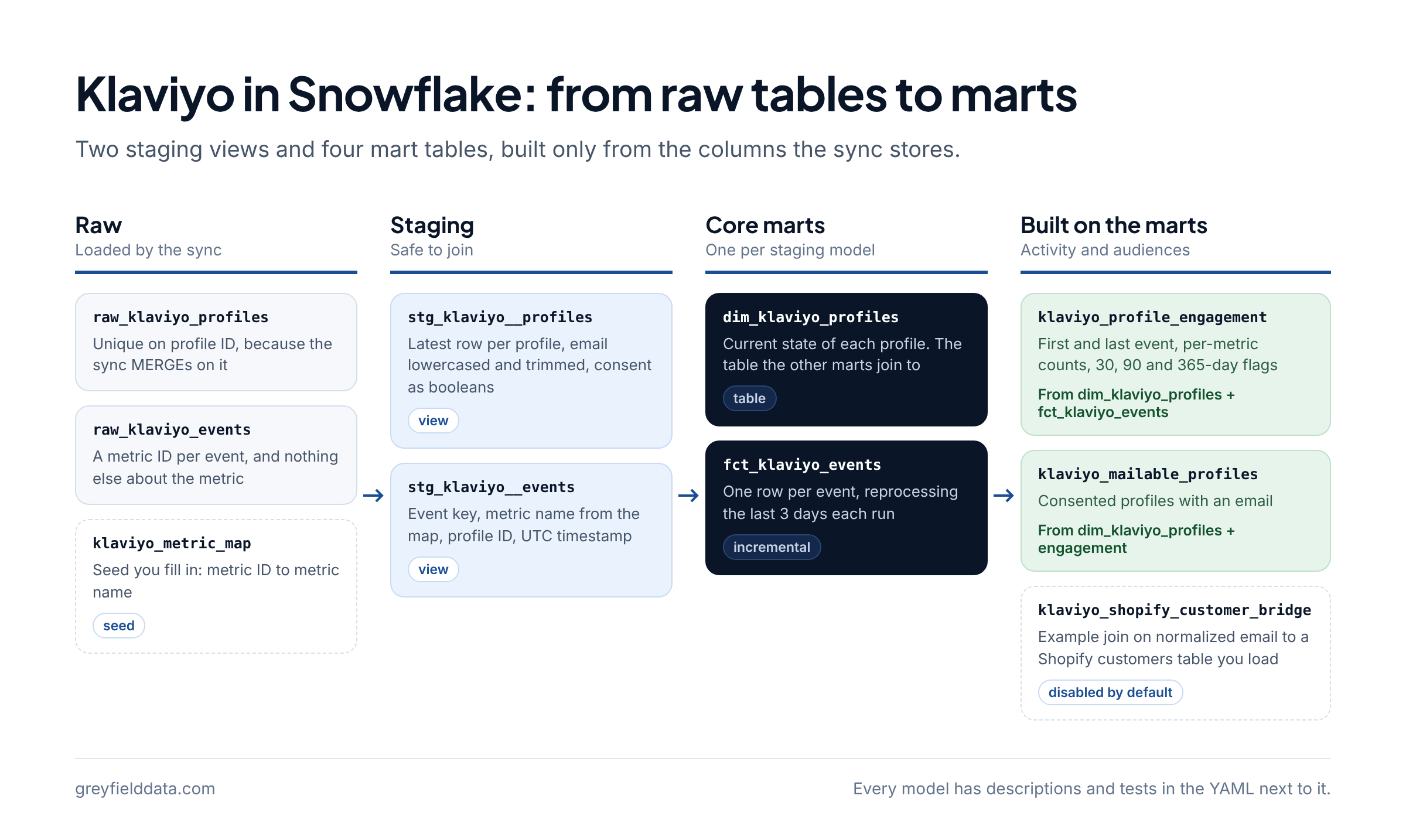
It includes two staging views, four mart tables and one example model, all built only from the columns the sync stores. The README has the full model table; here is what each one is for.
The lineage runs from the raw tables the sync loads, through staging, to the marts.
| Model | Materialized as | One row per | What it gives you |
|---|---|---|---|
stg_klaviyo__profiles |
view | profile | Latest row per profile ID, email lowercased and trimmed, consent flags as booleans |
stg_klaviyo__events |
view | event | Event key, metric ID, metric name from the map, profile ID and UTC timestamp |
dim_klaviyo_profiles |
table | profile | Email, has_email, email domain, email and SMS consent, last updated time |
fct_klaviyo_events |
incremental table | event | Metric name, profile, timestamp and date, reprocessing the last 3 days each run |
klaviyo_profile_engagement |
table | profile | First and last event, per-metric counts, days since last event, 30/90/365-day flags |
klaviyo_mailable_profiles |
table | mailable profile | Consented profiles with an email, optionally only recently active ones |
klaviyo_shopify_customer_bridge |
table, disabled | profile and Shopify customer pair | Example join on normalized email to a Shopify customers table you load |
Every model has descriptions and tests (unique, not_null, accepted_values and relationships) in the YAML file next to it. For how the raw tables get loaded in the first place, see the open-source Klaviyo to Snowflake sync.
What do the staging models clean up?
They make the raw tables safe to join. stg_klaviyo__profiles keeps the latest row per profile ID, turns an empty email into null, lowercases and trims the rest, and turns a null consent flag into false. The raw table is already unique on ID because the sync MERGEs on it, so the dedupe is a safeguard.
nullif(lower(trim(email)), '') as email,
coalesce(cast(email_marketing as boolean), false) as can_receive_email_marketing,
coalesce(cast(sms_marketing as boolean), false) as can_receive_sms_marketing,
stg_klaviyo__events builds an event_key from the metric ID and event ID, which matches how the raw table is keyed, and left joins the metric map so unmapped metrics keep their rows with a null metric_name. Timestamps are converted to UTC without a time zone in both models.
What do the profiles dim and events fact hold?
dim_klaviyo_profiles is the current state of each profile: email, whether it has one, the domain after the @, and the two consent flags. It is the table the other marts join to.
fct_klaviyo_events has one row per event with its metric name, profile, timestamp and date. It is incremental on event_key, and each run reprocesses the last few days before the latest event already loaded, so events that arrive late are still picked up.
where event_at >= (
    select {{ dbt.dateadd('day', -1 * var('klaviyo_events_lookback_days', 3), 'max(event_at)') }}
    from {{ this }}
)
Because older rows keep the metric name they were built with, run dbt build --full-refresh after you change the metric map.
How does the profile engagement model work?
klaviyo_profile_engagement summarizes every profile's events into one row, and profiles with no events get zero counts and false flags. For each metric name in the klaviyo_engagement_metrics variable it adds a count and a last-seen column, so the defaults give you opened_email_count, last_opened_email_at, clicked_email_count, last_clicked_email_at, placed_order_count and last_placed_order_at.
The activity flags compare the last event of any metric with a reference time:
coalesce(
    event_summary.last_event_at >= {{ dbt.dateadd('day', -1 * days, 'as_of.as_of_at') }},
    false
) as is_active_last_{{ days }}d,
| Column | Meaning |
|---|---|
first_event_at, last_event_at |
Earliest and latest synced event for the profile, any metric |
total_event_count |
All synced events for the profile, including unmapped metrics |
<metric>_count, last_<metric>_at |
Count and latest time for each configured metric name |
days_since_last_event |
Days from the last event to the reference time, null with no events |
is_active_last_30d, _90d, _365d |
True when the last event falls inside that window |
activity_as_of_at |
The reference time used for the flags |
Two details matter when you use it. "Active" means any event you sync, so the flags depend on which metric IDs are in KLAVIYO_EVENT_METRICS. And events with no profile ID, or for a profile not synced yet, are not counted. The reference time is the current UTC time unless you set klaviyo_as_of_timestamp, which is useful for reproducible test runs. The windows themselves are a variable, klaviyo_activity_windows_days.
What counts as a mailable profile?
A mailable profile has email marketing consent and an email address. That is the whole default filter in klaviyo_mailable_profiles, and the output carries the email, domain, both consent flags, the last event time and days since the last event.
where profiles.can_receive_email_marketing
  and profiles.email is not null
Set klaviyo_mailable_active_within_days and the model also requires an event within that many days of the reference time. Profiles with no events at all drop out when that filter is on.
dbt build --target snowflake --select klaviyo_mailable_profiles \
  --vars '{klaviyo_mailable_active_within_days: 90}'
The consent flag is Klaviyo's can_receive_email_marketing as the sync loaded it. The sync doesn't load suppression reasons, list membership or bounce history, so this list doesn't replace the checks Klaviyo makes at send time.
Why does the metric map seed exist, and how do you fill it in?
It exists because the raw events table stores a metric ID for each event and nothing else about the metric. There is no name and no payload, so without a mapping the models can't tell an open from an order. The seed transform/seeds/klaviyo_metric_map.csv supplies the names, and it ships with placeholders:
metric_id,metric_name
REPLACE_WITH_OPENED_EMAIL_METRIC_ID,Opened Email
REPLACE_WITH_CLICKED_EMAIL_METRIC_ID,Clicked Email
REPLACE_WITH_PLACED_ORDER_METRIC_ID,Placed Order
- List your metric IDs with Klaviyo's Get Metrics endpoint. They are the same IDs you put in
KLAVIYO_EVENT_METRICSfor the sync. - Replace each placeholder and add a row for every other metric you sync. If you filled the optional
LOOKUP_KLAVIYO_METRICStable fromsql/02_raw_tables.sql, you can export it into this file. - Keep the names
Opened Email,Clicked EmailandPlaced Orderexactly, or change theklaviyo_engagement_metricsvariable to the names you use. - Run
dbt seed, thendbt build --full-refreshso existing events get the new names.
A metric ID that is missing from the map only raises a warning, from a not_null test on metric_name in stg_klaviyo__events. Check the test output after your first build. dbt's seeds documentation covers how seed files load.
How do you run the Klaviyo dbt models on Snowflake?
Install dbt with the Snowflake adapter, copy the example profile, set the environment variables it reads, then seed and build. These are the README's steps.
cd transform
python3 -m venv .venv && . .venv/bin/activate
pip install dbt-core dbt-snowflake
cp profiles.example.yml profiles.yml   # git-ignored; or use ~/.dbt/profiles.yml
# set SNOWFLAKE_ACCOUNT and the DBT_SNOWFLAKE_* variables it reads
dbt seed --target snowflake
dbt build --target snowflake
The example profile uses key-pair authentication, the same style as the sync. The dbt user needs read access to the raw schema and a schema it can write to, which defaults to ANALYTICS.KLAVIYO_MODELS. The pipeline role from sql/01_role.sql is not meant for this, so create a separate transform role. If your raw tables aren't in RAW.KLAVIYO, change the klaviyo_database and klaviyo_schema variables in dbt_project.yml. How I set up a new Snowflake account covers the role and warehouse layout.
Can you try it without Snowflake?
Yes. A duckdb target runs the whole project on your laptop against synthetic seed files, so you can see every model's output before you point it at real data.
pip install dbt-core dbt-duckdb
dbt build --target duckdb
dbt build --target duckdb --vars '{klaviyo_enable_shopify_bridge: true}'
On that target the models read the example_synthetic_* seeds instead of the raw tables. They are made up: IDs start with SYNTH_ and addresses are on the reserved example.com, example.org and example.net domains. They include a duplicate profile, mixed-case and untrimmed emails, a missing email, null consent flags and an event with no profile, on purpose. The synthetic seeds are disabled on Snowflake.
What the synthetic run produces
I ran the build on the DuckDB target with the reference time fixed at 2026-03-10 00:00 (klaviyo_as_of_timestamp). This is synthetic data from the repository's seeds, not data from any Klaviyo account.
| Profile | Email consent | Opens | Clicks | Orders | Days since last event | 30d | 90d | 365d | Mailable |
|---|---|---|---|---|---|---|---|---|---|
SYNTH_P001 |
true | 1 | 1 | 1 | 58 | false | true | true | yes |
SYNTH_P002 |
false | 1 | 0 | 0 | 252 | false | false | true | no, no consent |
SYNTH_P003 |
true | 2 | 1 | 0 | 4 | true | true | true | yes |
SYNTH_P004 |
true | 0 | 0 | 0 | none | false | false | false | no, no email |
SYNTH_P005 |
null in raw, so false | 0 | 0 | 0 | none | false | false | false | no, no consent |
SYNTH_P006 |
true | 0 | 0 | 0 | none | false | false | false | yes, unless an activity filter is set |
SYNTH_P002 appears twice in the raw seed. The staging model keeps the later row, which has consent set to false, so the older opted-in row doesn't leak into the list. The event with no profile ID lands in fct_klaviyo_events but isn't counted for anyone. With klaviyo_mailable_active_within_days: 90, only SYNTH_P001 and SYNTH_P003 would stay.
What can an ecommerce team do with these tables?
They give you consent, recency and a few engagement counts per profile, inside the same warehouse as your orders. The models don't push anything back to Klaviyo, so getting a list into Klaviyo or an ad platform is a separate step, such as a reverse ETL tool or a file export.
| Use | Built from | Filter |
|---|---|---|
| Exclusion list of profiles you may not email | dim_klaviyo_profiles |
not can_receive_email_marketing |
| Mailable audience | klaviyo_mailable_profiles |
As built, optionally with the activity variable |
| Re-engagement audience | klaviyo_mailable_profiles joined to klaviyo_profile_engagement |
Active in 365 days but not in 90 |
| Lapsed buyers who still opt in | Same join | placed_order_count > 0 and an old last_placed_order_at |
| Klaviyo profile to Shopify customer | klaviyo_shopify_customer_bridge |
Matched on normalized email |
A re-engagement audience is one query over the marts. This is an example, not a model in the repository:
select m.profile_id, m.email, e.last_event_at, e.last_opened_email_at
from klaviyo_mailable_profiles m
join klaviyo_profile_engagement e on m.profile_id = e.profile_id
where e.is_active_last_365d
  and not e.is_active_last_90d;
How does the Shopify bridge work?
klaviyo_shopify_customer_bridge is an example of joining to another source, not a supported Shopify integration. The repo doesn't load Shopify, so you point the shopify_* variables at your own customers table and set klaviyo_enable_shopify_bridge: true. It inner joins on lowercased, trimmed email:
from klaviyo_profiles
inner join shopify_customers
    on klaviyo_profiles.email = shopify_customers.email
It is many-to-many, because one email can belong to several Klaviyo profiles or Shopify customers, so dedupe before you count people. From there you can join Shopify orders on shopify_customer_id to see, for example, which buyers have no email consent. How to combine Shopify, Klaviyo and Recharge data and how to track customers across platforms cover the wider identity model.
What should you know before using these models?
The biggest limit is the input. The sync stores four profile fields and, for events, only the metric ID, event ID, profile ID and time. So:
- No payload data. There are no campaign or flow names, subjects, order values or product details. Revenue, campaign and flow attribution are out of scope until the sync stores event properties.
- Start in a development schema. Build there first and compare counts with Klaviyo, as with any new models.
- The metric map is manual. Until you fill it in, metric names are null and the engagement counts are zero.
- Deleted profiles stay. The sync doesn't remove profiles deleted in Klaviyo, so neither do the models.
- Two tests only warn. Unmapped metric IDs and events whose profile hasn't synced yet raise warnings, not errors, so read the warnings.
- Config and tests move together. If you change the engagement metrics or activity windows, update the column tests in
models/marts/_klaviyo__marts.ymlto match.
Frequently asked questions
Is there a dbt package for Klaviyo on Snowflake?
Yes. This one models the raw tables that the open-source klaviyo-snowflake-sync loads. Fivetran publishes a Klaviyo dbt package for its own connector's schema; use the package that matches how your data is loaded, because the table and column names differ.
How do I get Klaviyo metric names into Snowflake?
Call Klaviyo's Get Metrics endpoint and put each metric ID and name in klaviyo_metric_map.csv, then run dbt seed and a full refresh. The sync stores only metric IDs on each event.
How do I build a list of Klaviyo profiles I can email in SQL?
Select profiles where can_receive_email_marketing is true and the email isn't null. That is what klaviyo_mailable_profiles does, with an optional filter for activity within a number of days.
Can these models report on campaign or flow performance?
No. The raw events have no payload, so there is no campaign, flow or revenue field to group by. You would need to extend the sync to store event properties first.
How do I match Klaviyo profiles to Shopify customers?
Join on email after lowercasing and trimming both sides, as the example bridge does. Expect some emails to match more than one profile or customer.
What to do next
Clone linerss/klaviyo-snowflake-sync, run dbt build --target duckdb to see the synthetic output, then fill in the metric map and build into a development schema on Snowflake. If you're loading Klaviyo yourself, the post on incremental Klaviyo loads explains how the raw tables stay complete.
If you want these models set up, extended with your own metrics, or joined to Shopify orders for retention reporting, see Snowflake consulting or ecommerce data warehouses with Greyfield, or book a call with Linus.
Part of the Snowflake guides, a reading path through related articles.
Linus Tse
Founder of Greyfield Data. Built 400+ dashboards. Certified in Sigma, Snowflake, Tableau, and Power BI.
About Linus