What is a semantic layer? A plain-English guide
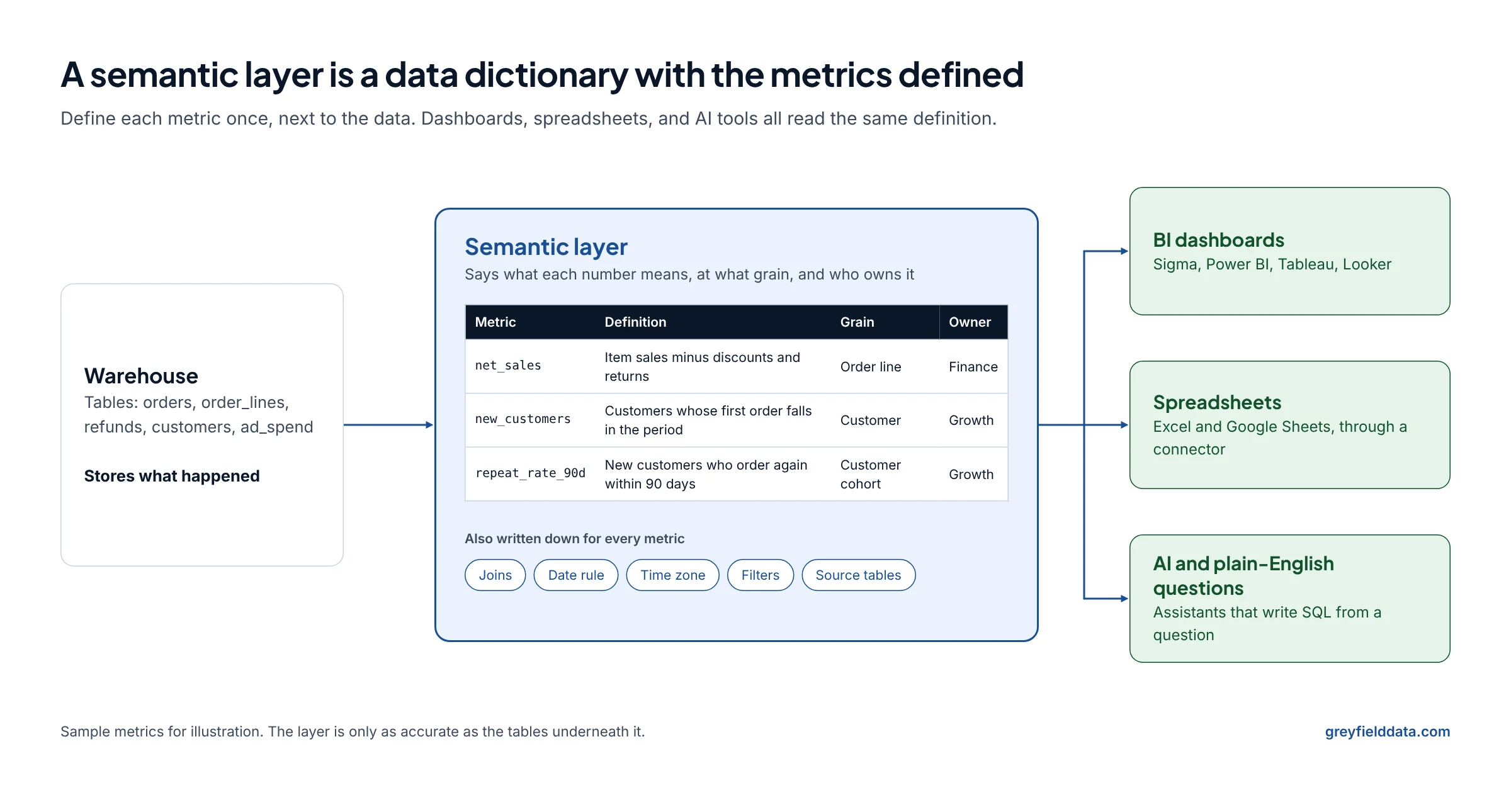
A semantic layer is a data dictionary with the metrics defined. It holds business definitions of metrics, dimensions, and joins that every tool reads from.

Greyfield Data
In this article 10 sections
People keep asking me what a semantic layer is. My short answer: a semantic layer is basically a data dictionary that has the metrics defined. It holds the business definitions of your metrics, the dimensions you slice them by, and the joins between tables, in one place that every tool reads from.
I design and build these for teams on Snowflake and for ecommerce brands. If you want help deciding where yours should live, see Snowflake consulting.
Key takeaways
- A data dictionary describes your columns. A semantic layer goes one step further and stores the calculation for each metric, so tools stop writing their own.
- Each metric needs a written definition, a grain, a date rule, a time zone, the joins it uses, and an owner. Without those, two tools can share a name and still disagree.
- You need one when the same number is calculated in more than one place, or when you want people (or AI tools) to ask questions in plain English.
- The options range from code-first layers (dbt Semantic Layer, Cube, AtScale) to layers inside a warehouse (Snowflake semantic views) or a BI tool (LookML, Sigma data models, Power BI semantic models).
- A semantic layer does not fix bad source data. It makes the same answer come back every time, right or wrong.
What is a semantic layer, in plain words?
A semantic layer is the agreed meaning of your numbers, stored next to the data instead of inside each report. When someone asks for "net sales by month", the layer already knows which tables to join, which rows to leave out, and how to add them up.
Without one, every dashboard, spreadsheet, and analyst writes that logic again. Small differences creep in: one report counts refunds on the order date, another on the refund date. Both say "net sales". Both are a little different.
Snowflake's overview of semantic views puts the same problem well: a concept like gross revenue might sit in a column with a cryptic name, and without one shared definition, "dozens of inconsistent calculations" can end up spread across reports.
How is a semantic layer different from a data dictionary, metrics layer, or BI model?
They overlap, and vendors use the words loosely. Here is how I separate them.
| Term | What it holds | Who reads it | Does it calculate? |
|---|---|---|---|
| Data dictionary | Table and column descriptions, owners, sometimes allowed values | People | No. It describes. |
| Metrics layer | Metric formulas, usually with time grains and filters | Tools, through an API or SQL | Yes, metrics only |
| Semantic layer | Metrics, plus dimensions, entities, and the joins between tables | Tools and people | Yes, and it generates the joins |
| BI model | Same idea as a semantic layer, but inside one BI tool | That BI tool's users | Yes, inside that tool |
The practical difference is reach. A BI model works well until someone opens Excel or an AI assistant that can't read it. A semantic layer that sits in the warehouse or in its own service can be read by several tools.
"Metrics layer" mostly survives as an older name. The dbt Semantic Layer, for example, uses MetricFlow to define metrics and also handles the joins, which makes it a semantic layer by the definition above.
What goes in a semantic layer?
Seven things, for every metric that matters:
- Metric. The name, a one-sentence definition, and the formula.
- Dimensions. The ways people slice it: date, channel, product, region.
- Grain. What one row means before the metric adds up. One order line? One order? One customer? Get this wrong and joins double-count.
- Joins. Which tables connect, on which keys, and in which direction (many orders to one customer).
- Date rule. Which date the metric uses. Order date, ship date, refund date, and payout date all give different months.
- Time zone. The zone used to cut days and months. A sale at 11:30 PM in New York is the next day in UTC.
- Owner. The person or team who decides when the definition changes.
It also helps to write down the filters (test orders out, staff orders out), the source tables, and which metric to use by default when someone says a vague word like "revenue".
A sample metric card
This is what one entry looks like when it's written out. The numbers in it are rules, not data.
| Field | Entry |
|---|---|
| Name | net_sales |
| Definition | Item sales after discounts and returns, excluding tax and shipping |
| Formula | gross_sales - discounts - returns |
| Grain | Order line, plus return line |
| Date rule | Sales on the order date. Returns on the date the refund was processed. |
| Time zone | Store time zone (America/New_York) |
| Joins | order_lines to orders on order_id; refund_lines to order_lines on line_id |
| Filters | Excludes test orders and staff orders |
| Source tables | shopify.order_lines, shopify.refund_line_items |
| Owner | Finance |
| Default for | "Sales" and "revenue" in dashboards and AI questions |
| Tie-out | Matches Shopify net sales for the same store and dates |
If you sell online, the ecommerce metric dictionary has cards like this for gross sales through LTV, plus a CSV template.
When do you need a semantic layer?
You need one when the same number is being calculated in more than one place and the copies have started to disagree. Common signs:
- Finance and marketing bring different revenue numbers to the same meeting. Why Shopify, finance, and marketing report different revenue walks through five honest answers to one question.
- Analysts copy the same SQL into every new dashboard.
- People export to spreadsheets and rebuild metrics by hand.
- You want people to ask questions in plain English through an AI tool.
You probably don't need one yet if you have one BI tool, a few dashboards, and one person who writes all the logic. Write the definitions down in a shared doc first. That document becomes the semantic layer later.
Which semantic layer tools are there?
There are three broad places a semantic layer can live: in a dedicated service, in the warehouse, or in a BI tool. Here is how the common options sit.
| Option | Where definitions live | What reads them | Worth knowing |
|---|---|---|---|
| dbt Semantic Layer | YAML in your dbt project, using MetricFlow | Partner integrations, including Google Sheets | Listed for dbt platform Starter, Enterprise, and Enterprise+ plans |
| Cube | Code-first data model, open-source core (Cube Core) | SQL (Postgres-compatible), REST, and GraphQL APIs | Also sells its own analytics product on top |
| AtScale | AtScale's semantic models | Power BI, Excel, Tableau, Looker, and AI tools | Runs queries on your warehouse |
| Looker LookML | LookML files in a Looker project | Looker, plus its connectors | The language Looker uses "to create semantic data models" |
| Snowflake semantic views | A schema-level object in Snowflake | SQL queries, Cortex Analyst and Cortex Agents, BI tools | See the step-by-step guide |
| Sigma data models and metrics | Sigma data models | Sigma workbooks | Metrics are defined per data source and don't carry through joins |
| Power BI semantic models | Power BI models, built on Analysis Services technology | Power BI reports | Microsoft sometimes calls it just "model" |
To see where each sits in the wider stack, the data stack map places them alongside connectors, warehouses, and BI tools.
How to choose
- One BI tool and no plans to add another: use that tool's model. It's the least work.
- Several tools, or AI questions, on Snowflake: look at semantic views first, since they live with the data.
- A dbt project already holds your logic: the dbt Semantic Layer keeps metrics next to the models that feed them.
- Excel and Power BI users who need the same numbers as everyone else: a dedicated layer like AtScale or Cube is built for that kind of fan-out.
Whichever you pick, the definitions table above is portable. It's the hard part, and it doesn't depend on the tool.
Why does a semantic layer matter for AI and plain-English questions?
An AI tool that only sees table and column names has to guess what "revenue" means. A semantic layer gives it the definitions, the joins, and the default metric, so it guesses less.
Snowflake says Cortex Analyst uses semantic views to understand data and generate SQL, and that schemas alone "lack critical knowledge like business process definitions and metrics handling." Its modeling guidance calls descriptions "the single most important element for accuracy."
Two cautions from building these:
- A layer reduces guessing, it doesn't remove it. If you define four revenue metrics, the tool still has to pick one. Say in the descriptions which one is the default and when to ask.
- Test with real questions. Snowflake suggests an evaluation set of about ten representative questions to start. Write down the answer you expect for each before you look at what the tool returns.
If you're connecting an assistant to Snowflake directly, start with a narrow role.
How do you start a semantic layer?
- List the five to ten numbers leadership argues about.
- Write a metric card for each one, like the sample above, and get the owner to agree.
- Tie each metric to a source total you already trust, such as a Shopify report or the closed month.
- Build the definitions in one tool. Start with the one most people already use.
- Point one dashboard at the new definitions and retire its private calculations.
- Add more metrics only after the first ones have held up for a month or two.
Frequently asked questions
Is a semantic layer the same as a data dictionary?
Not quite. A data dictionary describes your columns for people to read. A semantic layer stores the metric calculations and joins so tools can run them. A good semantic layer includes a data dictionary's descriptions.
Is a semantic layer the same as a metrics layer?
They overlap. "Metrics layer" usually means metric formulas only. "Semantic layer" usually adds dimensions, entities, and the joins between tables. Most current products do both and use the second name.
Do I need a semantic layer if I only use one BI tool?
Usually not a separate one. The BI tool's own model, such as a Power BI semantic model or a Sigma data model, does the job. Write your definitions down anyway so you can move them later.
Does a semantic layer make AI answers correct?
It makes them more consistent, not guaranteed correct. It can only be as accurate as the tables underneath, and the tool can still pick the wrong metric if the descriptions are vague.
Where should a semantic layer live?
Close to the data if several tools need it, and inside the BI tool if only one does. Snowflake semantic views, the dbt Semantic Layer, and Cube are common choices for the first case.
What to do next
If you're on Snowflake, follow the semantic views guide to build a first model with real SQL. If you run an ecommerce brand, start with the ecommerce metric dictionary and its template. Or book a call and we'll pick your first five metrics together.
Part of the Snowflake guides, a reading path through related articles.
Related
The data stack, mapped: 61 tools by the job they do
A map of the modern data stack in 11 categories, from ingestion and warehouses to semantic layers, BI, and AI, with what each tool does and how to choose.

How do you build a semantic layer in Snowflake with semantic views?
A worked CREATE SEMANTIC VIEW example on an orders and customers model, how to query it, how Cortex Analyst uses it, and the limits to plan for.
Ecommerce semantic layer: a metric dictionary for gross sales to LTV
Definitions for gross sales, net sales, net revenue, contribution margin, CAC, repeat rate, and LTV, with grain, date, sources, owner, and a free template.